
Shopify SEO Tips: A Priority Checklist for Store Owners

In short
Shopify SEO should start with indexing and site structure, then high-value collection and product pages, followed by speed, content, and links. Shopify automatically handles sitemaps, canonical tags, robots.txt, SSL, and supported-theme product markup, so store owners should prioritize merchant-controlled work and measure each change in Google Search Console.
Key takeaways
- As of September 2026, Shopify automatically generates several technical SEO elements, but a custom theme or app can still alter their output.
- Collection pages usually deserve priority for broad commercial searches, while product pages should target searches for a specific item, model, or attribute.
- Canonical tags can consolidate duplicate URL signals, but clean internal links are still needed to stop avoidable URL variations from spreading.
- Store performance work should begin with real-user data, not a list of generic speed recommendations.
- Every material SEO edit should be recorded with its date, target URL, baseline, and the result observed in Search Console and store analytics.
Table of contents
- Which Shopify SEO fixes should come first?
- What does Shopify handle automatically?
- Which pages should target which keywords?
- How should you structure collections, products, and internal links?
- How do you prevent duplicate and low-value URLs from wasting crawl attention?
- What should every collection and product page contain?
- How do you improve speed without breaking the store?
- When should you create content and build backlinks?
- How do you measure whether the work is paying off?
- What else do Shopify store owners ask about SEO?
- What should you do in the next seven days?
The common mistake is treating every possible optimization as equally urgent. Adding alt text to hundreds of old images might feel productive, but it should not come before fixing an important collection that is missing from navigation, targeting the wrong query, or excluded from Google's index.
A better Shopify SEO checklist starts with impact. Work from discovery and indexation toward page relevance, user experience, authority, and measurement.
Which Shopify SEO fixes should come first?
Start with problems that prevent important pages from being discovered, indexed, or understood. Then improve the collection and product pages closest to organic revenue before spending time on broad content production or advanced technical customization.
For each task, rate expected impact, confidence, and effort from 1 to 3. The planning score (impact × confidence) ÷ effort is not a Google ranking formula; it is a simple way to stop a long SEO backlog from being ordered by convenience.
The three-tier priority order
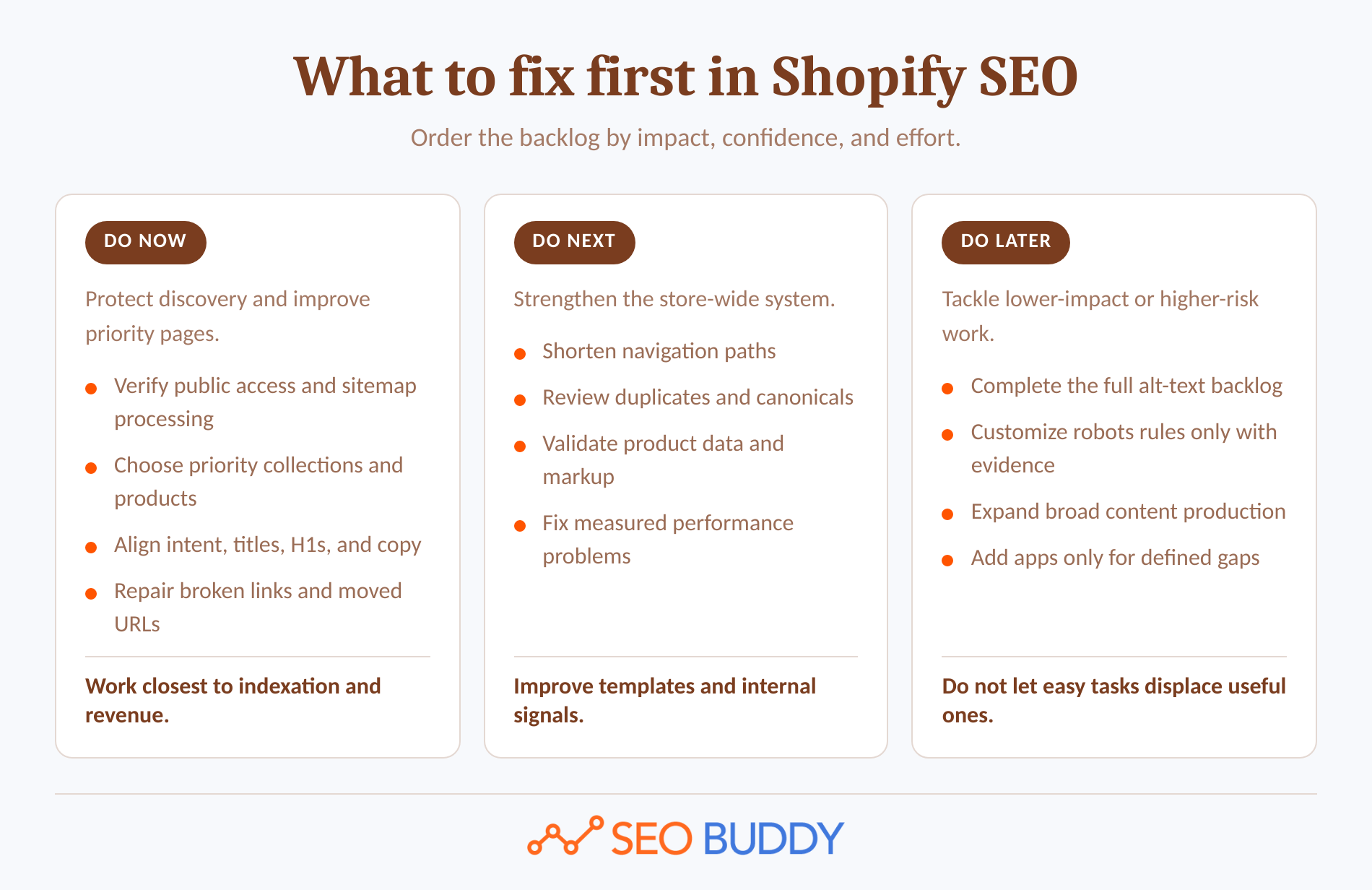
Do now
- Confirm that the live store is public, the primary domain resolves correctly, and the important URLs are accessible without a login.
- Verify the store in Google Search Console and submit the automatically generated
sitemap.xml. Shopify explains the store-side process in its Shopify sitemap documentation, while Google Search Console's Sitemaps report shows whether Google could fetch and process it. - Choose the collections and products with the strongest combination of search demand, revenue potential, margin, and inventory stability.
- Align each priority page with one search intent, then fix its title, H1, visible copy, internal links, and search-result description.
- Repair broken internal links and add relevant redirects for URLs that have genuinely moved or been retired.
Do next
- Shorten the path from the homepage to important collections and products.
- Review duplicate URL patterns, Google-selected canonicals, filters, search pages, and collection-context product links.
- Validate product structured data and confirm that price and availability match the visible page.
- Investigate any collection, product, or homepage template with poor real-user performance data.
Do later
- Complete a bulk alt-text cleanup after priority-page images are covered.
- Customize
robots.txt.liquidonly when a verified crawl problem justifies the risk. - Expand the blog after transactional pages have clear targets and useful internal links.
- Add an SEO app only when a defined requirement is not covered by Shopify, Search Console, the theme, or an existing workflow.
This order is deliberately different from a generic checklist. A store with an indexing problem does not need another blog post, and a store with weak collection pages does not need an advanced robots.txt experiment.
The highest-priority Shopify SEO work is the work that makes valuable pages indexable, understandable, and easier to reach.
Anybody can generate an article. Knowing which one is worth writing is the hard part.
The AI Content Engine reads your site and your competitors, then builds a ranked content plan and writes it. Setup is free, and you see your plan before you pay for anything.
See your content plan freeWhat does Shopify handle automatically?
Shopify handles much of the baseline technical setup, including canonical tags, a sitemap, a default robots.txt file, SSL, and standard URL paths. Store owners still need to verify that themes, apps, content decisions, navigation, and page performance have not weakened that foundation.
As of September 2026, Shopify's current SEO overview documents these automatic features:
- Canonical tags are generated to identify the primary version of a page.
sitemap.xmlandrobots.txtfiles are generated automatically.- SSL certificates are active by default.
- Themes generate title tags, and Shopify-built modern themes normally generate an H1.
- Supported Shopify themes and Theme Store themes include product structured data.
Automatic does not mean untouchable. An SEO app can add a second title, canonical, or structured data block. Custom theme logic can remove an H1, link to avoidable URL variations, hide content behind JavaScript, or output stale product information.
Check the rendered page instead of relying only on the admin preview. View the source for the title, meta description, canonical, robots directive, and structured data, then inspect representative URLs in Search Console. Shopify's own FAQ says missing titles and H1s are commonly caused by theme edits or apps.
Shopify also lets merchants edit titles, meta descriptions, handles, and alt text. Its title and meta guidance recommends descriptive titles of about 60 characters or fewer and unique meta descriptions written for the potential customer, while warning that search engines can rewrite both.
Store owners who need the underlying concepts before changing a theme can use SEO Buddy's free SEO lessons to review on-page, technical, ecommerce, and keyword topics by task.
Shopify covers the baseline technical plumbing, but the merchant still controls targeting, content, links, theme output, and performance.
Which pages should target which keywords?
Collection pages should usually target category-level commercial searches, while product pages should target a specific product or variant need. Informational guides should answer questions that occur before or after the purchase instead of competing with a collection for the same query.
Use page type to narrow the choice:
- Homepage: Brand searches and the broadest accurate description of the store.
- Collection page: Searches for a product category, use case, audience, material, style, or other grouping represented by multiple products.
- Product page: Searches for a named product, model, SKU, distinctive specification, or tightly defined item.
- Blog post or guide: Questions about choosing, comparing, using, maintaining, sizing, styling, or troubleshooting products.
- Policy or support page: Shipping, returns, warranty, care, compatibility, and other service questions.
A page should have one primary intent, not one isolated keyword. Close variants can belong on the same page when a searcher would expect the same answer and product set.
Build the map in this order:
- Export Search Console queries and pages for a meaningful baseline period.
- Group related searches by what the person is trying to accomplish.
- Identify the existing page that best satisfies each group.
- Look for cases where several pages compete for the same intent or one page appears for unrelated searches.
- Assign the strongest commercial intent to a collection or product before commissioning a new article.
- Record the target page, primary intent, supporting phrases, current performance, and next edit in one working sheet.
Do not force an exact-match phrase into every field. Put the clearest product or category description in the H1, use the title to earn the click, and let the body answer the buying questions that support the decision. Shopify recommends natural, readable keyword use and warns against copying a manufacturer's product description verbatim.
Assign one clear search intent to each important URL before rewriting titles or descriptions.
How should you structure collections, products, and internal links?
Build a shallow path from the homepage to major collections and from each collection to its products. Reinforce that path with descriptive menu labels, breadcrumbs, related links, and relevant guides that point to the commercial page they support.
A crawlable store hierarchy
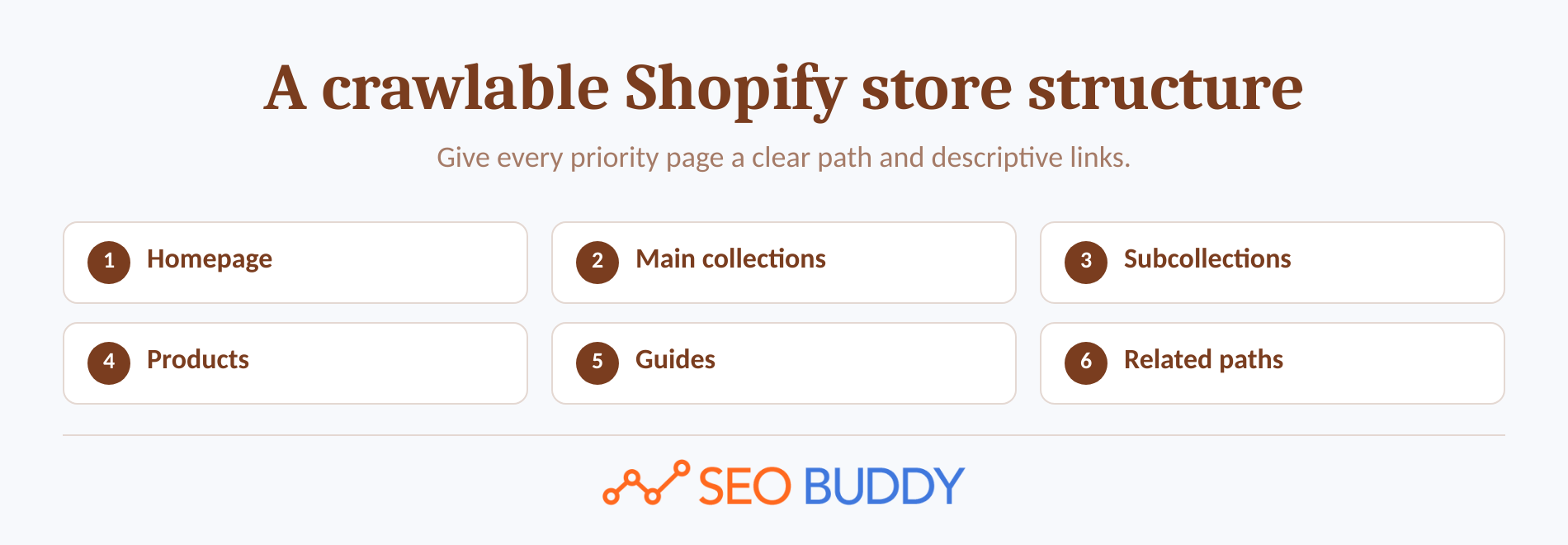
A practical structure is:
- Homepage links to the store's main commercial collections.
- Main collections link to useful subcollections when the catalog genuinely needs another level.
- Collections and subcollections contain crawlable links to every product that should be found through browsing.
- Product pages link to their parent or related collections, compatible products, and genuinely useful guides.
- Guides link to the collection or product that solves the problem discussed.
Shopify's site-structure guidance recommends keeping pages within three clicks of the homepage where possible and using descriptive menu and link text. Google Search Central's ecommerce structure guidance adds that Google uses the relationships between linked pages to infer which pages matter and recommends standard crawlable links rather than JavaScript-only navigation.
Do not make every collection equally prominent. Homepage and menu links should reflect business priority, customer demand, and inventory, not the order in which collections were created.
Use anchors that describe the destination. A link called women's waterproof hiking boots gives shoppers and crawlers more context than shop now. Avoid repeating a keyword unnaturally when a shorter product or category name reads better.
Teams applying the same checks across many templates can turn the process into assigned work with editable SEO SOPs, rather than relying on one person to remember every menu, breadcrumb, and contextual-link check.
A shallow, descriptive link path tells shoppers and search engines which collections and products matter most.
How do you prevent duplicate and low-value URLs from wasting crawl attention?
Shopify's automatic canonical tags reduce many duplicate-content risks, but they do not stop every URL variation from being crawled or linked internally. The practical goal is to link consistently to preferred URLs and use canonical tags, redirects, noindex directives, and robots controls for the problems each one is designed to solve.
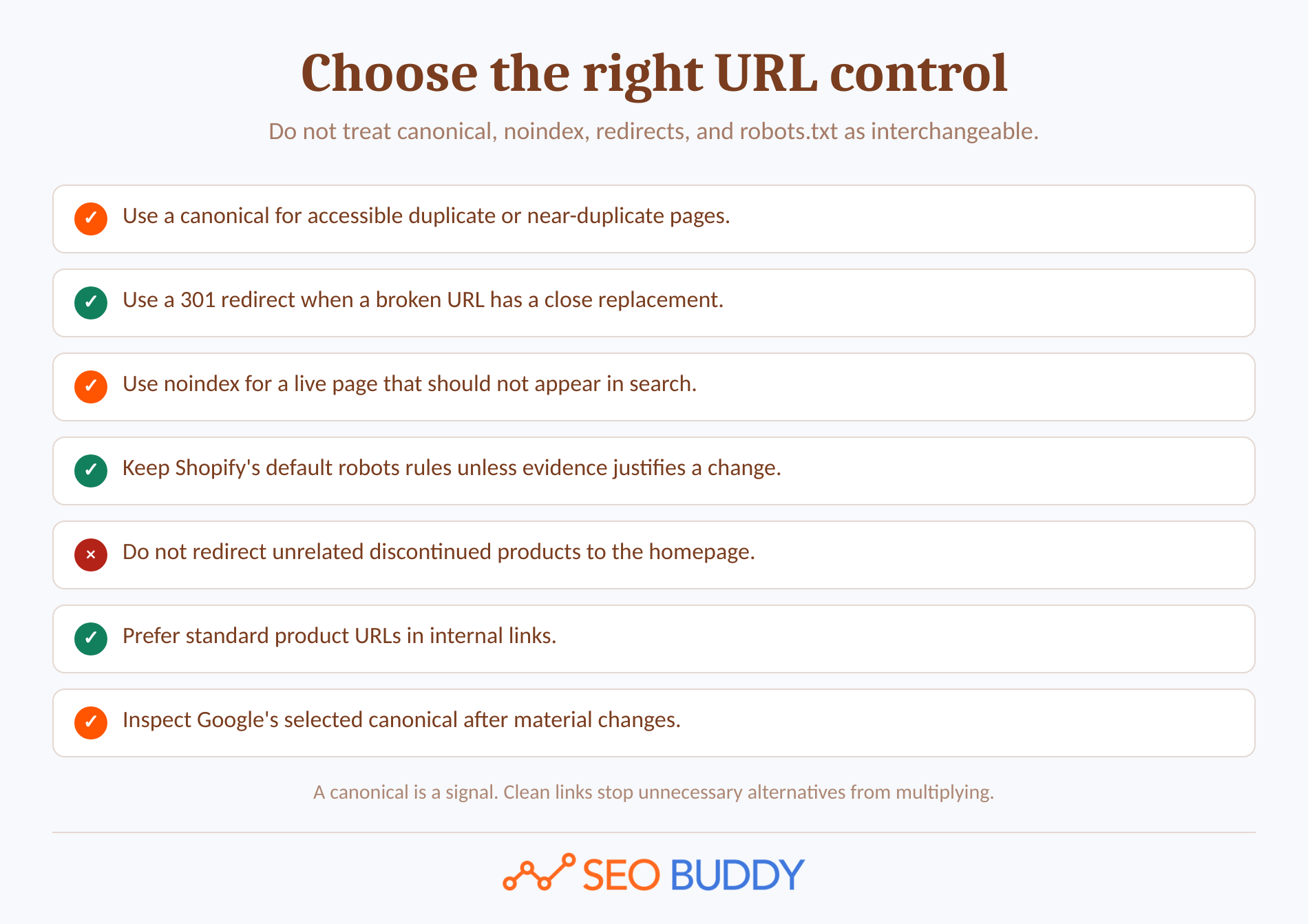
Use the right control for each URL problem
One Shopify-specific pattern deserves attention. The Liquid within filter can generate a collection-context product URL such as /collections/sale/products/example, even though the standard product URL is /products/example. Shopify's within filter documentation cautions that these paths expose the same content on separate URLs.
Shopify normally points these variations to the primary product URL with a canonical tag. Even so, themes should prefer the standard product.url for product-grid and internal links where collection context is not required. Consistent links reduce avoidable crawling and give analytics, sharing, and link signals one cleaner destination.
Use each control deliberately:
- Canonical tag: Use for duplicate or very similar pages that must remain accessible. Google's canonical guidance describes redirects and canonical annotations as strong signals, while sitemap inclusion is weaker.
- 301 redirect: Use when an old URL has moved and there is a close replacement. Shopify redirects work only from broken URLs, according to its URL redirect documentation. Do not redirect unrelated discontinued products to the homepage.
- Noindex: Use when a live page should remain available to visitors but should not appear in search. Shopify's page-hiding guidance documents an
seo.hiddenmetafield and an Unlisted status for appropriate resources. - Robots.txt: Use to control crawling, not as a guaranteed way to remove an indexed URL. Shopify says its default file works for most stores and warns that incorrect customization can cause a loss of search traffic in its robots.txt guidance.
Filters and sorting can create large numbers of low-value combinations. Shopify's default robots rules already block some filtered collection paths, and Google's faceted-navigation guidance warns that filter combinations can generate near-infinite URLs and slow the discovery of valuable pages.
Before changing robots rules, inspect which filtered URLs Google actually knows, whether any receive non-brand impressions, which canonical Google selected, and whether the filter represents a search demand worth serving with a dedicated collection. The existence of a parameter is not proof of an SEO problem.
Canonical tags help consolidate duplicates, but clean internal links and the right URL control prevent the problem from growing.
What should every collection and product page contain?
Every important collection and product page should answer the searcher's buying question without relying on the product grid or images alone. The page should also expose consistent titles, descriptions, availability, specifications, links, and structured data to search systems.
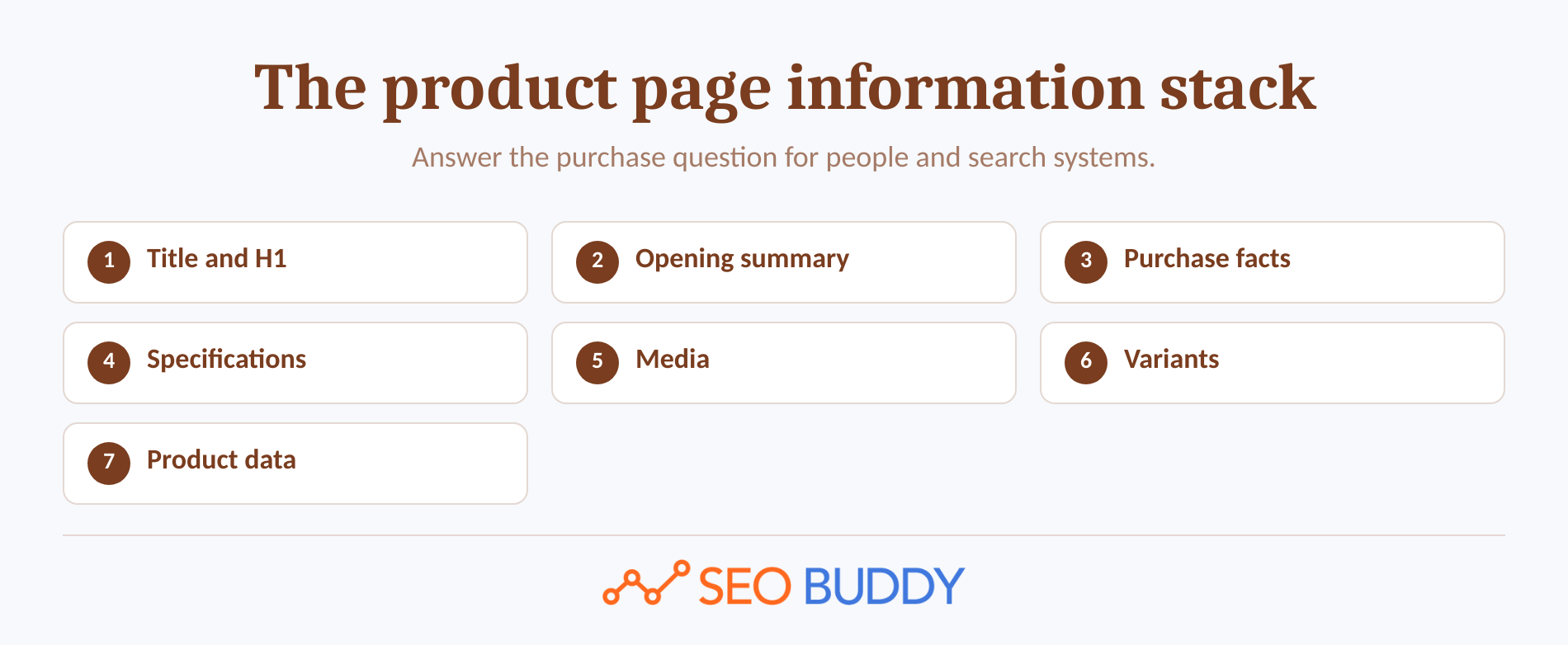
The product page information stack
For a collection page, check:
- The collection represents a real customer category rather than an arbitrary internal tag.
- The H1 states what the collection contains in plain language.
- The title is specific, readable, and distinct from similar collections.
- Introductory copy explains the range, audience, important attributes, and selection criteria without delaying the product grid unnecessarily.
- Products are reachable through standard crawlable links.
- Helpful filters improve browsing without becoming the only way to reach important products.
- Buying guidance, FAQs, or links to relevant guides answer questions that apply to the collection as a whole.
- The collection links to related categories only when the relationship helps a shopper continue the decision.
For a product page, check:
- The title and H1 clearly identify the product.
- The opening summary explains the main benefit and differentiator.
- Price, currency, availability, and purchasing controls are visible and consistent.
- The description is original and covers specifications, materials, dimensions, compatibility, sizing, care, and limitations where applicable.
- Variant names are understandable, and the selected variant matches the visible price, image, and availability.
- Images are useful, compressed appropriately, and given descriptive alt text when the image conveys information.
- Genuine reviews, delivery information, return details, and warranty information appear where they help the decision.
- Related products and guides are relevant rather than automatically added filler.
Shopify's current AI product-page guidance recommends clear titles, product summaries, price, availability, features, specifications, product attributes, sizing, materials, care instructions, and structured data. These details help human shoppers first, while also giving search engines and shopping assistants less ambiguity.
Supported Shopify themes include product markup, but customizations can remove properties or create duplicate blocks. Shopify describes its theme support in its structured-data documentation, and Google's Product structured data guidance recommends combining accurate page markup with Merchant Center data when appropriate.
Validate representative products with Google's Rich Results Test and Search Console reports. Do not add a second Product block simply because a tool reports optional properties; first identify which theme or app owns the existing markup and whether visible price, currency, variant, and availability match it.
A useful collection or product page answers the purchase question completely and exposes the same facts to search systems.
How do you improve speed without breaking the store?
Use Shopify's real-user performance reports to identify the affected metric, page type, and URL before changing code or removing features. Fix the measured cause, test the result, and keep a reversible copy of the theme instead of applying every recommendation from a generic speed report.
Start with real-user performance data
Shopify's web performance reports measure Core Web Vitals with real-user data. The reports retain 90 days of data, can be delayed by up to 36 hours, and classify these results as good:
- Largest Contentful Paint, or LCP: 2,500 milliseconds or less.
- Interaction to Next Paint, or INP: 200 milliseconds or less.
- Cumulative Layout Shift, or CLS: 0.1 or less.
Work through the likely causes in this order:
- Compare performance by page type and URL to find whether the problem affects the whole theme or a smaller template group.
- Review apps, tag-manager scripts, pixels, and custom code added near the date the metric changed.
- Remove unused apps and confirm whether an uninstalled app left code in the theme.
- Reduce unnecessary homepage sections, carousels, animations, pop-ups, and third-party scripts.
- Ensure the largest above-the-fold image is not lazy-loaded. Developer-level fixes can also mark that image with
fetchpriority="high". - Keep essential product information and navigation in rendered HTML rather than making visitors wait for client-side JavaScript.
- Test the duplicate theme, deploy one meaningful change, and watch the real-user result before making the next major edit.
Shopify's performance improvement guidance identifies themes, apps, and manually added third-party code as major merchant-controlled factors. Its theme performance guidance also prioritizes the LCP image, render-blocking apps, unnecessary JavaScript, and deeply nested Liquid work.
A faster score is not worth a broken variant selector, analytics gap, inaccessible menu, or missing purchase information. Test shopping and tracking behavior after every performance deployment.
Speed work should start with real-user evidence and remove the specific theme, app, or code cost causing the poor metric.
When should you create content and build backlinks?
Create supporting content after priority collections and products have clear targets, useful information, and internal links. Begin active link acquisition when the destination offers something specific enough that another publisher could reasonably cite or recommend it.
A useful Shopify content plan starts with questions connected to the catalog:
- How does a shopper choose between two product types?
- Which size, material, specification, or compatibility detail causes uncertainty?
- What should the customer know before using, installing, storing, cleaning, or maintaining the product?
- Which comparison can be answered fairly without disguising a sales pitch as advice?
- Which recurring support question deserves a permanent, indexable answer?
Each guide should have a defined destination. Link to the relevant collection or product when it answers the next question, and link back from the commercial page when the guide helps the purchase decision.
If topic selection and production are the bottleneck, SEO Buddy's AI Content Engine can be evaluated as a content-planning and publishing workflow. It should not replace the merchant's responsibility to verify product facts, stock, claims, and platform instructions.
Backlinks should come after page quality, not instead of it. Useful targets can include original research, calculators, compatibility references, detailed buying guides, visual explainers, expert commentary, or a category page that is demonstrably more useful than the pages already available.
Teams that want to conduct their own prospecting can use a structured link prospecting and outreach workflow. Prospecting and email delivery do not guarantee a reply, placement, ranking, or traffic result, so relevance and editorial value still need a human decision.
Publish content and seek links only after the destination page is useful enough to deserve both.
How do you measure whether the work is paying off?
Track search visibility, indexation, performance, and commercial outcomes at the page level. A useful measurement process connects every material edit to a dated hypothesis and ends with a decision to keep, revise, expand, or reverse the change.
A measurement log that leads to decisions
Record these fields for each priority URL:
- URL and page type.
- Primary search intent.
- Date and exact change.
- Expected effect.
- Search Console baseline for clicks, impressions, CTR, and average position.
- Google-selected canonical and index status.
- LCP, INP, and CLS where enough data exists.
- Organic landing-page sessions, conversions, revenue, or another business outcome.
- Review date and final decision.
Google Search Console's Performance report guidance recommends reviewing queries and pages, finding high-impression pages with low CTR, and focusing more on click and impression trends than position alone. Search Console often assigns performance data to Google's selected canonical, which is another reason to inspect duplicates before concluding that a URL has no traffic.
Use Google Search Console's URL Inspection guidance to check whether a page is indexed, which canonical Google selected, and whether the live page can be fetched. A submitted sitemap helps discovery, but neither submission nor an indexing request guarantees indexation or ranking.
For non-seasonal stores, a 28-day period compared with the previous 28 days is a practical working view. Seasonal stores should also compare the same period year over year. Do not judge a title change from one day of data or combine several major edits when the goal is to learn which one helped.
The final question is not simply whether rankings rose. Check whether the right non-brand queries produced more qualified visits and whether those visitors reached products, added items to the cart, or completed the outcome the page was meant to support.
Measure by page, query, canonical, performance, and revenue so every SEO change leads to a keep, revise, or reverse decision.
What else do Shopify store owners ask about SEO?
These questions address the prioritization and platform decisions that commonly block implementation. Each answer applies to Shopify SEO rather than promising a ranking or revenue outcome.
What is the 80/20 rule in SEO?
The 80/20 rule in SEO is a prioritization heuristic, not a Google rule. For a Shopify store, it means spending most effort on the few templates and pages that influence the most revenue or search demand: indexable collections, best-selling products, internal links, duplicate URL control, and measurable speed problems.
Which SEO tool is best for Shopify?
The best Shopify SEO tool depends on the job. Start with Google Search Console for queries, indexing, and canonicals, plus Shopify's own web performance reports for Core Web Vitals. Add a specialized tool only when a defined gap remains, such as crawling, keyword research, structured data testing, or outreach.
Is Shopify good with SEO?
Shopify is good for SEO fundamentals because it automatically provides sitemaps, robots.txt, canonical tags, SSL, and structured data in supported themes. It does not choose the right keywords, write differentiated collection and product content, build internal links, control app bloat, or earn authority. Those merchant-controlled tasks determine much of the result.
Shopify supplies a sound base, but no tool replaces page targeting, useful content, clean links, and measurement.
What should you do in the next seven days?
Use the next seven days to establish a baseline and improve one group of commercially important pages. Avoid starting with a store-wide rewrite, because a smaller controlled batch makes errors easier to catch and results easier to interpret.
- Day 1: Export Search Console page and query data, then record organic outcomes from store analytics.
- Day 2: Verify the primary domain, sitemap access, index status, and Google-selected canonical for representative URLs.
- Day 3: Map the most valuable search intents to existing collections, products, and guides.
- Day 4: Improve the titles, H1s, visible copy, and search-result descriptions of the priority collections.
- Day 5: Improve the related product pages, including specifications, variants, availability, images, alt text, and structured data validation.
- Day 6: Add descriptive internal links and correct avoidable collection-context product links, broken URLs, and relevant redirects.
- Day 7: Review page-type performance, document every deployment, and schedule the first measurement date.
To turn this plan into assigned, repeatable work, use SEO Buddy's 122-step SEO Checklist. Start with the highest-impact Shopify tasks, give each task an owner, and capture the baseline before the first edit.
The next action is to record the baseline for one priority collection before changing anything.

CEO & Founder at SEO Buddy


 Why Google Rankings Fluctuate and When to Take Action
General SEO
Why Google Rankings Fluctuate and When to Take Action
General SEO
 Is SEO an Ongoing Process? What to Repeat Monthly, Quarterly, and Annually
General SEO
Is SEO an Ongoing Process? What to Repeat Monthly, Quarterly, and Annually
General SEO
 Link-Building Packages Explained: Deliverables, Pricing, and Red Flags
General SEO
Link-Building Packages Explained: Deliverables, Pricing, and Red Flags
General SEO
 Is SEO Dead? What AI Search Changed and What Still Works
General SEO
Is SEO Dead? What AI Search Changed and What Still Works
General SEO
Get the SEO work done, not just read about it
Create a free account and run your first content plan, keyword research and link-building campaign. No card, and setup is free until your first article.
Free to start. We never sell your address.