
Why Google Rankings Fluctuate and When to Take Action

In short
Google rankings fluctuate because search results are recalculated as Google processes new pages, site changes, competing content, query intent, location, device context, and ranking-system updates. Small, short-lived shifts are usually normal. Investigate when losses are broad, persistent, paired with falling clicks or impressions, or connected to indexing, security, manual-action, or migration problems. (developers.google.com)
Key takeaways
- Google Search Central's guidance on traffic drops says small shifts, such as moving from position 2 to 4, can occur at any time and may reverse without changes. Avoid radical edits to a page that already performs well. (developers.google.com)
- Search Console Performance report documentation defines average position as the average position of a site's topmost result, while live results vary by time, location, device, and recent search history. (support.google.com)
- Diagnose scope before cause by isolating affected queries, pages, countries, devices, and search types before treating a change as sitewide.
- Act immediately on confirmed availability, indexing, security, manual-action, or migration failures; short-lived movement without traffic loss usually needs monitoring first.
- After a core update finishes, Google recommends waiting at least one full week before comparing performance because data gathered during the rollout can mislead. (developers.google.com)
Table of contents
- How much ranking movement is normal?
- Why does my Google ranking keep changing?
- How can you identify the cause without guessing?
- When should you wait, and when should you act?
- What should you check after a sudden ranking drop?
- Which metrics matter more than a single ranking?
- What else should you know about ranking fluctuations?
- What should you do next?
A ranking report can make a normal reshuffle look like an emergency. The goal is not to stop every keyword from moving. It is to determine whether the change affects real search visibility, identify the most likely cause, and choose a response that does not create a second problem.
How much ranking movement is normal?
Small shifts in individual query positions are normal, especially when clicks and impressions remain broadly stable. A movement becomes more concerning when it persists, affects many important queries or pages, and coincides with a measurable loss of search visibility.
Google's own examples separate a small drop from position 2 to 4 from a large drop from position 4 to 29. Google also advises against making radical changes when a well-performing page experiences a small fluctuation because the page may move back without intervention. (developers.google.com)
Search Console can also make movement look larger or stranger than it is. Average position is an aggregate, and the result shown to an individual searcher depends on the query, time, location, device, and recent history. A manual search from one browser is therefore not a reliable benchmark for a global audience. (support.google.com)
The practical test is impact: check whether clicks and impressions declined, whether the same pages lost visibility across related queries, and whether the pattern continues across more than one reporting period.
A small position change is normal until the wider data shows that visibility or traffic is actually deteriorating.
Anybody can generate an article. Knowing which one is worth writing is the hard part.
The AI Content Engine reads your site and your competitors, then builds a ranked content plan and writes it. Setup is free, and you see your plan before you pay for anything.
See your content plan freeWhy does my Google ranking keep changing?
Google rankings change because the search index, ranking systems, available pages, and searcher context are not static. The same symptom can come from reporting variation, a change on the website, a stronger result elsewhere, changing demand, or a Google update.
Match the pattern to the likely cause
Use the pattern in the data to reduce the list of possible causes:
- Measurement and searcher context: A position changes in manual searches but Search Console remains stable. Check country, device, query wording, and date filters.
- Recrawling after a site change: One URL moves after its title, content, canonical tag, internal links, or URL changes. Google may be processing the new signals.
- Technical or indexing trouble: A page disappears, loses impressions sharply, or becomes unavailable. Check server responses, robots rules,
noindex, canonical selection, redirects, and indexing reports. - Changing intent or competing results: The ranking pages or result types change even though the affected page did not. Another page may now satisfy the query more directly.
- Changes across the web: Important links can appear or disappear, and Google documents link analysis as one part of its ranking systems in Google's ranking systems guide. (developers.google.com)
- Demand and seasonality: Impressions decline while positions remain fairly steady. Compare the affected queries with Google Trends and a year-over-year period.
Algorithm updates are one possibility, not the default explanation. As of November 4, 2026, the Google Search Status Dashboard lists the September 2026 spam update, which began on September 24 and lasted 13 days and 16 hours, as its latest ranking event. A matching date is evidence to investigate, but it does not prove that the update caused a specific site's movement. (status.search.google.com)
If crawling, canonicalization, or indexing terminology is unfamiliar, SEO University provides background lessons before any changes are made.
Ranking volatility becomes diagnosable when each movement is matched to a specific data, site, market, or Google timeline.
How can you identify the cause without guessing?
Start by proving that the change is real and locating its scope before investigating individual SEO factors. This prevents one unusual query, device, or reporting day from triggering unnecessary site changes.
Use this five-step diagnostic sequence
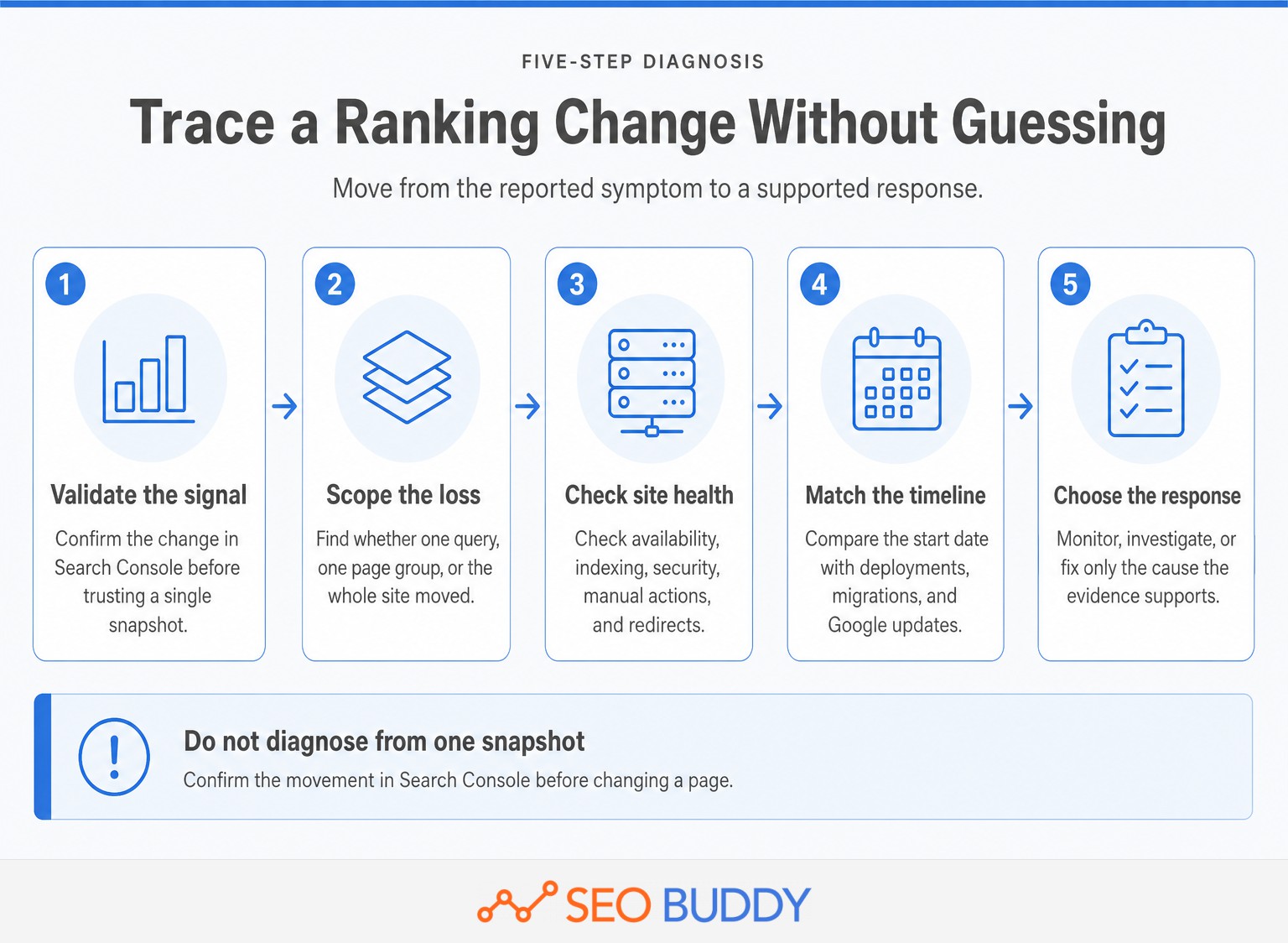
- Validate the signal. Compare Search Console data with the original report. If a third-party rank tracker is used, treat it as a consistent snapshot for a defined location and device, then confirm the change in Search Console.
- Locate the loss. Segment by query, page, country, device, search appearance, and search type. Determine whether the change affects one term, one URL, one template, or the whole site.
- Check search eligibility. Confirm that affected pages load correctly, remain indexable, use the intended canonical URL, and have no relevant security issue or manual action.
- Match the timeline. Review content edits, releases, migrations, redirect changes, template changes, and server incidents from the period when movement started.
- Test external explanations. Compare Google update dates, search demand, and the pages now appearing for the affected queries.
For a team, SEO troubleshooting SOPs can turn this sequence into an assigned, repeatable check instead of a one-off investigation.
The right diagnosis narrows the problem before anyone edits content or changes technical settings.
When should you wait, and when should you act?
Wait when the movement is isolated, brief, and unsupported by a decline in clicks or impressions. Investigate persistent or widespread patterns, and act immediately when Google or users cannot reliably access the affected pages.
Classify the response before changing the page
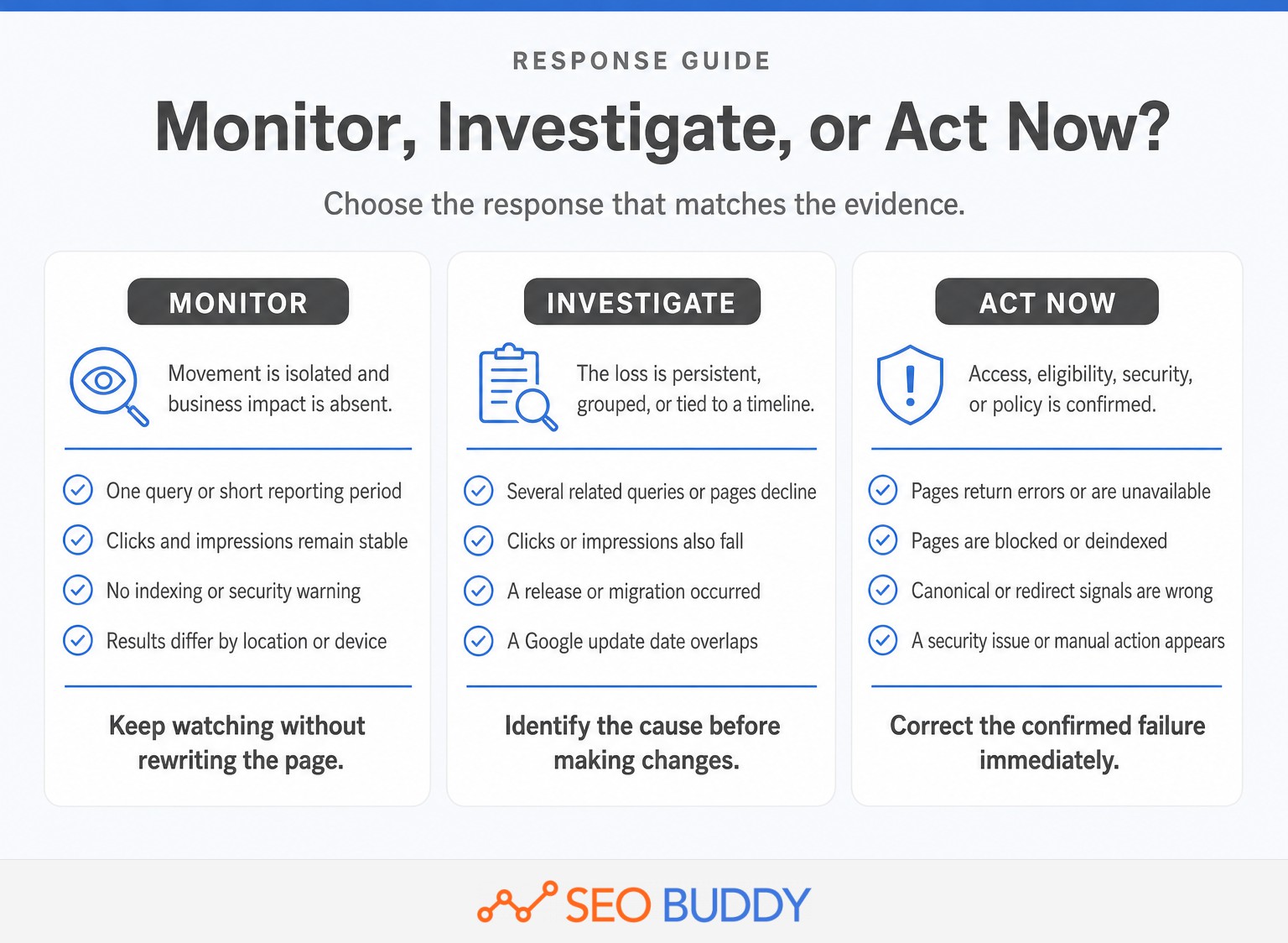
- Monitor: One query moves for a short period, Search Console traffic remains stable, no indexing warnings appear, and different locations or devices show different results.
- Investigate: Multiple related queries or pages lose visibility, the pattern continues across reporting periods, clicks or impressions fall, or the start date matches a content release, migration, or Google update.
- Act now: Pages return errors, become blocked or deindexed, use incorrect canonical or redirect signals, contain an accidental
noindex, or show a security issue or manual action.
For a suspected core update, follow Google's core update guidance: wait until the rollout has finished, allow at least one full week, and then compare an appropriate before-and-after period. Google specifically advises against drastic action for a small position drop on an otherwise successful page. (developers.google.com)
Wait on isolated noise, investigate persistent patterns, and fix confirmed access, indexing, security, or policy failures immediately.
What should you check after a sudden ranking drop?
Begin with Search Console and site availability rather than rewriting the affected content. A technical or policy failure needs a different response from a demand shift, competitor gain, or algorithmic reassessment.
Run this sudden-drop checklist
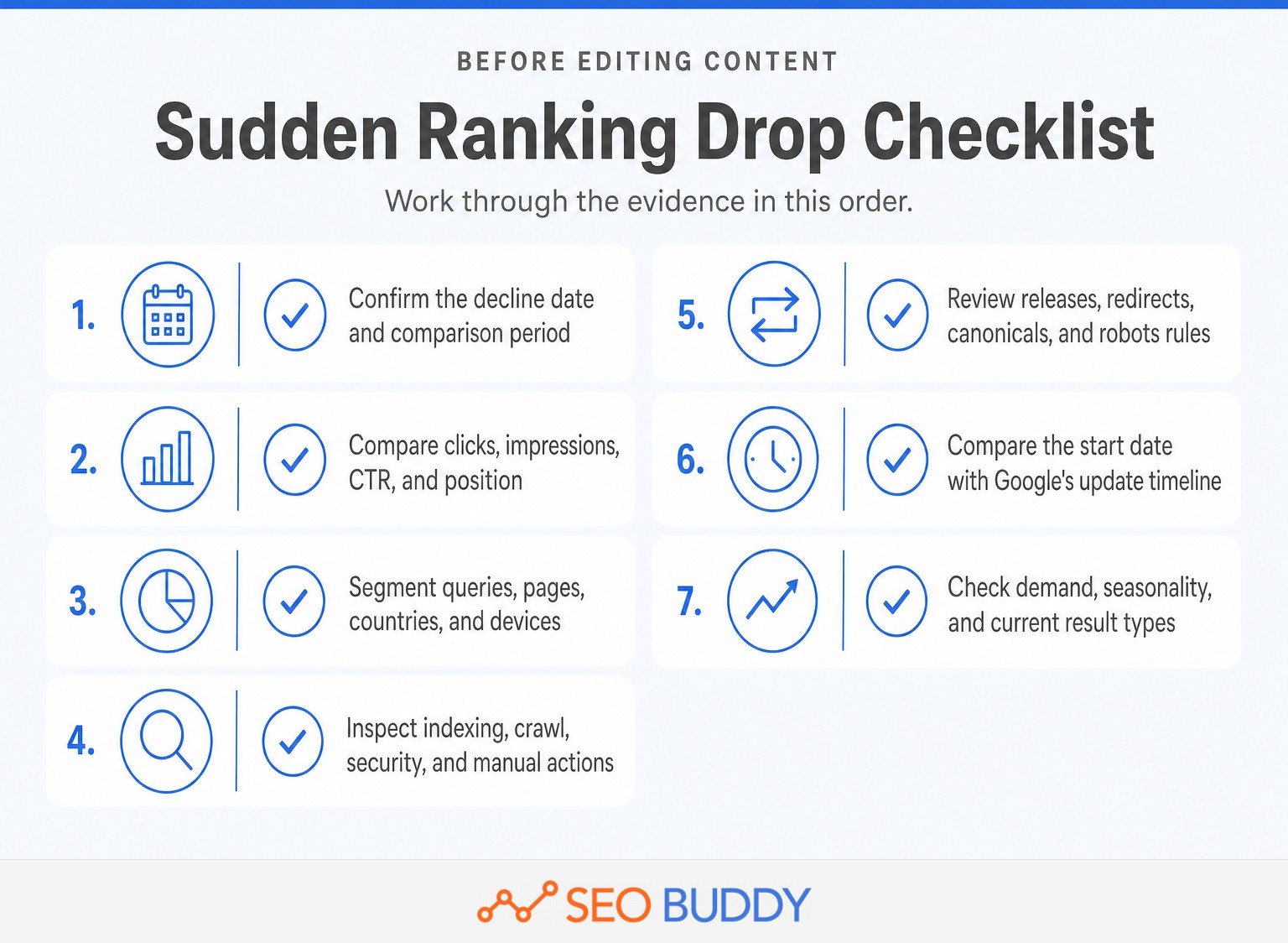
- Confirm the date. Identify the first clear day or week of decline and compare it with an equivalent previous period.
- Compare all four metrics. Review clicks, impressions, click-through rate, and average position together.
- Segment the loss. Check pages, queries, countries, devices, search types, and search appearances.
- Inspect site health. Review Page Indexing, Crawl Stats, Security Issues, Manual Actions, server logs, and uptime records.
- Review recent changes. Check deployments, content edits, URL changes, redirects, canonical tags, robots rules, navigation, and internal links.
- Check Google's timeline. Compare the start date with the official status dashboard, but do not assume correlation proves causation.
- Check the market. Review whether search demand fell or the dominant result type and search intent changed.
Google Search Central identifies technical issues, security issues, spam issues, seasonality, changing interests, site moves, and algorithmic changes as distinct causes of organic traffic drops. The diagnosis should therefore preserve those distinctions instead of treating every decline as a content-quality verdict. (developers.google.com)
A sudden drop should be traced through Search Console, site changes, and Google timelines in that order.
Which metrics matter more than a single ranking?
A ranking is a diagnostic signal, not the final business outcome. Google recommends focusing less on absolute position and more on impressions and clicks, then connecting those search metrics to qualified visits and conversions. (developers.google.com)
Track these measures together:
- Impressions show whether the site is still eligible and visible for relevant searches.
- Clicks show whether that visibility is producing visits.
- Click-through rate can reveal a title, snippet, intent, or search-result-layout problem when impressions remain stable.
- Landing-page traffic shows whether the affected URLs lost meaningful organic visits.
- Conversions or leads show whether the movement has a business consequence.
A page can lose average position while gaining clicks from more valuable queries. It can also retain a high tracked position while losing traffic because demand or search-result presentation changed.
Rankings are diagnostic signals, while clicks, impressions, qualified visits, and conversions are the outcomes.
What else should you know about ranking fluctuations?
Most follow-up questions come down to scope, duration, and business impact. The answers below apply those tests without treating every position change as an emergency.
Why has my Google ranking suddenly dropped?
A sudden Google ranking drop can come from an algorithm update, a technical or indexing problem, a site change, a manual or security issue, stronger competing pages, or lower search demand. Check Search Console by page and query, then match the drop date against deployments and Google's status dashboard before editing content.
Why isn't ranking #1 on Google enough anymore?
Ranking first for one tracked query does not guarantee the most clicks, qualified visits, or conversions. Search results vary by time, location, device, and user context, while features above and around organic listings can change attention. Judge performance using clicks, impressions, click-through rate, landing-page traffic, and business outcomes.
What is the 80/20 rule in SEO?
The 80/20 rule in SEO is a prioritization heuristic, not a Google rule: a small share of pages, queries, or fixes often produces most results. Use data to find high-impression pages, valuable queries, and sitewide technical problems first. Do not assume the ratio is literally 80/20 for every website.
How long should I wait before reacting to a ranking change?
Wait through ordinary one-day movement unless clicks, impressions, or indexing also deteriorate. For a core update, Google recommends waiting until rollout finishes and then allowing at least one full week before analysis. Act immediately when pages are unavailable, deindexed, blocked, compromised, or affected by a manual action.
The safest response is evidence-led: identify the scope and cause before deciding whether to wait or intervene.
What should you do next?
A ranking change deserves a response only after the signal, scope, and likely cause are clear. The next action should match the evidence, not the size of the number on a rank report.
When the diagnosis reveals a broader growth issue, use the prioritized plan to improve organic traffic rather than chasing one keyword. For the recurring cadence behind monitoring and maintenance, see is SEO an ongoing process, explained.
To turn the diagnosis into assigned work, use the SEO Checklist + SOP Collection to record the finding, owner, next check, and completed fix.
Do not try to stabilize every ranking; build a repeatable process for spotting the changes that affect real search performance.

CEO & Founder at SEO Buddy


 Is SEO an Ongoing Process? What to Repeat Monthly, Quarterly, and Annually
General SEO
 Link-Building Packages Explained: Deliverables, Pricing, and Red Flags
General SEO
 Is SEO Dead? What AI Search Changed and What Still Works
General SEO
 How to Hire a Link-Building Agency: 12 Questions to Ask Before Signing
General SEO
Get the SEO work done, not just read about it
Create a free account and run your first content plan, keyword research and link-building campaign. No card, and setup is free until your first article.
Free to start. We never sell your address.