
Best SEO Tools of 2025: Which Ones Are Still Worth Using in 2026?

In short
The best SEO tools of 2025 are still worth using in 2026 when they provide first-party data, solve a recurring workflow problem, and remain actively supported. Start with Google Search Console, Google Analytics 4, Google Trends, performance testing, and reporting, then add content or link software only where a specific bottleneck justifies the cost.
Key takeaways
- Google Search Console remains the foundation because it reports first-party search data and added worldwide generative AI reporting by August 31, 2026.
- Google Trends measures relative search interest on a normalized 0-to-100 scale, not absolute monthly search volume.
- PageSpeed Insights combines real-user field data from the previous 28-day period with controlled Lighthouse lab testing.
- No single product reliably replaces search measurement, analytics, crawling, content production, link acquisition, and reporting.
- A paid tool should enter the stack only after the team can name the recurring bottleneck, the tool owner, and the decision it will improve.
Table of contents
- Which SEO tools from 2025 are still worth using in 2026?
- What is the best SEO tool for each job?
- Which five tools should form the core of most SEO stacks?
- How should you build an SEO tool stack without overbuying?
- Which tools do beginners actually need?
- When should you replace a tool from your 2025 stack?
- What gaps will this stack still leave?
- What else should you know about SEO tools?
- What should you do next?
This guide was checked on October 10, 2026, using official documentation and current public product pages. It is an availability, capability, and workflow audit rather than a claim that every interface was logged into and tested. Anyone revisiting the search phrase best SEO tool 2025 now needs to separate durable SEO jobs from changing product catalogs.
Which SEO tools from 2025 are still worth using in 2026?
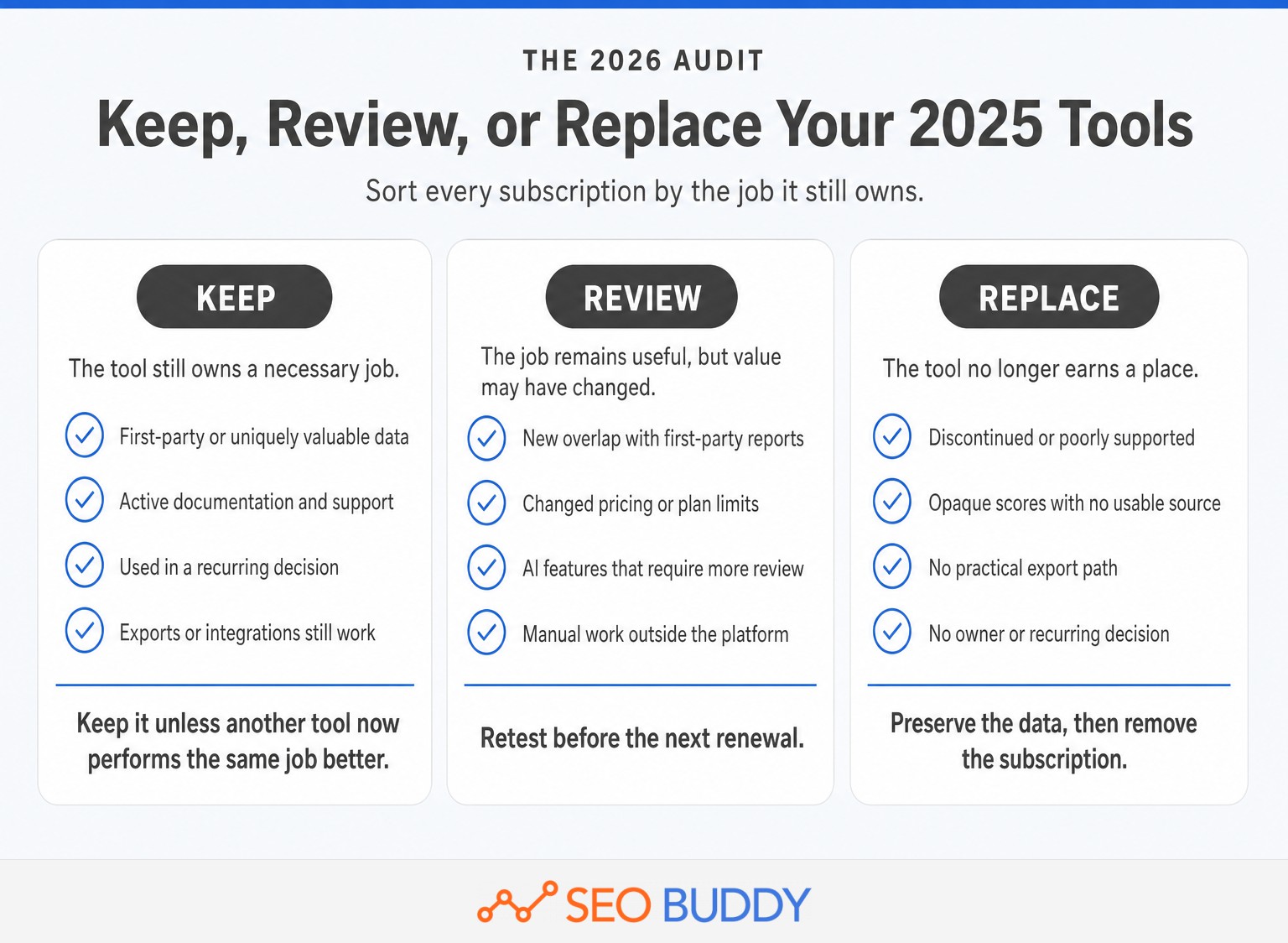
Most SEO tool categories recommended in 2025 still matter, but not every subscription deserves renewal. Keep tools that provide first-party data or a unique capability, and retest paid products whose pricing, AI features, integrations, or data coverage have changed.
The clearest reason to revisit a 2025 list is that search reporting changed during 2026. Google's generative AI performance report rolled out to all websites worldwide by August 31, 2026. It provides a dedicated view of impressions in AI Overviews and AI Mode, grouped by page, country, device, and date.
Google then began the global rollout of web multimodal reporting on September 24, 2026. Search Console can now separate searches that begin with images, including activity from visual search features. A third-party subscription purchased only because Search Console lacked AI or multimodal visibility may now overlap with first-party reporting.
Structured-data expectations changed too. Google's Search Console change log states that FAQ rich results stopped appearing in Google Search on May 7, 2026. A visible FAQ can still answer readers and accurately describe page content in schema, but a tool should not be purchased because it promises an FAQ rich result that Google no longer displays.
Use three renewal categories:
- Keep: first-party measurement, actively supported diagnostic utilities, and reporting systems that feed recurring decisions.
- Review: paid content, rank-tracking, outreach, link-database, and all-in-one software with overlapping features or changed prices.
- Replace: discontinued products, unexplained scores, tools without usable exports, and subscriptions that duplicate a better source already in the stack.
A tool surviving from 2025 does not automatically make it the best choice now. Its current value depends on the data it owns, the work it removes, and the decision that becomes better because the tool exists.
A 2025 tool belongs in a 2026 stack only if its data, support, and workflow value still hold up now.
Anybody can generate an article. Knowing which one is worth writing is the hard part.
The AI Content Engine reads your site and your competitors, then builds a ranked content plan and writes it. Setup is free, and you see your plan before you pay for anything.
See your content plan freeWhat is the best SEO tool for each job?
The best SEO tool depends on the job because measurement, diagnosis, production, and execution require different data. A useful stack assigns one primary owner to each job and avoids paying twice for the same capability.
SEO Buddy publishes this guide and sells several products included below. The table therefore states the limits of those products and includes independent first-party Google utilities where they are the stronger source. Availability and cost models were checked on October 10, 2026, but prices can change.
| SEO job | Current choice | Why it remains useful | Main limitation | Current access or cost model |
|---|---|---|---|---|
| Search performance and indexing | Google Search Console | Reports impressions, clicks, CTR, position, indexing information, URL inspection data, and newer AI and multimodal visibility | Query data can be omitted or truncated, and recent data can be delayed | Available to verified site owners |
| On-site behavior and business outcomes | Google Analytics 4 | Connects acquisition and landing-page activity with events and key events | Results depend on correct implementation, consent configuration, and event definitions | Available; implementation work may carry a separate cost |
| Demand direction and seasonality | Google Trends | Compares relative interest, locations, periods, and related searches using Google search data | Values are normalized and do not represent absolute search volume | Browser-based tool |
| Page-performance diagnosis | PageSpeed Insights | Combines field data from real users with Lighthouse lab diagnostics | Low-data URLs may lack field results, and lab runs can vary | Browser tool and API |
| Structured-data validation | Rich Results Test | Checks which supported Google rich results can be generated from a URL or code sample | A valid test does not guarantee that Google will display a rich result | Browser-based tool |
| Cross-source reporting | Google Data Studio | The product formerly called Looker Studio combines data sources into customizable reports | Poor metric definitions produce poor dashboards, regardless of presentation quality | No-cost version available; Pro capabilities are separate |
| SEO planning and repeatable execution | SEO Checklist + SOP Collection | Provides 122 ordered checklist steps and 66 procedures for assigning and completing recurring SEO work | It is guidance and process documentation, not an automated crawler or rank tracker | $0 with a free account |
| Content research, production, and publishing | SEO Buddy AI Content Engine | Uses a sitemap, optional Search Console data, competitors, business priorities, and brand inputs to plan and produce articles | It is not a dedicated crawler, rank tracker, existing-page optimization editor, or cross-platform AI monitor | $1 for three days, then from $19 per month |
| Link prospecting and email outreach | SEO Buddy Link Building Campaign | Finds prospects and contacts, displays Domain Rating, and sends a three-email sequence from the customer's mailbox | Prospecting does not guarantee replies or links; the user remains responsible for targeting, mailbox setup, and legal compliance | Prepaid usage with no subscription |
| Curated submission opportunities | SEO Buddy Link Chest | Provides a current database of 2,454 opportunities, workflow tracking, and more than 500 step-by-step guides | The customer must complete submissions and secure the links; it is not a backlink analytics database | $19 per month or $99 for lifetime access |
Google's Search Console data documentation explains that privacy protections omit some queries, tables can be limited to the most important rows, and normal data availability can lag by two to three days. Search Console is still the best first-party starting point, but it is not a complete keyword database.
Google Trends has a different limit. Google normalizes Trends values by time and location before scaling them from 0 to 100. A value of 100 means peak relative interest within the selected comparison, not 100 searches or a known monthly volume.
PageSpeed Insights also needs careful interpretation. Field data reflects real-user experiences over the previous 28 days, while lab data comes from a controlled Lighthouse test. Field and lab results answer different questions, so one should not be treated as proof that the other is wrong.
The Rich Results Test checks technical eligibility. Google's structured-data guidelines explicitly state that valid markup does not guarantee a rich result because content quality, relevance, policies, and search context still affect display.
The best SEO tool is the smallest reliable tool that owns one necessary job without duplicating the rest of the stack.
Which five tools should form the core of most SEO stacks?
For most organizations, the core five are Google Search Console, Google Analytics 4, Google Trends, PageSpeed Insights, and Google Data Studio. Together they cover search visibility, on-site outcomes, demand direction, performance diagnosis, and reporting before the organization buys specialist production software.
- Google Search Console owns search visibility. Use it to find queries, landing pages, indexing problems, AI-feature impressions, and changes in search demand for the site. Average position needs context, so compare ranking movement with realistic organic ctr by position rather than treating every one-position change as equal.
- Google Analytics 4 owns on-site outcomes. Search Console can show that a searcher reached the site, while Analytics can show what happened afterward. Define key events around real business actions such as qualified leads, purchases, registrations, or other meaningful outcomes.
- Google Trends owns direction, not volume. Use it to compare topics, detect seasonality, assess geographic differences, and see whether interest is rising or falling. Keep a separate source for absolute keyword-volume estimates when that number is required.
- PageSpeed Insights owns page-level performance diagnosis. Run it when investigating Core Web Vitals, slow templates, or changes that may have affected user experience. A full technical audit still requires broader crawling and log analysis.
- Google Data Studio owns recurring reporting. Connect the sources that matter, define each metric once, and build a report around decisions rather than decorative charts. A reporting layer is useful only when someone reviews it and assigns the next action.
Rich Results Test is a valuable sixth utility for sites using supported structured data. It is task-specific rather than a system that most teams need to monitor every day.
Content production, crawling, rank tracking, backlink research, link outreach, and AI citation monitoring should be added according to the business model. An ecommerce site with thousands of changing URLs has different requirements from a service business publishing four articles each month.
For most organizations, five dependable systems used every month beat a long list of overlapping subscriptions.
How should you build an SEO tool stack without overbuying?
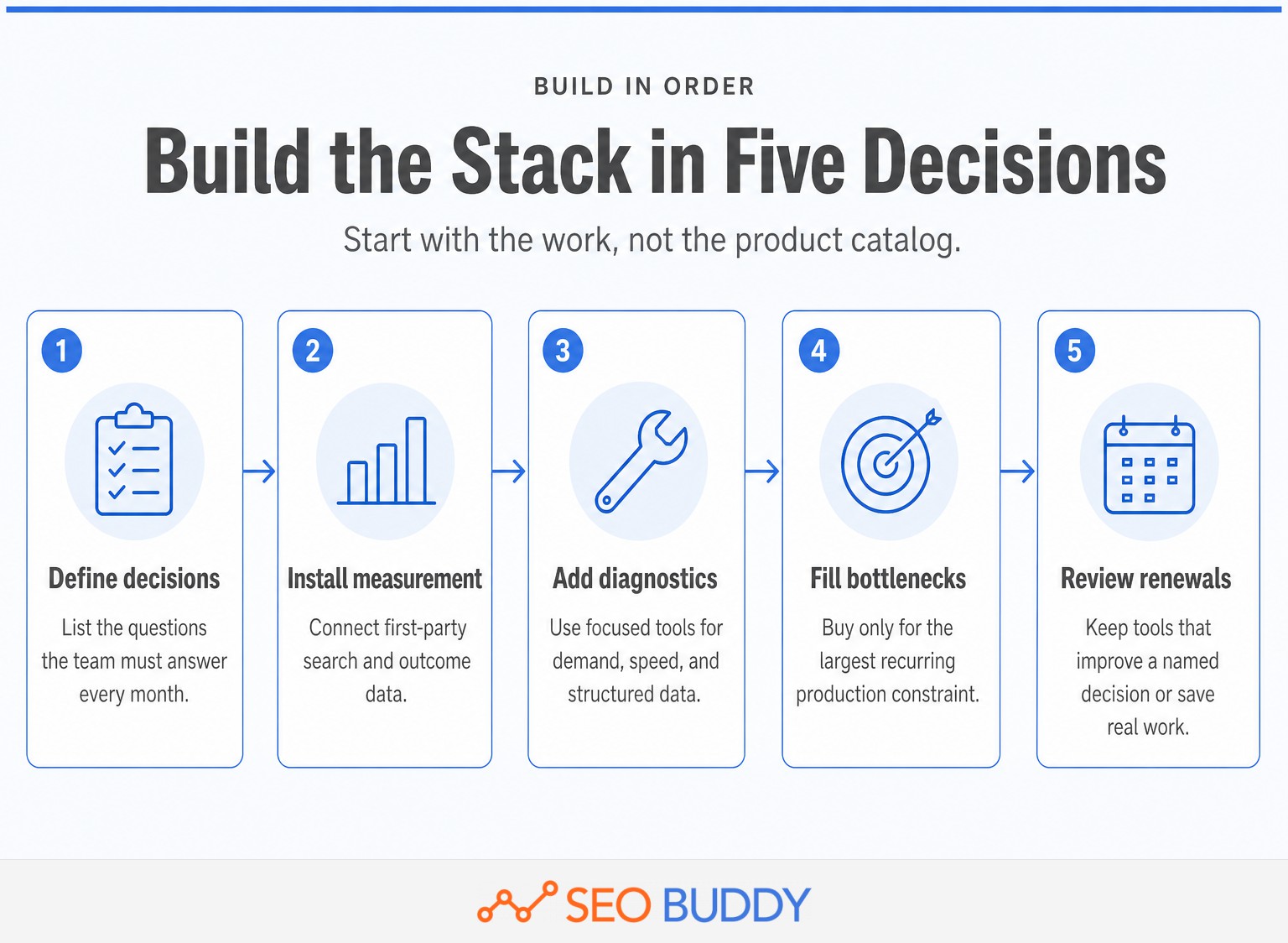
Build the stack in workflow order: measure, diagnose, decide, execute, and report. A clear seo workflow process prevents the team from buying isolated utilities that never become part of recurring work.
1. Start with the decisions, not the products
List the questions the team must answer every month. Typical examples include which pages are losing clicks, which topics deserve content, what technical problem blocks indexing, which pages need links, and which activities contributed to leads or revenue.
If competitor research is one of those decisions, define the method for how to find competitor keywords before selecting software. The tool should support the research method rather than becoming the method.
2. Install first-party measurement
Connect Search Console and Analytics before paying for estimated versions of data the business can collect directly. Confirm site ownership, filters, key events, consent settings, time zones, and access permissions. Poor configuration can make an otherwise capable tool misleading.
3. Add diagnostic utilities
Use Trends for demand direction, PageSpeed Insights for performance, and Rich Results Test for supported structured data. These tools answer focused questions and can prevent a broad platform from becoming the default answer to every problem.
4. Buy for the largest recurring bottleneck
Add content software when research, drafting, illustration, linking, or publishing is the constraint. Add outreach software when prospecting and follow-up are the constraint. Add a crawler when site scale makes manual technical checks inadequate. Add rank tracking when scheduled keyword monitoring affects real decisions.
5. Review the stack at renewal
Record the license fee, setup time, review time, manual exports, integrations, and switching cost. Ask which recurring decision would become slower or worse if the tool disappeared. A product with no clear answer is a candidate for cancellation, even when its feature list looks impressive.
Total cost is not just the subscription. It includes the analyst time required to clean exports, reconcile conflicting metrics, maintain dashboards, review AI output, and turn findings into work.
Build the stack around recurring decisions, then buy software only for the bottleneck that remains.
Which tools do beginners actually need?
Beginners need trustworthy measurement and a repeatable routine, not the largest platform available. Start with the no-cost or browser-based Google tools, then add one paid system only after a recurring task becomes a genuine constraint.
A practical beginner stack contains:
- Google Search Console for visibility and indexing.
- Google Analytics 4 for behavior and key events.
- Google Trends for relative demand and seasonality.
- PageSpeed Insights for performance checks.
- Rich Results Test when structured data is present.
- Google Data Studio when recurring reports become necessary.
- SEO Buddy's free SEO Checklist and 66 SOPs for deciding what to do next.
The checklist layer matters because access to data does not create a process. A beginner can spend hours switching between reports without completing an optimization, publishing a page, fixing a technical problem, or contacting a prospect.
Turn the tools into a routine with a small list of monthly seo tasks. Assign an owner to each report, define the action triggered by a change, and keep a record of completed work. The routine can grow as the site and team grow.
Do not buy specialist software because a list labels it essential. Add it when the site has enough pages, keywords, content volume, prospects, or reporting complexity to make the specialist capability useful.
Beginners need trustworthy data and a repeatable routine before they need a large paid platform.
When should you replace a tool from your 2025 stack?
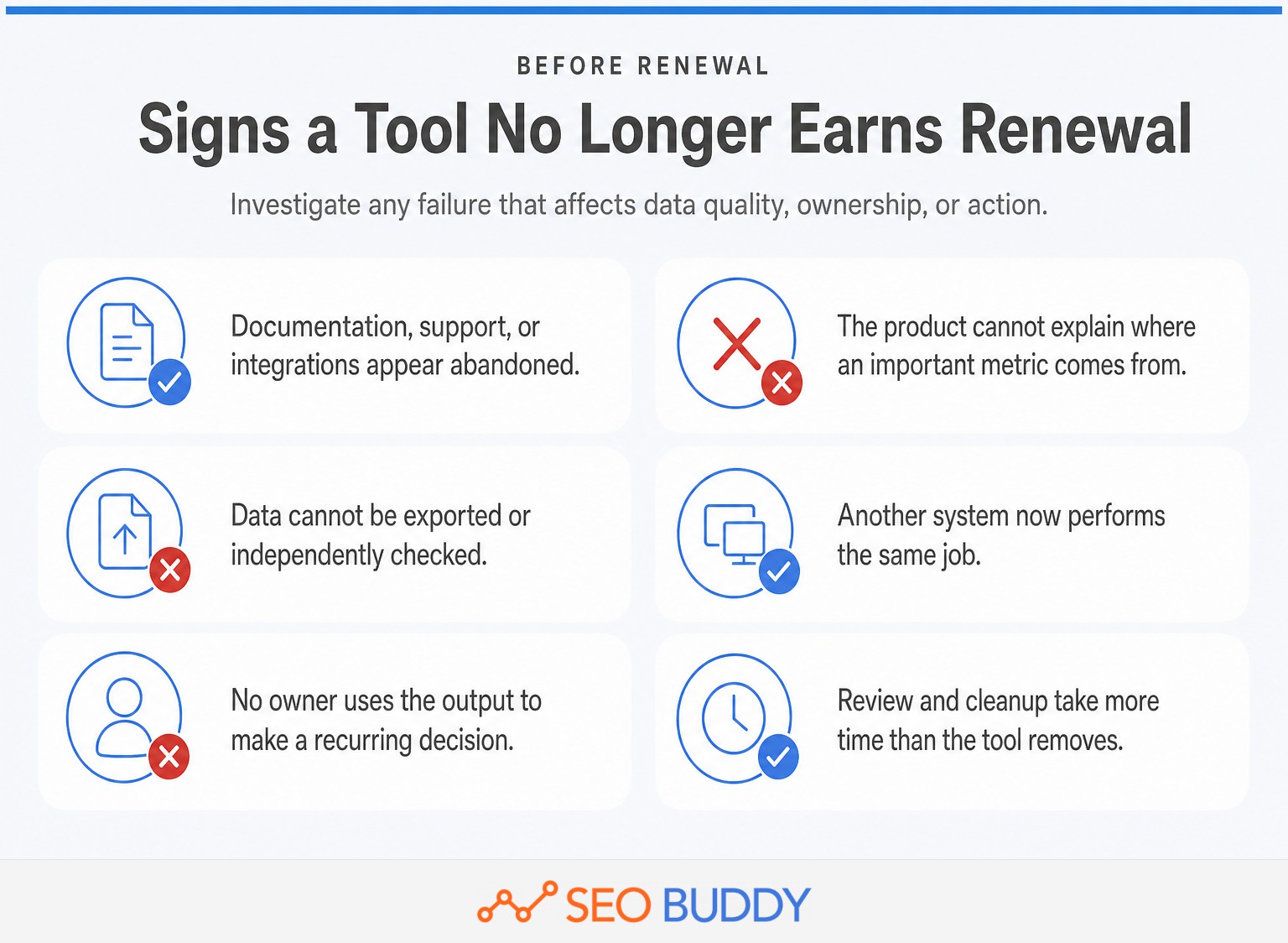
Replace or downgrade a tool when its unique value has disappeared. A familiar interface and sunk setup time are not enough to justify another renewal.
Ask these questions before the renewal date:
- Is the product still actively supported? Check release notes, documentation, integration status, and support channels rather than relying on an old review.
- Can the source of its data be explained? Treat unexplained traffic estimates, AI scores, difficulty numbers, and visibility indexes as directional rather than factual.
- Can the data leave the platform? Useful exports and APIs reduce lock-in and make independent checking possible.
- Does another tool already perform the same job? New Search Console reporting may overlap with software purchased under older assumptions.
- Does anyone use the output to make a decision? An unread dashboard is a cost, not an asset.
- Does the workflow still justify the operating time? A low monthly price can hide hours of cleanup, prompting, reviewing, and copying between systems.
Switching has a cost too. Preserve historical exports, metric definitions, report ownership, campaign records, and documentation before canceling. If a replacement calculates metrics differently, record the change so the team does not mistake a measurement break for an SEO change.
A tool should earn renewal through a unique decision, dataset, or time saving that the team can name.
What gaps will this stack still leave?
This stack does not cover every specialist SEO requirement. Search Console and the listed SEO Buddy products provide useful foundations, but they should not be described as replacements for capabilities they do not offer.
SEO Buddy does not currently offer:
- Dedicated rank tracking and scheduled keyword-position monitoring.
- A technical SEO crawler and automated site-audit platform.
- A standalone backlink analytics and competitor link-intelligence database.
- A content optimization editor for improving an existing page in real time.
- Cross-platform AI citation and share-of-voice monitoring.
- A broad outreach relationship CRM with long-term publisher histories and team reporting.
Search Console's 2026 generative AI report narrows one gap by reporting impressions in Google's AI Overviews and AI Mode. It does not provide cross-platform monitoring of every assistant, and its dedicated AI report currently centers on impressions rather than a complete conversion journey.
PageSpeed Insights is similarly focused. It diagnoses one page at a time and does not replace a crawler that discovers issues across thousands of URLs. Rich Results Test validates a URL or code sample and does not continuously audit an entire site.
SEO Buddy AI Content Engine focuses on finding, creating, illustrating, linking, and publishing new articles. Link Building Campaign focuses on prospecting and sending outreach, while Link Chest provides submission opportunities. None of those products should be presented as rank trackers, technical crawlers, backlink indexes, or existing-page optimization editors.
A credible stack states its gaps plainly and adds specialist software only where those gaps matter.
What else should you know about SEO tools?
Is SEO still relevant in 2025?
Yes. SEO was relevant in 2025, and it remains relevant in October 2026 because people still use search systems to discover, compare, and evaluate information. The work has broadened: teams now monitor traditional results, AI-generated search features, multimodal discovery, technical accessibility, content quality, and authority rather than focusing only on blue-link rankings.
What are the 5 best SEO tools?
For most organizations, the five-tool core is Google Search Console for search visibility, Google Analytics 4 for on-site behavior and key events, Google Trends for demand direction, PageSpeed Insights for performance diagnosis, and Google Data Studio for reporting. Add specialist content, crawling, link, or rank-tracking software only when the workflow requires it.
What are the most effective SEO tools for 2026?
The most effective SEO tools for 2026 are the ones tied to a decision: Search Console for Google visibility, Analytics 4 for outcomes, Trends for demand shifts, PageSpeed Insights for page performance, Rich Results Test for structured data, and a focused production tool for the team's biggest bottleneck. Effectiveness depends on use, not feature count.
The best tool list changes by workflow, but first-party data remains the safest foundation.
What should you do next?
Audit the current stack before buying another subscription. Record each tool's owner, recurring decision, unique data, monthly cost, review time, integration dependencies, and renewal date in one sheet, then remove the products that no longer have a distinct job.
If content planning and publication are the measured bottleneck, review the AI Content Engine against that specific workflow. It should be judged on whether its research, planning, production, illustration, linking, and publishing functions remove work the team is currently doing manually.
The next tool should remove a measured bottleneck, not add another dashboard.

CEO & Founder at SEO Buddy


 Best AI Writing Tools for SEO Content: What to Use and Avoid
General SEO
Best AI Writing Tools for SEO Content: What to Use and Avoid
General SEO
 AI SEO Services: What Providers Do, What They Cost, and How to Choose
General SEO
AI SEO Services: What Providers Do, What They Cost, and How to Choose
General SEO
 Programmatic SEO: How It Works, When to Use It, and When Not To
General SEO
Programmatic SEO: How It Works, When to Use It, and When Not To
General SEO
 A Repeatable SEO Workflow Process: From Research to Reporting
General SEO
A Repeatable SEO Workflow Process: From Research to Reporting
General SEO
Get the SEO work done, not just read about it
Create a free account and run your first content plan, keyword research and link-building campaign. No card, and setup is free until your first article.
Free to start. We never sell your address.