
A Repeatable SEO Workflow Process: From Research to Reporting

In short
An SEO workflow process turns recurring search work into a controlled cycle: prioritize opportunities, define the brief, assign an owner, complete and review the work, publish it, then measure the result. Each stage needs named inputs, a clear output, an approval gate, and a trigger for the next action.
Key takeaways
- A useful SEO workflow gives every deliverable one accountable owner, even when several specialists contribute.
- Work should not start until its required inputs, acceptance criteria, and approver are visible.
- A five-stage cycle can cover prioritization, design, execution, publishing, and measurement without turning every task into a separate process.
- Workflow-health metrics such as cycle time and rework should be reported separately from clicks, conversions, and other SEO outcomes.
- Reusable SOPs belong on recurring, risk-sensitive tasks; judgment-heavy decisions need principles and escalation paths instead.
Table of contents
- What makes an SEO workflow different from a task list?
- What are the five steps of an SEO workflow?
- Who owns each part of the SEO workflow?
- What inputs, outputs, and approval gates should each stage have?
- Which SEO tasks need reusable SOPs?
- What should be automated, and what still needs human review?
- How do you measure whether the SEO workflow is working?
- Frequently asked questions
- How do you put the workflow into practice this week?
The difficult part of SEO is rarely finding another task to add. The difficult part is deciding which work deserves attention, moving it between people without losing context, and proving what changed after publication. A workflow solves that operational problem.
What makes an SEO workflow different from a task list?
An SEO task list says what to do. An SEO workflow says when a task starts, who is accountable, what evidence is required, who approves it, and what happens next.
A checklist can contain hundreds of useful actions and still leave a team asking the same questions: Which item comes first? Who has access? What does finished mean? Is the work waiting for an editor, developer, client, or analyst?
A complete workflow item records at least these fields:
- Trigger: The event or condition that allows work to begin.
- Owner: The one person accountable for moving the item to completion.
- Inputs: The data, access, files, and decisions required before execution.
- Output: The page, report, fix, brief, or other concrete deliverable created.
- Definition of done: The acceptance criteria the output must satisfy.
- Approval gate: The person and checks required before the item moves forward.
- Evidence: The URL, screenshot, test result, change log, or report proving completion.
- Next action: The status change or follow-up task created after approval.
The status done should never mean that someone worked on the task. It should mean the expected output exists, meets its acceptance criteria, and has passed the required gate.
A task becomes part of a workflow only when its owner, start condition, completion standard, and next handoff are explicit.
Anybody can generate an article. Knowing which one is worth writing is the hard part.
The AI Content Engine reads your site and your competitors, then builds a ranked content plan and writes it. Setup is free, and you see your plan before you pay for anything.
See your content plan freeWhat are the five steps of an SEO workflow?
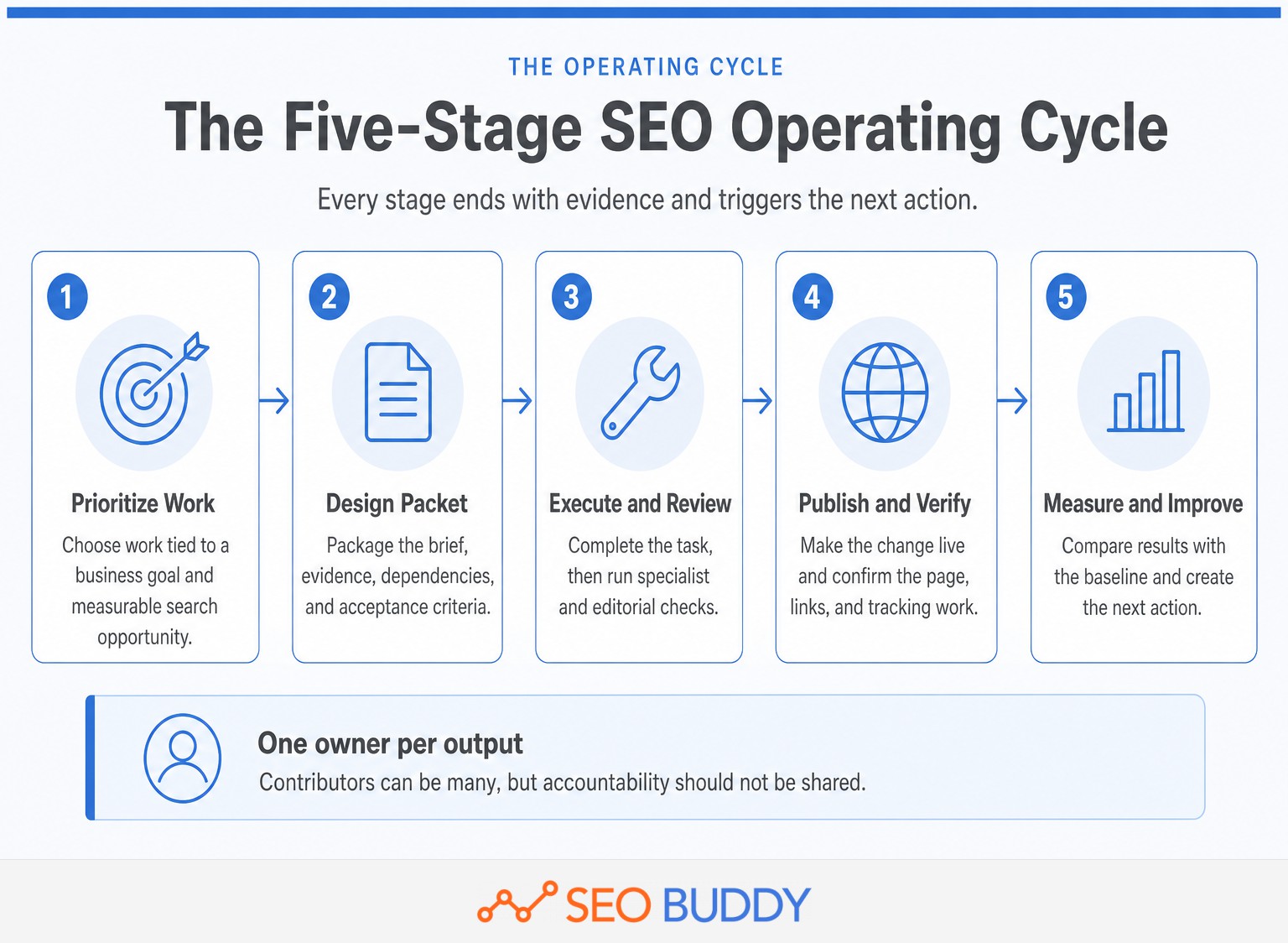
The five steps are prioritize, design, execute, publish, and improve. Each step should end with a verifiable output rather than a vague status such as in progress.
1. Prioritize the right work
Prioritization converts a backlog into a decision. Start with business goals, existing pages, search-performance data, customer questions, technical constraints, and available resources.
Research should produce a short opportunity record containing the target audience, search problem, relevant page or page type, commercial relevance, expected outcome, dependencies, and confidence level. When competitor demand or content gaps are part of that decision, use a repeatable SEO competitor analysis rather than copying a rival's topic list.
The approval gate is a strategy decision: Is the opportunity relevant to the business, distinct from existing content, feasible with current resources, and measurable after implementation?
2. Design the work packet
The design stage gives the person doing the work everything needed to start without another meeting. For content, the packet may include the reader's question, intent, outline, source requirements, internal-link targets, visual requirements, call to action, and publication checks.
For a technical task, the packet may instead contain affected templates, sample URLs, reproduction steps, expected behavior, testing requirements, rollback instructions, and the person authorized to approve deployment.
The output is not merely a brief. It is an executable work packet with no unresolved dependency hidden inside it.
3. Execute and review the work
Execution follows the approved packet, while review tests the deliverable against the definition of done. The reviewer should check the actual output rather than asking whether the contributor followed every personal preference.
For content, review should test factual support, search intent, usefulness, originality, brand fit, links, metadata, images, accessibility, and the promised next step. Google's current people-first content guidance recommends useful, reliable material created primarily for readers, not content produced mainly to manipulate search visibility. (developers.google.com)
A rejected item should return with a reason and a named revision request. A status such as needs changes without an explanation creates another bottleneck instead of resolving one.
4. Publish and verify the result
Publication is a controlled change, not the moment a draft is copied into a content management system. The publisher should confirm the final URL, title, headings, canonical treatment, internal links, images, structured data where applicable, tracking, and mobile presentation.
Google's December 2025 technical requirements identify three minimum conditions for index eligibility: Googlebot must not be blocked, the page must return a successful HTTP status, and the page must contain indexable content. Meeting those conditions does not guarantee indexing, but they belong in a basic publication gate. (developers.google.com)
The output is a verified live change with a publication timestamp, baseline data, and evidence that the intended version is accessible.
5. Measure and improve
Measurement compares the live result with the baseline and creates a new decision. The stage should answer three questions: What changed, what probably caused it, and what action follows?
Avoid judging every SEO change immediately. Google's 2025 SEO Starter Guide says some changes can appear within hours while others may take several months, and it generally advises waiting a few weeks before assessing search impact. (developers.google.com)
Close the cycle by creating the next action: retain the change, revise it, expand the approach, investigate an anomaly, update the SOP, or stop spending effort on the opportunity.
A five-stage cycle works because every stage creates the evidence needed to start the next one.
Who owns each part of the SEO workflow?
Every stage needs one accountable owner, although several people may contribute. The accountable owner moves the work forward, resolves blockers, and makes sure the evidence is attached before handoff.
| Stage | Accountable owner | Typical contributors | Approval gate |
|---|---|---|---|
| Prioritize | SEO lead or marketing manager | Analyst, sales, product, client lead | Opportunity has business fit, evidence, and a baseline |
| Design | SEO lead or content manager | Writer, subject expert, developer, designer | Work packet is complete and dependencies are accepted |
| Execute | Named specialist | Writer, developer, designer, outreach operator | Deliverable meets the documented definition of done |
| Review | Editor or SEO reviewer | Subject expert, legal, brand, developer | Approve, return with changes, or reject with a reason |
| Publish | Publisher or web owner | Developer, analyst, content manager | Live output passes publication and tracking checks |
| Measure | Analyst or SEO lead | Stage owner, marketing manager, client lead | Finding is converted into a decision or follow-up task |
A small team may assign several of these roles to one person. That does not remove the need to state which role that person is performing at each gate. Self-review is sometimes unavoidable, but the contributor should still use a separate checklist and review pass.
Agencies also need to distinguish delivery approval from client approval. A client does not need to approve every title tag or internal link, but the workflow should identify changes that affect claims, positioning, legal risk, brand policy, or significant development resources.
Define a response expectation for every approver. Otherwise a carefully documented workflow can still spend most of its time waiting in an approval queue.
One accountable owner per stage prevents shared responsibility from becoming no responsibility.
What inputs, outputs, and approval gates should each stage have?
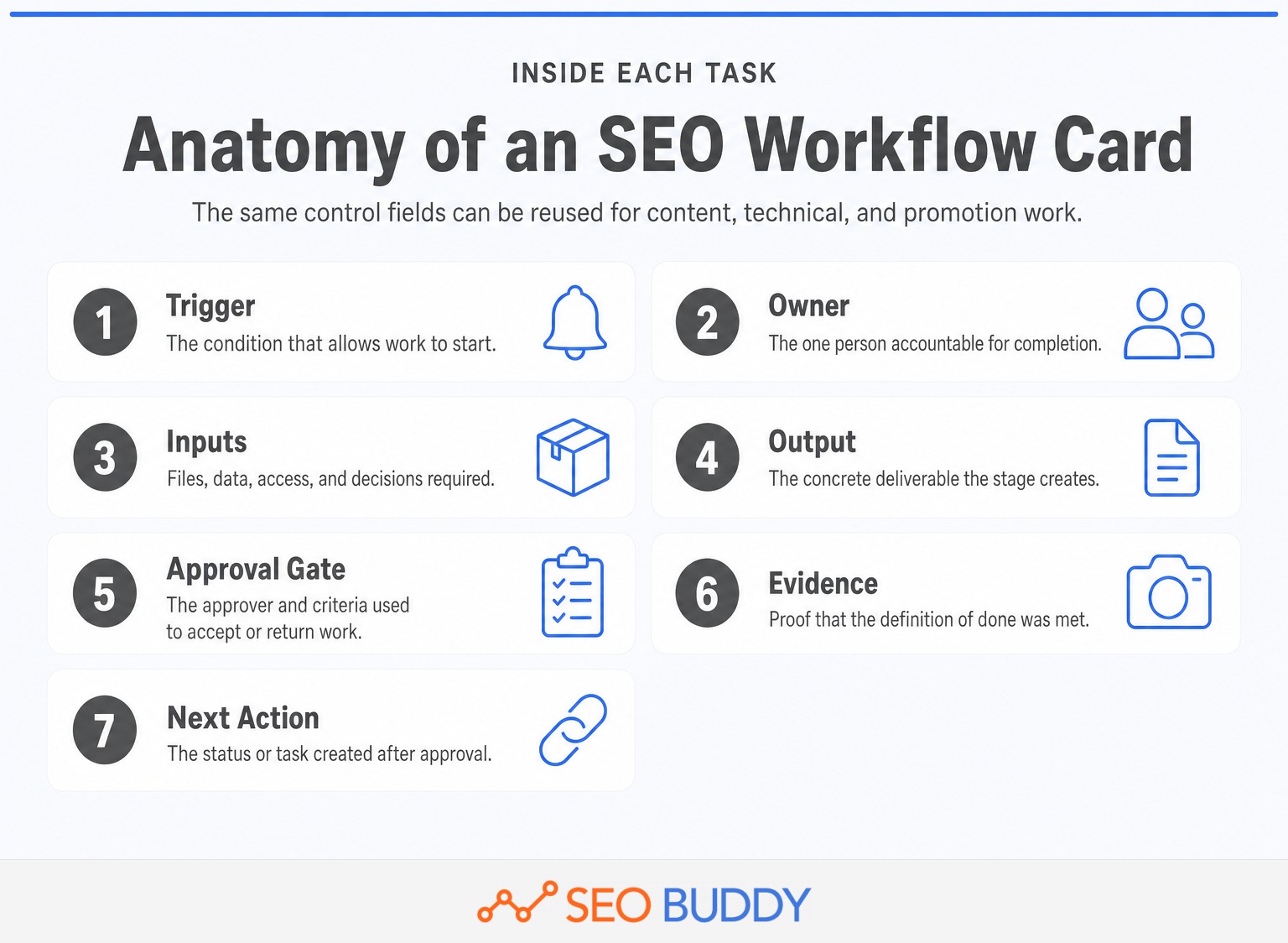
Each stage should use the same control fields so contributors do not have to relearn the process for every project. The task itself should contain the context and evidence, rather than sending people through old messages and disconnected documents.
A practical workflow card contains:
- Objective: The result the work is intended to influence.
- Trigger: The event, schedule, or approved decision that starts the task.
- Owner and contributors: One accountable owner plus any supporting roles.
- Required inputs: Data, access, tools, source material, and prior approvals.
- Procedure: The linked SOP or concise instructions for this specific item.
- Output: The concrete artifact or change being delivered.
- Definition of done: The checks that must pass before review.
- Approval gate: The approver, review criteria, and allowed decisions.
- Evidence: The live URL, test, screenshot, export, or change record.
- Next trigger: The task or measurement event created after approval.
Consider a content-refresh task. Its trigger could be a meaningful decline against an agreed comparison period or a change in the product information on the page. Inputs would include the current URL, query and page data, the existing copy, current search results, business changes, and approved sources.
The output would be the revised page and a change log. The gate would require an SEO or content reviewer to confirm search intent, claims, internal links, metadata, and the publication plan. Evidence would include the approved version, live URL, completed QA record, and publication timestamp.
Keep gates at decisions where an error would be expensive or difficult to reverse. Routine formatting does not need executive approval. A sitewide redirect rule, a medical claim, or a major change in commercial positioning deserves a stronger gate.
A workflow is controllable when every item shows what starts it, what proves it is done, and what happens next.
Which SEO tasks need reusable SOPs?
Create SOPs for recurring tasks where variation causes rework, risk, or slow onboarding. Do not write a long SOP for a rare judgment call; document the decision principles and escalation path instead.
As checked on October 2, 2026, SEO Buddy's live SEO Checklist distributes 122 steps across nine areas: User Experience 8, Performance 12, Technical SEO 16, Content 12, On-Page SEO 19, Off-Page SEO 11, Local SEO 16, Foundation 16, and WordPress setup 12. (seobuddy.com)
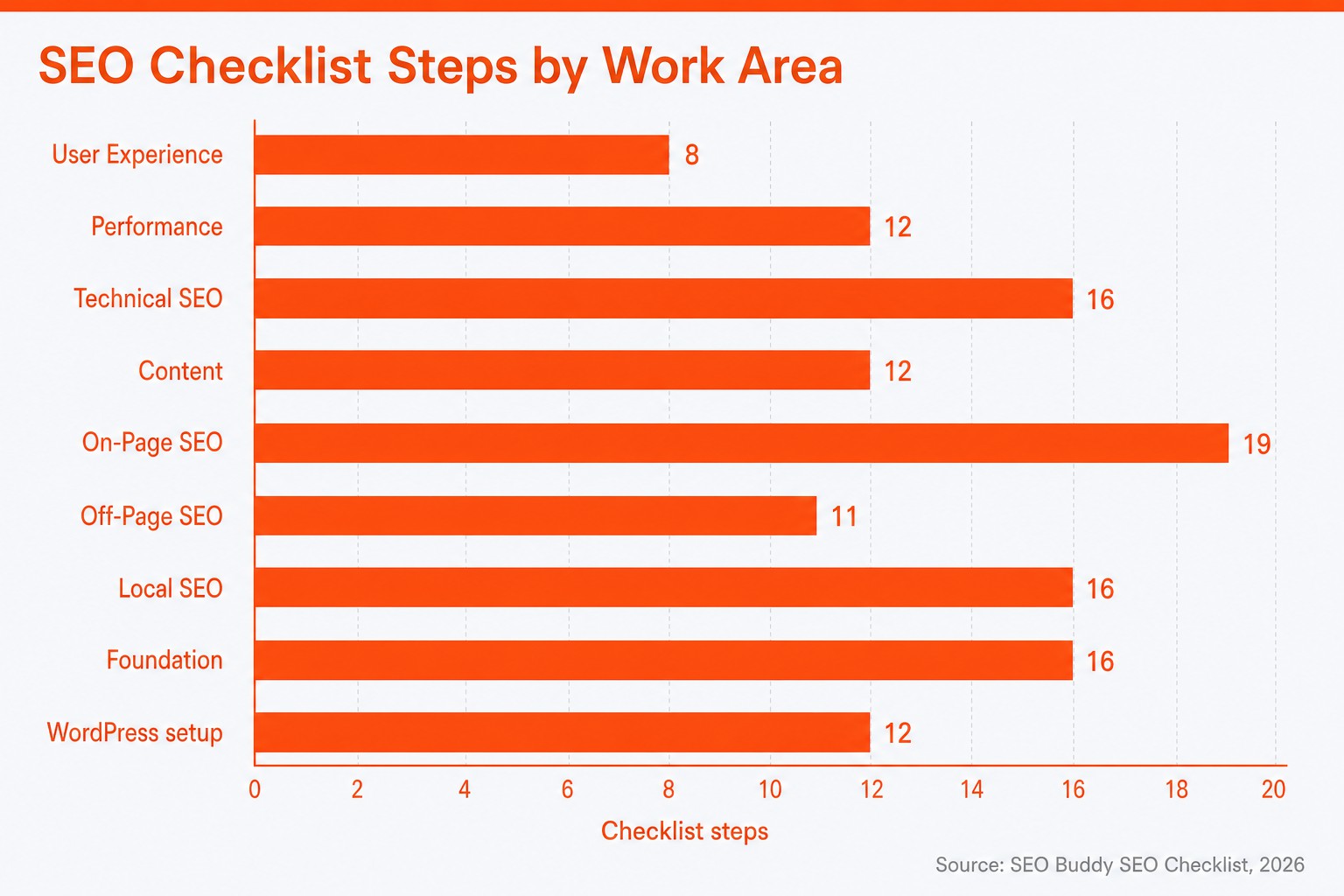
The distribution is not a universal prescription for how every site should allocate effort. It shows why an SEO workflow usually needs several specialist tracks rather than a single content-production board.
Create an SOP when one or more of these conditions apply:
- More than one person performs the task and consistency matters.
- The order of steps, tool settings, or access permissions affects the result.
- An error is difficult to notice, expensive to reverse, or likely to affect many pages.
- The task requires evidence for a client, manager, regulator, or later audit.
- A new contributor should be able to complete the work without repeated live training.
A useful SOP contains its purpose, prerequisites, ordered instructions, expected result, exceptions, evidence requirements, owner, and last-reviewed date. Screenshots help with interfaces, but the written instruction should remain understandable when an interface changes.
Training and SOPs solve different problems. Use SEO University when a contributor needs to understand the principle behind the work; use an SOP when the contributor needs to complete a specific task consistently.
Use an SOP when consistent execution matters more than individual improvisation.
What should be automated, and what still needs human review?
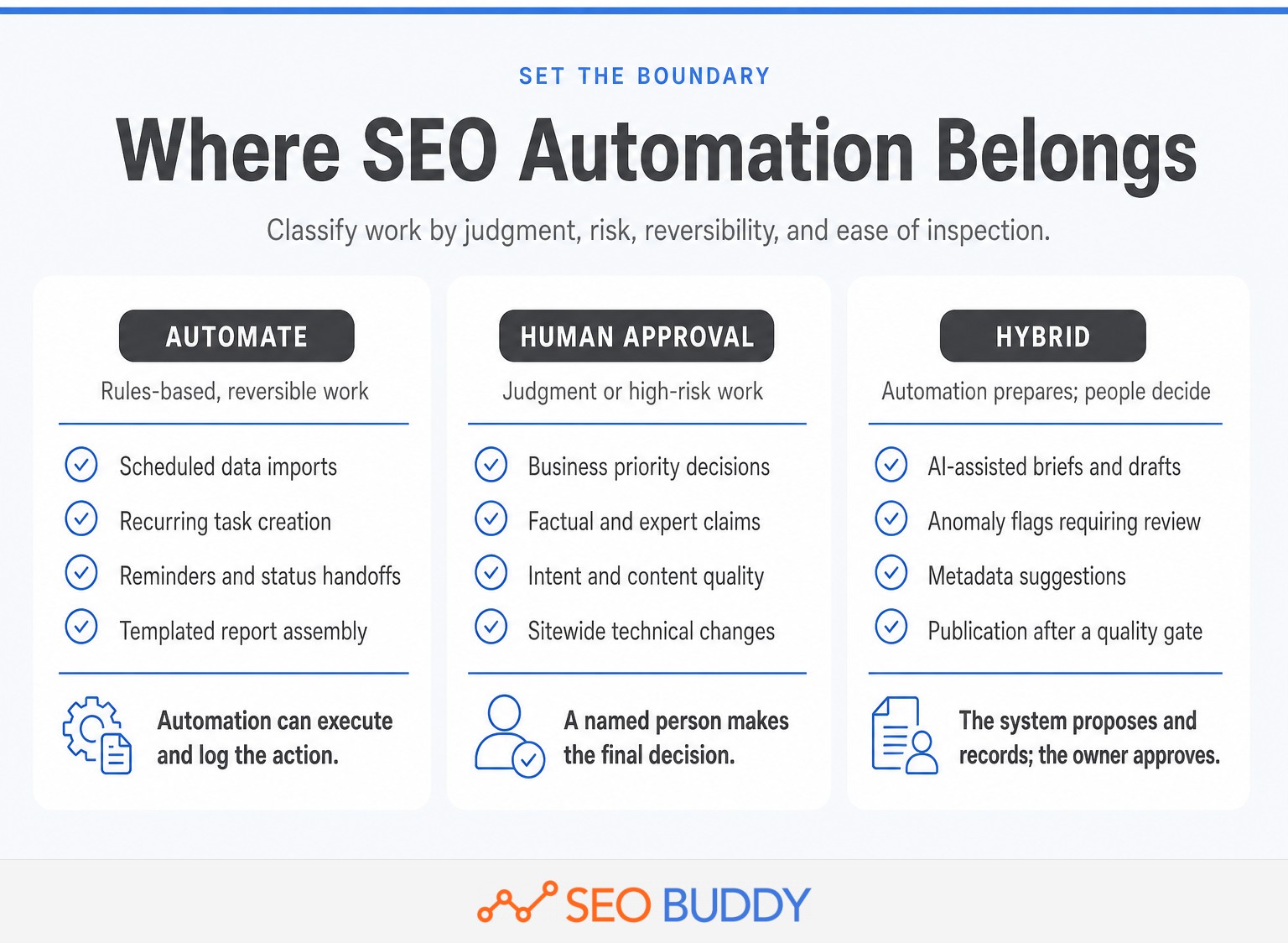
Automate steps that are rules-based, reversible, and easy to inspect. Keep human approval for decisions that affect business priorities, factual claims, user experience, or difficult-to-reverse site changes.
Good candidates for automation include scheduled data imports, recurring task creation, reminders, status notifications, templated report assembly, prerequisite checks, and alerts for missing fields. These actions move information or enforce an existing rule.
Human approval should remain on opportunity prioritization, interpretation of search intent, expert or legal claims, brand positioning, final content quality, and high-risk technical changes involving redirects, canonical tags, indexing directives, or sitewide templates.
Hybrid steps sit between the two. A system may draft a brief, suggest metadata, flag an anomaly, or prepare a report, while a named person checks the evidence and makes the decision. SEO Buddy's AI Content Engine, for example, can use Search Console data, a sitemap, and competing ranking pages to select topics and produce articles; the workflow should still define the approval gate applied to the resulting work. (support.seobuddy.com)
Every automation also needs an owner, a visible activity log, a failure alert, a manual fallback, and a stop condition. If nobody notices when the automation fails, the system has hidden the problem rather than solving it.
Automation should move information and routine work, while people retain authority over judgment and risk.
How do you measure whether the SEO workflow is working?
Measure workflow health and SEO outcomes separately. A process can be efficient while choosing weak work, and a strong strategy can still be slowed by poor handoffs.
Workflow-health metrics show how reliably work moves:
- Cycle time from approved opportunity to verified live output
- Time spent waiting for inputs, review, or deployment
- First-pass approval rate
- Number of revision rounds or reopened tasks
- Blocked items and the reason for each block
- SOP exceptions and manual interventions
- Delay between publication and verification
- Percentage of completed items with evidence attached
SEO outcome metrics show what the work influenced:
- Search impressions and clicks
- Click-through rate
- Query and page trends
- Organic sessions and engaged visits
- Leads, sign-ups, purchases, or other agreed conversion actions
- Indexed and excluded pages where relevant
- Revenue or qualified pipeline attributed through the business's agreed measurement model
Google Search Console's performance metric documentation defines impressions, clicks, average position, and click-through rate. Google's documentation also recommends focusing more on trends in impressions and clicks than on average position alone. (support.google.com)
Use the right source for each question. Google's guide to Search Console and Google Analytics data describes Search Console as the source of truth for performance in Google Search and Google Analytics as the source of truth for behavior inside the site. (developers.google.com)
A practical reporting cadence is:
- Weekly operations review: Inspect blockers, waiting time, missed gates, and work due next.
- Monthly performance review: Compare page and query trends, conversions, completed work, and observations against the baseline.
- Quarterly process review: Remove unnecessary steps, revise SOPs, change approval authority, and reallocate resources based on evidence.
Keep the report decision-oriented. Record what shipped, what was delayed, what changed in the data, the limits of the evidence, and the next action. A report that displays metrics without assigning a decision is an archive, not a management tool.
Report workflow health and search outcomes together so the team can tell whether the problem is execution, strategy, or timing.
Frequently asked questions
These common questions reduce the framework to practical decisions. The answers are deliberately short so they can be used in a workflow brief or team training note.
What are the 5 steps of workflow?
The five workflow steps are: prioritize the opportunity, define the work packet, execute and review, publish and verify, then measure and improve. Each step should have one accountable owner, required inputs, a defined output, an approval gate, and a trigger that moves the work into the next step.
What is the 80/20 rule in SEO?
The 80/20 rule in SEO is a prioritization heuristic, not a Google rule. It means concentrating effort on the small number of pages, queries, technical fixes, or promotion opportunities most likely to affect business results. Use impact, confidence, effort, and dependency scores rather than assuming every SEO task deserves equal time.
How does SEO work step by step?
SEO works step by step by making a site accessible to search engines, identifying what the intended audience searches for, creating or improving useful pages, connecting and promoting those pages, and measuring search visibility and business outcomes. The cycle repeats because performance data reveals the next technical, content, or authority opportunity.
What are the top 5 SEO strategies?
Five durable SEO strategies are maintaining a crawlable technical foundation, matching pages to search intent, publishing helpful and original content, strengthening internal links and site structure, and earning relevant external attention. The right mix depends on the site's constraints, current visibility, commercial goals, and ability to execute consistently.
The useful answer to any SEO workflow question is the one that changes the next assigned action.
How do you put the workflow into practice this week?
Start with one deliverable that repeats often, such as a new article, content refresh, or technical fix. Run the workflow once before trying to redesign the entire SEO operation.
- Choose one recurring deliverable and name its current owner.
- Write down what currently triggers the work and which inputs are usually missing.
- Define the concrete output and the checks that make it complete.
- Name the approver and the decisions available at the gate.
- Decide what evidence must be attached after publication or deployment.
- Run one real work item through the process and record every delay.
- Turn the stable execution steps into an SOP, then revise the workflow using the delays found during the run.
If the team needs ready-made procedures instead of blank documents, open SEO Buddy's SOP Collection. The live collection checked on October 2, 2026 contains 66 procedures across seven areas and more than 700 pages, which can be adapted with the team's own owners, gates, evidence, and exception rules. (seobuddy.com)
Start with one recurring SEO deliverable, make every handoff explicit, and improve the workflow after a real run.

CEO & Founder at SEO Buddy






Get the SEO work done, not just read about it
Create a free account and run your first content plan, keyword research and link-building campaign. No card, and setup is free until your first article.
Free to start. We never sell your address.