
12 Automated SEO Tools for Research, Content, Publishing, and Reporting

In short
Automated SEO tools are best used for repeatable data collection, prioritization, drafting, publishing, testing, and reporting. The strongest stack combines a reliable data source, an automation layer, and a controlled execution step, while people still approve strategy, claims, search intent, brand positioning, technical changes, and anything that could affect customers or revenue.
Key takeaways
- Start by automating observation and reporting, where mistakes are easier to detect and reverse than live website changes.
- A complete SEO automation stack needs a reliable data source, a repeatable rule, an execution tool, and an approval or exception path.
- Google Trends shows relative interest rather than absolute search volume, so it should support keyword decisions rather than make them alone.
- PageSpeed Insights provides repeatable lab checks, while the Chrome UX Report API shows aggregated real-user experience where enough data exists.
- Publishing automation should create drafts by default until the team has proven its review process and rollback plan.
Table of contents
- Which automation layer should you choose first?
- Which 12 automated SEO tools fit a repeatable workflow?
- What should automated SEO tools never decide on their own?
- How do you choose SEO automation software without losing quality?
- Can you build a useful stack with free tools?
- What else do people ask about SEO automation?
- Which automation should you implement next?
SEO automation is not a single product category. It includes data sources, APIs, scripts, content systems, publishing endpoints, performance tests, and reporting interfaces. Capabilities in this guide were checked against official documentation on September 27, 2026.
For a broader market overview, the guide to best ai seo tools covers platforms beyond the narrower automation stack discussed here.
Which automation layer should you choose first?
Start with the layer that creates the most repeated work and the least strategic risk. For most lean teams, that means measurement and reporting before automated publishing or live website changes.
| Workflow layer | Repeated work to automate | Useful starting tools | Human approval point |
|---|---|---|---|
| Research | Pulling query and demand data | Search Console API, Google Trends, Keyword Planner | Approve the target, intent, and business relevance |
| Content | Selecting opportunities and producing drafts | AI Content Engine | Verify evidence, positioning, and editorial quality |
| Operations | Moving data and triggering recurring jobs | Google Sheets API, Apps Script | Own credentials, permissions, and failure alerts |
| Publishing | Creating or scheduling CMS drafts | WordPress REST API | Approve the final page before publication |
| Performance | Running lab tests and checking field data | PageSpeed Insights API, CrUX API, Lighthouse CI | Diagnose the cause before applying a fix |
| Reporting | Refreshing dashboards and distributing reports | Google Analytics Data API, Looker Studio | Interpret causes, exceptions, and business impact |
A safe workflow has three functional layers. The source supplies evidence, the automation layer applies a known rule, and the execution layer creates an output or action. A review gate should sit before any action that is public, difficult to reverse, or capable of changing revenue-critical pages.
Buying one large platform does not remove this architecture. It simply places several layers behind one interface. The same questions still apply: where did the data come from, what rule was applied, what changed, and who is accountable when the output is wrong?
The safest first automation removes repeated observation work while leaving decisions and live changes under human control.
Anybody can generate an article. Knowing which one is worth writing is the hard part.
The AI Content Engine reads your site and your competitors, then builds a ranked content plan and writes it. Setup is free, and you see your plan before you pay for anything.
See your content plan freeWhich 12 automated SEO tools fit a repeatable workflow?
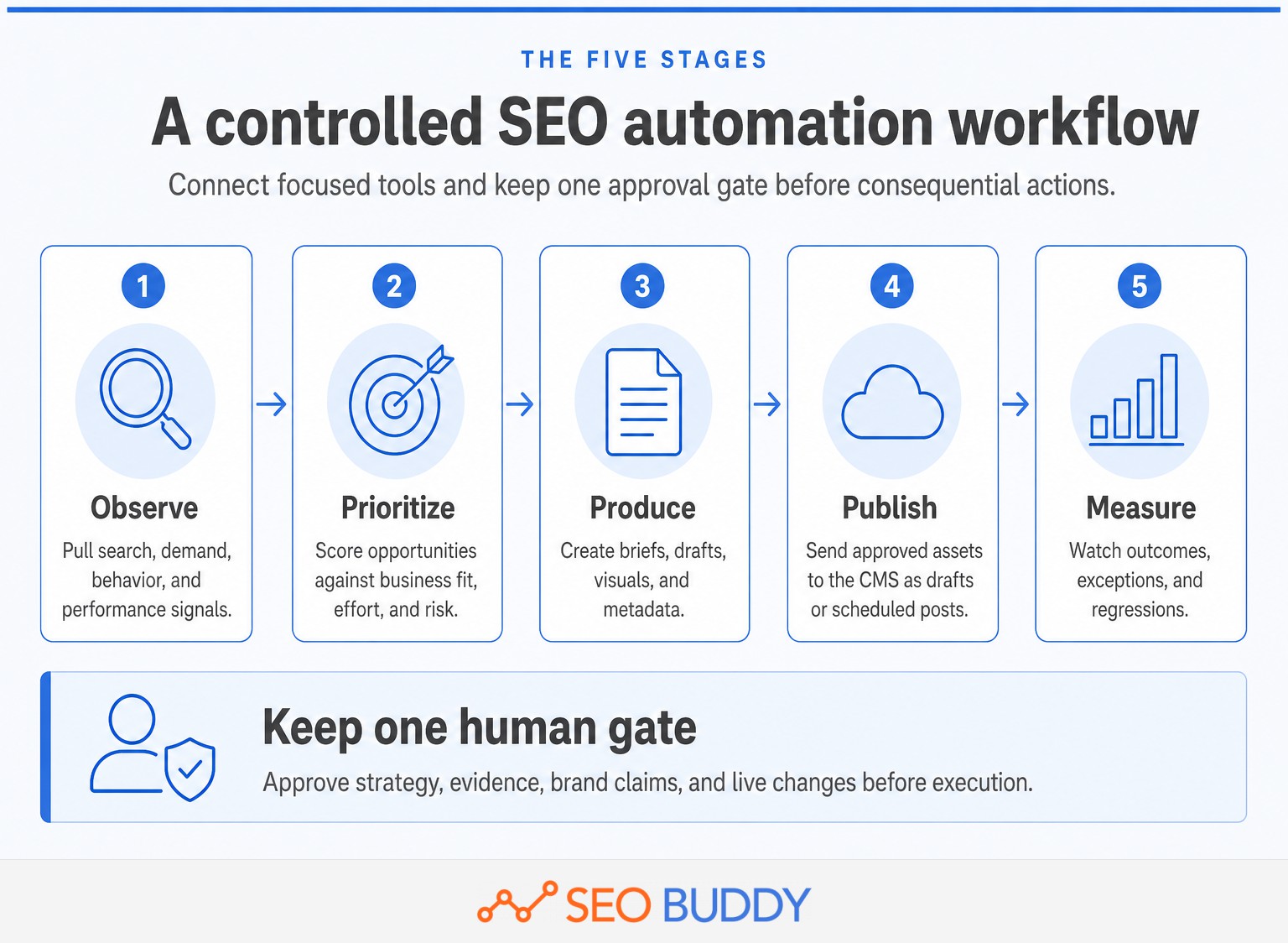
These 12 tools cover research, data movement, content production, publishing, performance monitoring, and reporting. They are not interchangeable, so the right stack usually combines several focused tools rather than expecting one system to make every decision.
1. AI Content Engine for researched content production
AI Content Engine combines topic selection, content planning, drafting, visuals, metadata, internal links, and publishing destinations. According to SEO Buddy's product documentation, it reads a sitemap, optional Search Console data, ranking pages, business priorities, and brand inputs before selecting article opportunities. Use it when content planning and production are the bottleneck. Keep a person responsible for evidence, product claims, and the auto-publish setting.
2. Search Console API for query and page monitoring
The Search Console API can retrieve clicks, impressions, click-through rate, and average position using filters and dimensions such as query, page, country, and device. It is useful for weekly opportunity reports, page-decay alerts, and content-refresh queues. Google's documentation warns that Search Analytics prioritizes top rows and does not guarantee every row, so do not mistake one API pull for a complete data warehouse.
3. Google Trends for changes in demand
Google Trends helps compare search interest across time and locations. Its data is sampled, aggregated, and normalized, which makes it useful for identifying seasonality, changing language, or the direction of demand. It does not provide an absolute search count. A person should confirm that a rising topic fits the audience and is not a short-lived news spike with no commercial relevance.
4. Keyword Planner for repeatable keyword discovery
Keyword Planner can generate ideas and filter them by keyword text, average monthly searches, location, language, and advertising competition. It works well as a repeatable discovery input, especially when a team needs the same filters applied across markets. Access to its basic features requires completing account setup with billing information. Advertising competition should not be presented as organic ranking difficulty.
5. Google Sheets API for workflow queues
The Google Sheets API can append or update structured rows, making a spreadsheet useful as a lightweight queue for keywords, URLs, assignments, approvals, and status changes. It is approachable for teams that are not ready for a database. The human risk is hidden fragility: changed columns, broken formulas, duplicate identifiers, or an undocumented sheet owner can stop the workflow silently.
6. Apps Script for scheduled actions and alerts
Google's installable triggers allow Apps Script functions to run on recurring schedules or in response to events in Workspace files. A script can pull data, update a sheet, send an exception email, or prepare a report. Triggers run under the account of their creator and are subject to quotas, so ownership and failure notifications must be documented before the original creator changes roles or leaves.
7. WordPress REST API for controlled publishing
The WordPress REST API can create posts with a title, content, excerpt, author, featured media, categories, tags, and statuses including draft, future, and publish. For most content workflows, draft should be the default. Authentication, permissions, sanitization, and a final preview remain essential because successful API delivery only proves that WordPress accepted the request, not that the page is accurate or visually correct.
8. PageSpeed Insights API for repeatable lab checks
The PageSpeed Insights API measures a page and returns Lighthouse-based lab results with improvement suggestions. It is useful for checking templates, release candidates, or a fixed URL sample on a schedule. Google's current documentation recommends using the CrUX API for field data because real-user data is planned for removal from the PageSpeed Insights API. A lab score should not be treated as proof of every visitor's experience.
9. Chrome UX Report API for real-user performance data
The CrUX API provides aggregated real-user experience data at page or origin level. The data is a rolling 28-day average and is updated daily, with metrics available by form factor where sufficient samples exist. This makes CrUX useful for monitoring Core Web Vitals trends. Smaller or less-visited pages may return no record, so the absence of data is not evidence that performance is good.
10. Lighthouse CI for preventing regressions
Lighthouse CI can run audits during a continuous integration process, store reports, and assert that selected performance, accessibility, or SEO checks pass. It is most useful for teams that deploy a coded website through a repository. Start by observing results before making every score a release gate, because test variability or an unrealistic threshold can block a valid deployment without identifying a meaningful user problem.
11. Google Analytics Data API for outcome reporting
The Google Analytics Data API provides programmatic access to report data and supports custom, batch, pivot, and real-time reporting methods. It can automate reports that connect organic landing pages with engagement, key events, or revenue. The API follows the property's reporting identity settings. A person still needs to interpret attribution limits, consent-related gaps, internal traffic, and whether a reported conversion was commercially valuable.
12. Looker Studio for dashboards and recurring delivery
Looker Studio turns connected data into reusable dashboards, while its automatic report delivery can send recurring PDF reports to approved recipients. It is useful when stakeholders need the same view without rebuilding slides every month. Keep the report focused on decisions rather than filling it with every available metric. A scheduled dashboard distributes numbers; it does not explain why a change happened or what should happen next.
A useful SEO automation stack connects data, action, and review; it does not ask one tool to perform every job.
What should automated SEO tools never decide on their own?

Automated SEO tools should not independently decide business strategy, publish unsupported claims, or deploy consequential website changes. Those decisions require context, accountability, and the ability to recognize an exception that was never written into the automation rule.
Keep direct human ownership over these decisions:
- Business relevance: A keyword can have demand and low competition while attracting people who will never need the product.
- Search intent: Similar phrases can require a guide, product page, comparison, calculator, or support document. A score cannot always distinguish them reliably.
- Evidence and claims: Statistics, legal statements, medical guidance, prices, product capabilities, and customer outcomes need a traceable source and current date.
- Brand positioning: A generated draft should not invent a service, promise an unsupported result, or recommend something the business does not sell.
- Technical remediation: An audit can identify a symptom, but redirects, canonical tags, robots directives, templates, and structured data can create site-wide damage when changed incorrectly.
- Publication and rollback: Someone must know what was published, how to reverse it, and who receives the alert when a job fails halfway through.
Turn these review points into documented repeatable SEO workflows rather than relying on one experienced team member to remember every exception.
Automation should handle repetition, while a named person remains responsible for meaning, risk, and the final action.
How do you choose SEO automation software without losing quality?
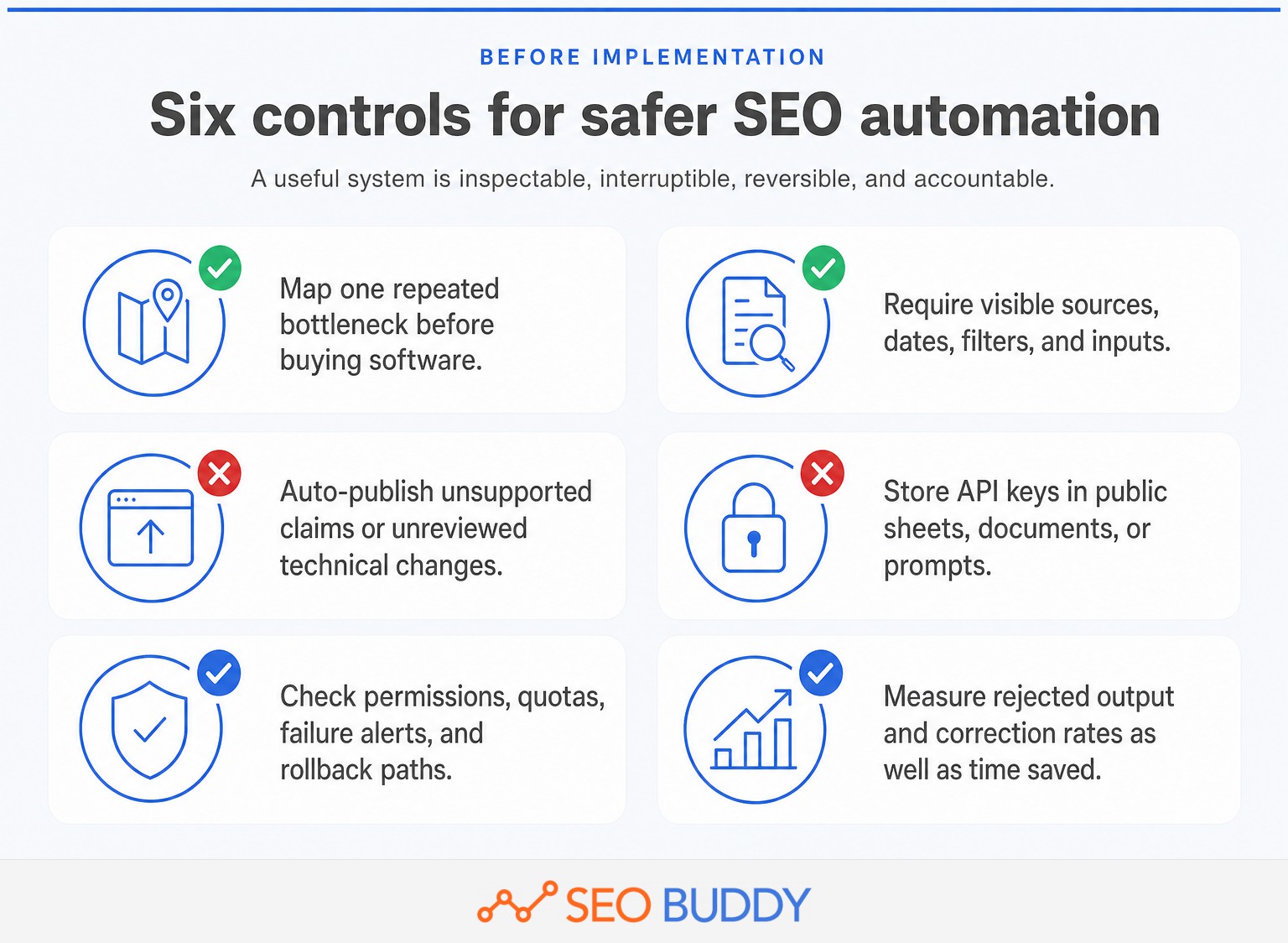
Choose SEO automation software by starting with a repeated task, a measurable acceptable output, and a clear owner. A long feature list matters less than traceable sources, controlled permissions, useful failure alerts, and an easy way to review or reverse the result.
Use six tests before committing:
- Can the tool show its inputs? A recommendation is easier to verify when the source URL, query, date range, and applied filter are visible.
- Can the workflow stop for review? Look for draft modes, approval states, test environments, permission levels, or a manual publish setting.
- What happens when a job fails? The system should expose errors and preserve enough context to rerun or repair the failed step.
- Can the action be reversed? Publishing, redirects, metadata changes, and bulk edits need version history, backups, or a documented rollback method.
- What is the real operating cost? Include setup, API access, engineering, maintenance, training, and review time rather than comparing subscription prices alone.
- Does it reduce errors as well as time? Track rejected drafts, false alerts, missing rows, broken jobs, and corrections after publication.
A practical SEO task checklist can help assign ownership and keep automated tasks connected to the rest of the SEO program.
The best automation is inspectable, interruptible, reversible, and measured by accepted work rather than raw output volume.
Can you build a useful stack with free tools?
A team can build a capable starter stack without buying a large SEO suite, although free access does not eliminate setup and maintenance costs. Existing analytics, search, spreadsheet, CMS, and performance tools can cover much of the recurring work when someone has the technical capacity to connect them.
A practical low-cost stack could use:
- Search Console API, Google Trends, and Keyword Planner for research inputs.
- Google Sheets API and Apps Script for queues, recurring pulls, and alerts.
- PageSpeed Insights API and CrUX API for lab and field performance monitoring.
- Google Analytics Data API and Looker Studio for outcome reporting.
- WordPress REST API for controlled draft delivery when the site uses WordPress.
This approach trades subscription convenience for configuration and maintenance. APIs have quotas, account requirements, authentication work, changing schemas, and failure modes. Keyword Planner also requires completed account setup with billing information, even when it is being used for keyword ideas rather than an active advertising campaign.
A low-cost stack works when the team has time to maintain the connections; otherwise, software that packages the workflow may cost less than repeated manual repair.
What else do people ask about SEO automation?
The recurring questions are whether automation replaces SEO, how much work can be automated, and which tools form a sensible starter stack. The short answers below separate repeatable execution from the judgment that still belongs to a person.
Is SEO dead now with AI?
SEO is not dead because AI has changed how people discover and evaluate information, not removed the need for useful, accessible, trustworthy pages. AI can accelerate research and production, but search visibility still depends on satisfying intent, earning trust, maintaining technical access, and measuring what produces qualified visits or conversions.
Can SEO be automated?
SEO can be automated wherever the input, rule, and acceptable output are clear. Data pulls, alerts, draft creation, CMS delivery, performance tests, and recurring reports are good candidates. Strategy, evidence review, brand claims, technical remediation, and final publication still need a responsible person who can recognize context and exceptions.
What are the top 5 SEO tools?
For a lean team, a practical top five is the Search Console API for organic search data, Google Trends for demand direction, AI Content Engine for researched content workflows, the PageSpeed Insights API for repeatable lab checks, and Looker Studio for dashboards. The right five changes with the team's bottleneck and technical capacity.
SEO automation supports responsible SEO work; it does not remove the need for responsible people.
Which automation should you implement next?
Implement the smallest workflow that removes a repeated bottleneck without creating a larger review problem. Run it manually first, document the accepted output, and automate only after the team understands the exceptions.
- Choose one task that repeats at least monthly.
- Define the input, output, owner, approval point, failure alert, and rollback method.
- Compare the automated result with the existing process before expanding its permissions or volume.
If researched content planning and production are the bottleneck, review the AI Content Engine and begin with drafts that require approval rather than immediate publication.
The next useful automation is the one the team can inspect, control, and trust.

CEO & Founder at SEO Buddy






Get the SEO work done, not just read about it
Create a free account and run your first content plan, keyword research and link-building campaign. No card, and setup is free until your first article.
Free to start. We never sell your address.