
17 Types of AI SEO Tools for Research, Content, and Growth

In short
The best AI SEO tool is the one that removes a specific bottleneck without creating a larger review burden. Choose by the work to automate, the data the tool can read, how far it carries the workflow, where human approval occurs, and whether it can move a verified output into publishing or reporting.
Key takeaways
- The right AI SEO tool completes a defined job instead of adding another disconnected output to the workflow.
- A task assistant handles one prompt, while a context-aware system can use site, search, business, brand, and publishing inputs.
- A modern SEO stack may contain 17 distinct capabilities, but most teams need only the categories that remove current bottlenecks.
- Human reviewers should retain control of sources, factual claims, business boundaries, strategic decisions, and final publication.
- Tool cost should include setup, corrections, transfers, approval time, and unused outputs rather than subscription price alone.
Table of contents
- Which AI SEO tool should you choose first?
- What should an AI SEO tool know before it produces anything?
- Which 17 AI SEO tools or capabilities belong in a modern stack?
- How do you compare AI SEO tools without getting distracted by feature lists?
- Where does AI help, and where should a human stay in control?
- How should a small team build an AI SEO workflow?
- Are free AI SEO tools enough for a small business?
- What else should you know about AI SEO tools?
- What should you do next?
AI SEO tools now cover much more than writing. As of September 2026, AI tools for SEO can support research, clustering, briefs, optimization, publishing, technical checks, outreach, rank monitoring, and visibility analysis for AI-generated search answers.
Many pages about the best AI SEO tools begin with brand names. A more useful starting point is the unfinished job consuming the team’s time, followed by the inputs and controls required to complete that job safely.
Which AI SEO tool should you choose first?
Choose the tool that completes the highest-value unfinished job in the current SEO process. If an output must be researched again, corrected heavily, reformatted, and copied into another system, the automation is shallow even when the first result appears quickly.
Three levels of AI SEO automation
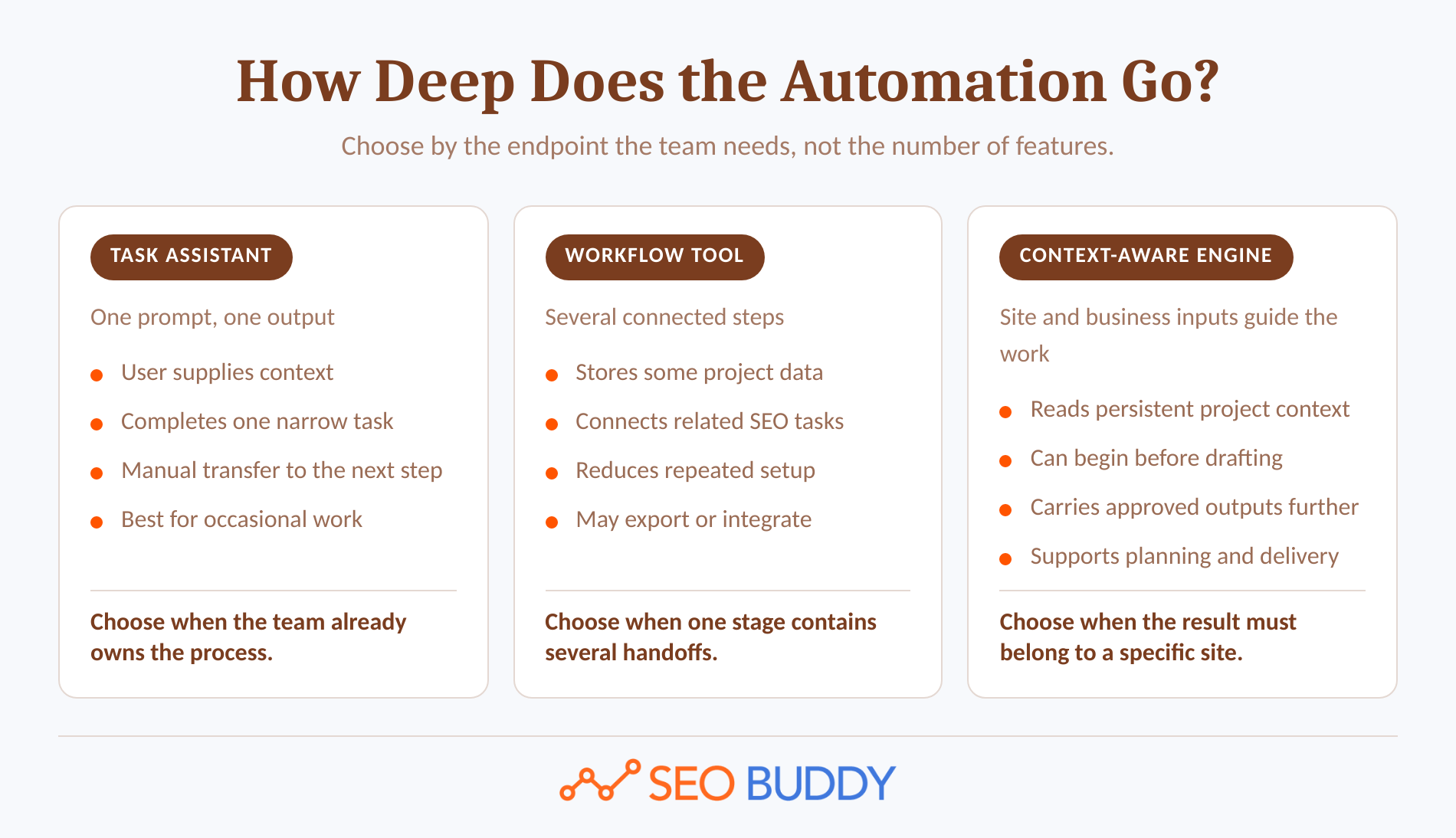
AI SEO products generally operate at one of three workflow depths:
- Task assistant: A person supplies a prompt and receives one output, such as a title, cluster, outline, or rewritten paragraph. The user must provide context and handle every handoff.
- Workflow tool: The software connects several steps, such as keyword discovery, clustering, brief generation, and optimization. It may store project data or connect to another system.
- Context-aware engine: The system reads site, search, business, brand, and publishing information before it selects or produces work. It can carry an approved output further into the workflow.
Start with the outcome, not the interface. A content team may not need another drafting tool if its real bottleneck is deciding what to publish. An agency may have enough research data but need repeatable approval, export, and client delivery. A founder may need the entire path from opportunity selection to a CMS-ready draft.
Ask four questions before opening a pricing page:
- What work is repeatedly late or left unfinished?
- What inputs does that work require?
- Where does a person need to make a decision?
- What should happen after the output is approved?
A tool that answers only the first half of the workflow can still be useful, but the remaining labor should be visible before purchase.
Choose the narrowest tool that completes the workflow you actually need, not the one with the longest feature list.
Anybody can generate an article. Knowing which one is worth writing is the hard part.
The AI Content Engine reads your site and your competitors, then builds a ranked content plan and writes it. Setup is free, and you see your plan before you pay for anything.
See your content plan freeWhat should an AI SEO tool know before it produces anything?
An AI SEO tool should receive enough context to produce an output that fits the site and the business. The minimum useful context varies by task, but prompt-only input is rarely enough for planning, internal linking, business claims, or publishing.
The six inputs that reduce cleanup
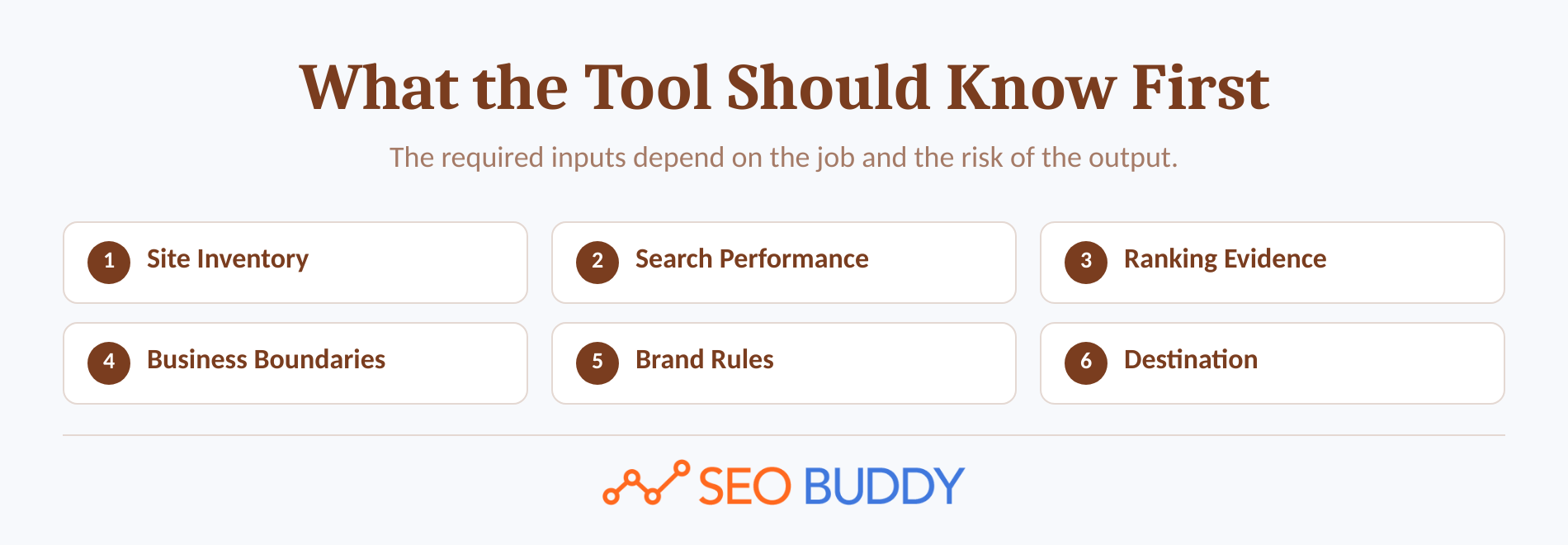
1. Site inventory
A sitemap or crawlable URL list shows what already exists. Without it, a tool may duplicate a topic, recommend an irrelevant internal link, or propose an article the site has already published.
2. Search performance
Search data reveals pages and queries that already receive impressions, clicks, or partial visibility. Google’s official Search Console Performance report includes query and page dimensions as well as clicks, impressions, click-through rate, and average position. (support.google.com)
3. Live ranking evidence
Current search results show the intent, content types, SERP features, questions, and competitive depth associated with a query. A static keyword list cannot show whether a result page is dominated by tools, product pages, videos, forums, or an answer that suppresses clicks.
4. Business priorities and exclusions
The system should know what the company sells, which audiences matter, and what it does not offer. This input prevents a commercially polished article from promoting the wrong service or promising a feature the business cannot provide.
5. Brand and editorial rules
Tone, examples, visual identity, preferred terminology, source requirements, and prohibited claims affect the finished page. These controls are more useful when they persist at project level instead of being pasted into every prompt.
6. Publishing destination
A tool that publishes or prepares CMS-ready drafts needs the destination’s fields, permissions, formatting rules, image requirements, and approval state. Draft-only access is the safer starting point until rendering and rollback procedures have been tested.
Not every task needs all six inputs. A title generator can work from a page summary, while a monthly content system needs substantially more context. The purchase question is not how much data the tool can collect, but whether it can use the necessary data without creating unnecessary risk.
The more business and site context a tool receives, the less cleanup its output should require.
Which 17 AI SEO tools or capabilities belong in a modern stack?
There is no universal list of 17 best AI SEO tools because different products solve different jobs. The useful comparison is a list of 17 capabilities, the input each requires, and the human decision that should remain visible.
The 17-category decision table
| # | Tool type | Use it when | Minimum input | Human check |
|---|---|---|---|---|
| 1 | Keyword and question discovery | The team needs relevant demand ideas | Seed topics or site data | Business relevance |
| 2 | Intent and SERP analysis | The correct page type is unclear | Query and live results | Intent changes and SERP contamination |
| 3 | Content gap analysis | Competitors cover topics the site misses | Site inventory and ranking pages | Commercial relevance |
| 4 | Keyword clustering and mapping | Keywords may belong on shared pages | Keyword set and existing URLs | Cannibalization risk |
| 5 | Opportunity scoring | The content calendar lacks priorities | Demand, difficulty, fit, and click potential | Assumptions behind the score |
| 6 | Content brief generation | Research needs a repeatable format | Query, sources, and ranking evidence | Source quality and freshness |
| 7 | Site-context content engine | Research, production, and publishing are disconnected | Site, search, business, and brand data | Claims and final approval |
| 8 | Drafting and rewriting assistant | A writer needs a first draft or controlled variation | Prompt and source material | Accuracy and originality |
| 9 | On-page optimization | An existing draft needs coverage guidance | Draft or URL and comparison corpus | Score chasing |
| 10 | Metadata and schema assistance | Page fields create a production bottleneck | Page content and template | Validity and visible-page consistency |
| 11 | Internal linking recommendations | Relevant pages are poorly connected | Site inventory and target URL | Anchor and destination relevance |
| 12 | Visual and alt-text production | Prose needs diagrams, charts, or illustrations | Article facts and visual purpose | Text and data integrity |
| 13 | CMS publishing automation | Copying and formatting cause delays | Approved content and credentials | Permissions and rendering |
| 14 | Content refresh and decay detection | Existing pages lose traffic or relevance | Historical performance and inventory | Seasonality and intent change |
| 15 | Technical SEO auditing | Crawl, index, or rendering issues need diagnosis | Crawl and index data | Developer confirmation |
| 16 | Link prospecting and outreach | Authority work needs repeatable prospecting | Targets, criteria, contacts, and mailbox | Relevance and message claims |
| 17 | Rank and AI visibility monitoring | The team needs outcome measurement | Keyword or prompt set and domains | Volatility and attribution |
Research and prioritization tools
1. Keyword and question discovery
Discovery tools expand seed topics using search suggestions, related questions, existing performance data, and semantic relationships. The useful output is not the largest list. It is a smaller set of queries that match the site’s audience, offers, and ability to compete.
2. Intent and SERP analysis
SERP analysis tools classify what the current results are answering and which formats dominate. The tool should show the evidence behind its label because a query can mix informational articles, commercial comparisons, product pages, videos, and local results.
3. Content gap analysis
A content gap tool compares a site’s coverage with pages or domains earning relevant visibility. It should identify missing questions and subtopics without turning competitor headings into an outline to copy.
4. Keyword clustering and mapping
Clustering tools group queries that can probably be served by one page and map them against existing URLs. Human review remains necessary where two phrases appear similar but represent different audiences, funnel stages, or page types.
5. Opportunity scoring and calendar planning
Scoring tools combine demand, competition, business relevance, organic click potential, and site strength to order opportunities. Reject unexplained scores. A useful system states why a topic was selected and which assumptions could change the decision.
Content and optimization tools
6. Content brief generation
Brief tools collect ranking evidence, questions, related searches, source requirements, and structural recommendations. The best brief is not the longest. It gives the writer a clear angle, factual boundaries, required evidence, and a reason the new page should exist.
7. Site-context content engine
A site-context engine begins before drafting. It can use the sitemap, performance data, competitors, business priorities, exclusions, brand inputs, and publishing destination to choose and produce work that belongs on a specific website.
8. Drafting and rewriting assistant
A drafting assistant is suitable for controlled tasks such as turning approved notes into a first draft, creating alternatives, simplifying a passage, or changing structure. Its output quality depends heavily on the source material and constraints supplied by the user.
9. On-page content optimization
Optimization tools compare a draft or existing URL with a reference corpus and suggest missing concepts, questions, headings, or entities. Treat the score as a diagnostic proxy, not a target that justifies adding repetitive text.
10. Metadata and structured-data assistance
AI can draft title tags, meta descriptions, alt text, and structured data from approved page content. Google’s 2026 generative AI guidance says accuracy, quality, and relevance also apply to metadata, structured data, and image alt text, so generated fields still need validation. (developers.google.com)
11. Internal linking recommendations
Internal linking tools match the current page with relevant destinations found through a sitemap or crawl. A reviewer should reject a suggestion when the destination does not answer the reader’s next question or the anchor overstates what the linked page contains.
12. Visual and alt-text production
Visual tools can turn a process, comparison, mechanism, or decision into a diagram or illustration. Charts require real numerical data, screenshots require real interfaces, and generated images should not be trusted to render accurate labels or statistics.
Publishing, authority, and measurement tools
13. CMS publishing automation
Publishing automation packages approved content, images, metadata, categories, and links for a destination. Look for draft states, preview support, permission controls, predictable formatting, and a documented fallback when an integration fails.
14. Content refresh and decay detection
Refresh tools use historical performance, page age, query changes, and competing results to flag pages that may need attention. A decline is not automatically decay. Seasonality, tracking changes, lost demand, and a changed SERP can produce similar patterns.
15. Technical SEO auditing
Technical tools crawl pages and inspect status codes, directives, canonical signals, links, structured data, rendering, and indexability. AI can group issues and propose priorities, but a developer or technical SEO specialist should confirm the cause before sitewide changes are applied.
16. Link prospecting and outreach
Prospecting tools find pages that mention a topic, link to competing resources, or fit defined editorial criteria. Outreach automation can find contacts and prepare follow-ups, but people should approve prospect relevance, personalization, factual claims, and mailbox settings.
17. Rank and AI visibility monitoring
Monitoring tools observe keyword positions, search features, brand mentions, citations, or prompt responses over time. They form a measurement layer rather than a production workflow, and teams should account for location, personalization, volatility, and uncertain attribution.
A modern stack is a chain of jobs, and most teams need only the links that remove a real bottleneck.
To act on visibility gaps, OptimizeCamp helps teams assess how well their content is prepared for AI search. It audits factual accuracy, topic coverage, and citation readiness, then suggests inline edits to address outdated claims, missing subtopics, and unclear structure. Its WordPress integration also lets users audit existing posts and push approved improvements back to their site. Used alongside rank and citation monitoring, it connects content issues with practical fixes. Treat its scores as optimization guidance, then use observed mentions, citations, and traffic to evaluate results.
How do you compare AI SEO tools without getting distracted by feature lists?
Compare each tool against one real workflow and one approved output definition. A feature matters only when it removes work, improves a decision, reduces errors, or carries an accepted result to the next stage.
The eight checks that matter before purchase
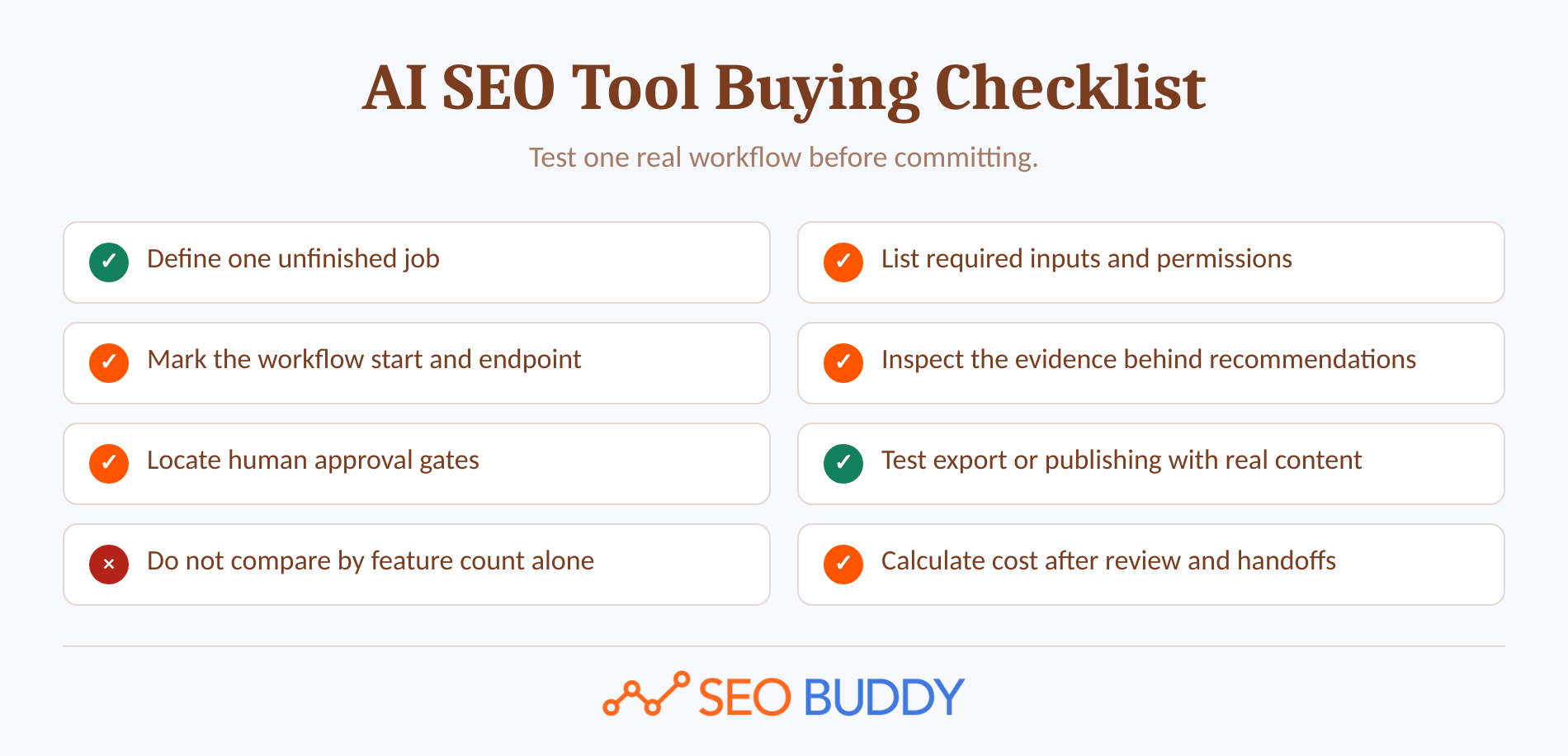
1. Define the job. Write one sentence describing the recurring problem, such as finding attainable article topics or preparing approved drafts for a CMS.
2. List required inputs. Record which site, search, business, brand, analytics, mailbox, or CMS data the tool needs and who can authorize access.
3. Measure workflow depth. Identify where the tool starts, where it stops, and which transfers remain manual.
4. Inspect evidence. Ask where recommendations, volumes, classifications, and factual claims come from. A polished answer without traceable evidence is still an unsupported answer.
5. Locate approval gates. Confirm that a person can review high-risk outputs before messages are sent, pages are changed, or content is published.
6. Test delivery. Export or publish a real sample. Check headings, links, metadata, images, permissions, and mobile rendering rather than judging an interface demo.
7. Measure review burden. Track corrections, missing sources, irrelevant recommendations, formatting work, and unused outputs. Fast generation can hide slow approval.
8. Calculate completed-work cost. Add the subscription, usage charges, setup time, reviewer time, integration maintenance, and remaining manual work.
Map the current process with an SEO Checklist, then turn the accepted workflow and its approval rules into editable SEO SOPs. This prevents the tool from becoming a private shortcut that only one team member understands.
During a trial, use a real page and the same acceptance criteria for every candidate. The winner is the tool that produces the lowest-friction approved outcome, not the fastest unreviewed output.
Compare completed workflow cost and review burden, not the number of AI buttons in the interface.
Where does AI help, and where should a human stay in control?
AI is most useful for repeatable analysis, transformation, classification, and production tasks with clear inputs and acceptance criteria. Humans should retain control wherever evidence, accountability, business judgment, or irreversible publication decisions are involved.
The review gates AI should not skip

Google’s current guidance on generative AI content says generative AI can help with research and structure, but publishers should focus on accuracy, quality, and relevance. (developers.google.com)
Google’s spam policies define scaled content abuse as producing many pages primarily to manipulate rankings rather than help users, regardless of whether automation or people created them. (developers.google.com)
Keep human approval around these decisions:
- Source selection: Confirm that the evidence is primary, current, and relevant to the jurisdiction or product version involved.
- Factual verification: Check names, dates, prices, statistics, quotations, product capabilities, and technical instructions.
- Business boundaries: Prevent the page from claiming the company sells, supports, guarantees, or has experienced something it has not.
- Original contribution: Add first-party data, expert judgment, customer evidence, examples, or a distinctive framework that source summaries cannot provide.
- Sensitive subjects: Require qualified review for legal, medical, financial, safety, or other high-stakes claims.
- Final publication: Review links, images, metadata, rendering, permissions, and the page’s actual usefulness before release.
When a reviewer lacks enough subject context to approve a recommendation, consult focused SEO content resources or a primary source before accepting the output. Approval should mean the reviewer understands the page, not merely that the text appears fluent.
AI should accelerate repeatable work while humans own claims, judgment, and publication.
How should a small team build an AI SEO workflow?
A small team should automate one bottleneck at a time and preserve a visible human owner for the result. Expanding only after a real workflow works is safer and easier to measure than buying an all-purpose system and changing every process at once.
A five-step rollout for a small team
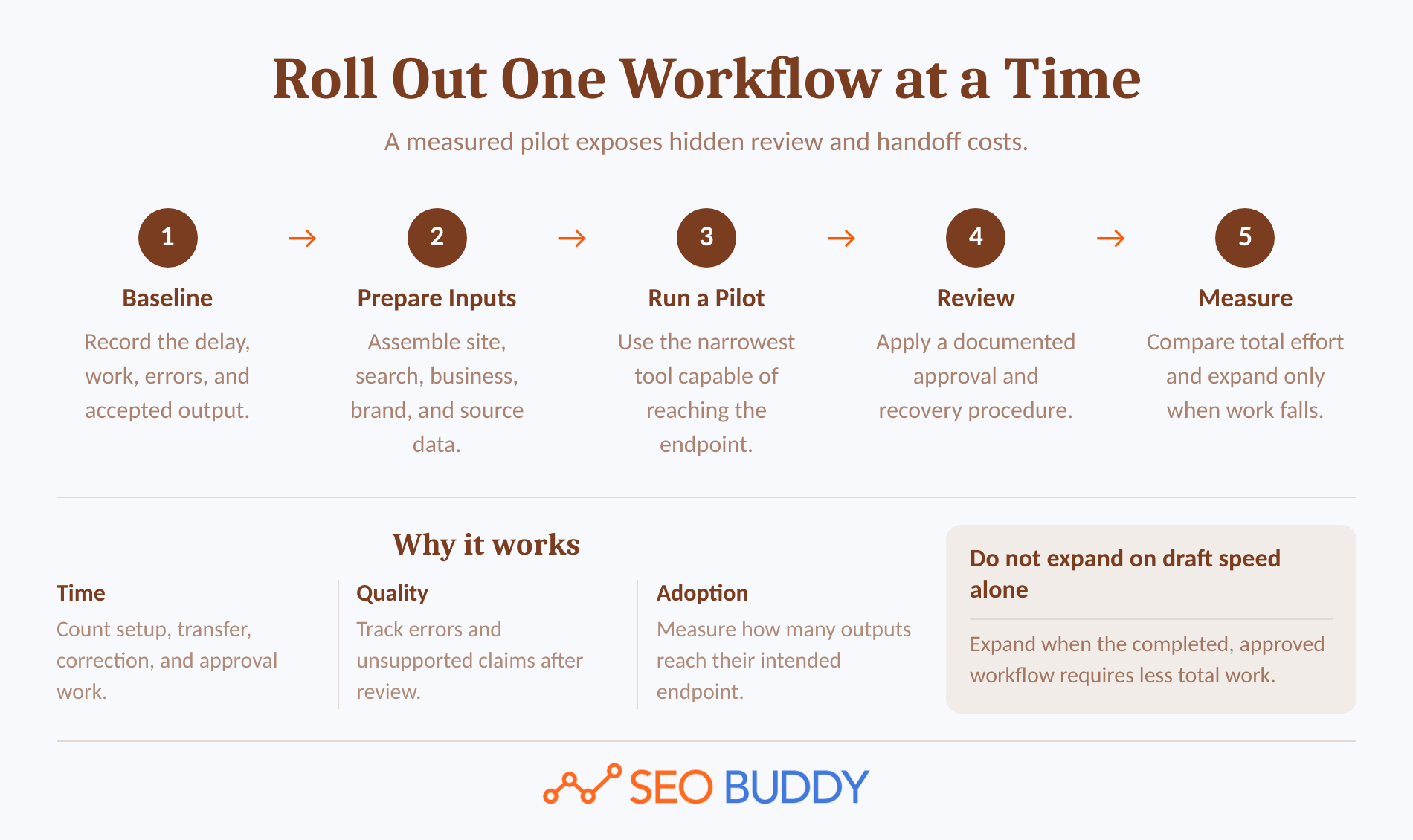
1. Baseline the bottleneck. Record the work involved, who performs it, where it waits, which mistakes recur, and what an acceptable output looks like.
2. Assemble the inputs. Prepare the necessary site inventory, search data, business facts, brand rules, sources, templates, and destination access before evaluating software.
3. Choose the narrowest capable tool. Select the category that reaches the required endpoint without buying unrelated capabilities. A drafting assistant may be enough for one writer, while an end-to-end content workflow needs deeper context and publishing support.
4. Define review and recovery. Assign the approver, document the checks, keep publishing in draft mode during testing, and decide how the team will recover from a failed integration or incorrect output.
5. Measure the completed outcome. Compare total effort, correction volume, publishing delay, output adoption, and performance signals across several cycles. Expand only when the process saves work after review.
Teams that need to clarify SEO roles or fill a knowledge gap before documenting the process can use free SEO training as a reference. Tool access does not replace the ability to recognize a poor recommendation.
Start with one measured workflow, document it, and automate only after the handoffs work.
Are free AI SEO tools enough for a small business?
Free AI SEO tools can be enough for learning, diagnostics, occasional research, and isolated production tasks. They are less likely to be enough when the business needs persistent project context, collaboration, repeatable approvals, large usage allowances, or automated publishing.
A practical free or low-cost starting stack can cover:
- Search queries, clicks, impressions, CTR, and average position through Search Console.
- Indexing and live-page diagnosis through Google’s URL Inspection tool. (support.google.com)
- One-off clustering, outline, metadata, and rewriting tasks through limited assistant access.
- Manual content briefs and internal link review using spreadsheets or documents.
- Draft preparation through a CMS without automated publication.
The hidden cost is the handoff. Someone must move context into each tool, reconcile conflicting outputs, verify claims, format the result, and record what happened.
Consider a paid workflow when usage limits interrupt scheduled work, project context must persist, several people need shared controls, or the manual transfers cost more than the system replacing them. Keep the free tools that continue to perform a clear diagnostic job.
Free tools are useful for diagnosis and one-off tasks, but they rarely remove every handoff that consumes team time.
What else should you know about AI SEO tools?
AI SEO tools can support almost every stage of search work, but no single category is automatically best for every team. The following answers resolve three common questions using the same workflow-first standard.
Which AI tool is best for SEO?
The best AI tool for SEO is the tool that completes the highest-value unfinished job in the team’s workflow. A research tool is best when topic selection is weak; a context-aware content system is better when research, drafting, internal links, visuals, and publishing must move together. Judge approved outcomes, not generated words.
Can you do SEO with AI?
AI can support keyword discovery, SERP analysis, clustering, briefs, drafting, metadata, internal linking, technical checks, publishing, outreach, and reporting. AI cannot safely own factual verification, business claims, strategic trade-offs, or final publication without review. Google permits AI assistance, but low-value scaled content can violate its spam policies. (developers.google.com)
What is AI SEO called now?
AI SEO is still SEO, although AEO, answer engine optimization, and GEO, generative engine optimization, describe work aimed at visibility in AI-generated answers. As of September 2026, Google’s guidance for generative AI features says this work remains SEO because those features rely on core Search ranking and quality systems. (developers.google.com)
AI can support SEO, but Google still treats foundational SEO and helpful content as the core.
What should you do next?
Choose one delayed, repetitive, or disconnected SEO workflow and define what an approved outcome looks like. Test the relevant tool category with real site inputs, then measure the work remaining after review rather than the speed of its first output.
If the bottleneck is selecting, writing, illustrating, internally linking, and publishing search-oriented articles, SEO Buddy’s AI Content Engine uses a site’s sitemap, optional Search Console data, competitors, business priorities, exclusions, and brand inputs to build a plan and produce drafts for supported publishing destinations. (seobuddy.com)
The AI Content Engine is not positioned as a technical crawler, dedicated rank tracker, standalone backlink database, existing-page optimization editor, or AI-visibility monitoring product. If one of those jobs is the actual bottleneck, select the corresponding specialist category instead.
Test one real workflow, measure the review burden, and keep only the automation that produces an approved outcome.

CEO & Founder at SEO Buddy






Get the SEO work done, not just read about it
Create a free account and run your first content plan, keyword research and link-building campaign. No card, and setup is free until your first article.
Free to start. We never sell your address.