
How to Find Organic Traffic in Google Analytics 4

In short
To find organic traffic in Google Analytics 4, open Reports > Acquisition > Traffic acquisition and use Session default channel group as the primary dimension. Read the Organic Search row for sessions from unpaid search results. Use Landing page for entry pages and the linked Search Console reports for Google queries, clicks, impressions, and position. (support.google.com)
Key takeaways
- Use Traffic acquisition, not User acquisition, when the question is how many organic sessions occurred during a date range.
- As of November 2026, Organic Search includes non-ad visits from Google AI Overviews and AI Mode, while AI Assistant is a separate channel. (support.google.com)
- Use Landing page with an organic comparison to identify the pages that started organic sessions.
- Change the primary dimension to Session source / medium when you need to separate
google / organicfrom other search engines. - Linked Search Console reports add Google query and landing-page metrics, but the data can be 48 hours behind and covers a maximum of 16 months. (support.google.com)
Table of contents
- Where can you see organic traffic in GA4?
- Which report should you use for organic traffic?
- Which landing pages get organic search visits?
- How do you compare organic traffic over time?
- How do you connect Search Console to GA4?
- Why do GA4 and Search Console organic numbers not match?
- What should you check if organic traffic looks wrong?
- How do you turn this into a repeatable SEO report?
- What else do people ask about organic traffic in GA4?
- What should you do next?
GA4 navigation is customizable, so two properties may not show identical report collections. Google’s current Traffic acquisition documentation says an Editor or Administrator can restore the report when it has been removed from the default view. (support.google.com)
Where can you see organic traffic in GA4?
Open Reports > Acquisition > Traffic acquisition, then find Organic Search under the Session default channel group dimension. Traffic acquisition is the correct starting point for organic sessions from new and returning visitors during the selected period. (support.google.com)
Google defines Organic Search as visits from non-ad links in organic search results. The definition now includes Google AI Overviews and AI Mode, but it excludes channels such as Organic Social, Organic Shopping, Organic Video, and AI Assistant. Review Google’s current default channel group definitions when a source appears in an unexpected row. (support.google.com)
Follow these steps:
- Select the correct GA4 property and date range.
- Open Reports > Acquisition > Traffic acquisition.
- Confirm that the first column uses Session default channel group.
- Find or search for the Organic Search row.
- Read Sessions, Engaged sessions, Engagement rate, Key events, and any revenue metric relevant to the property.
Use Session default channel group when you want Google’s maintained channel definitions. A property can use an editable primary channel group, so a custom primary group may categorize traffic differently.
To isolate Google rather than all search engines, change the primary dimension to Session source / medium and search for google / organic. Google’s documentation specifically uses that value as an example of filtering the Traffic acquisition table. (support.google.com)
Once the traffic is isolated, move from reporting to the prioritized actions that can improve organic traffic.
Because traffic measurement needs a consistent cadence, teams asking “is SEO an ongoing process?” should use the same report and definitions on every review date.
For period-based organic visits, the Traffic acquisition report and Session default channel group are the correct starting point.
Anybody can generate an article. Knowing which one is worth writing is the hard part.
The AI Content Engine reads your site and your competitors, then builds a ranked content plan and writes it. Setup is free, and you see your plan before you pay for anything.
See your content plan freeWhich report should you use for organic traffic?
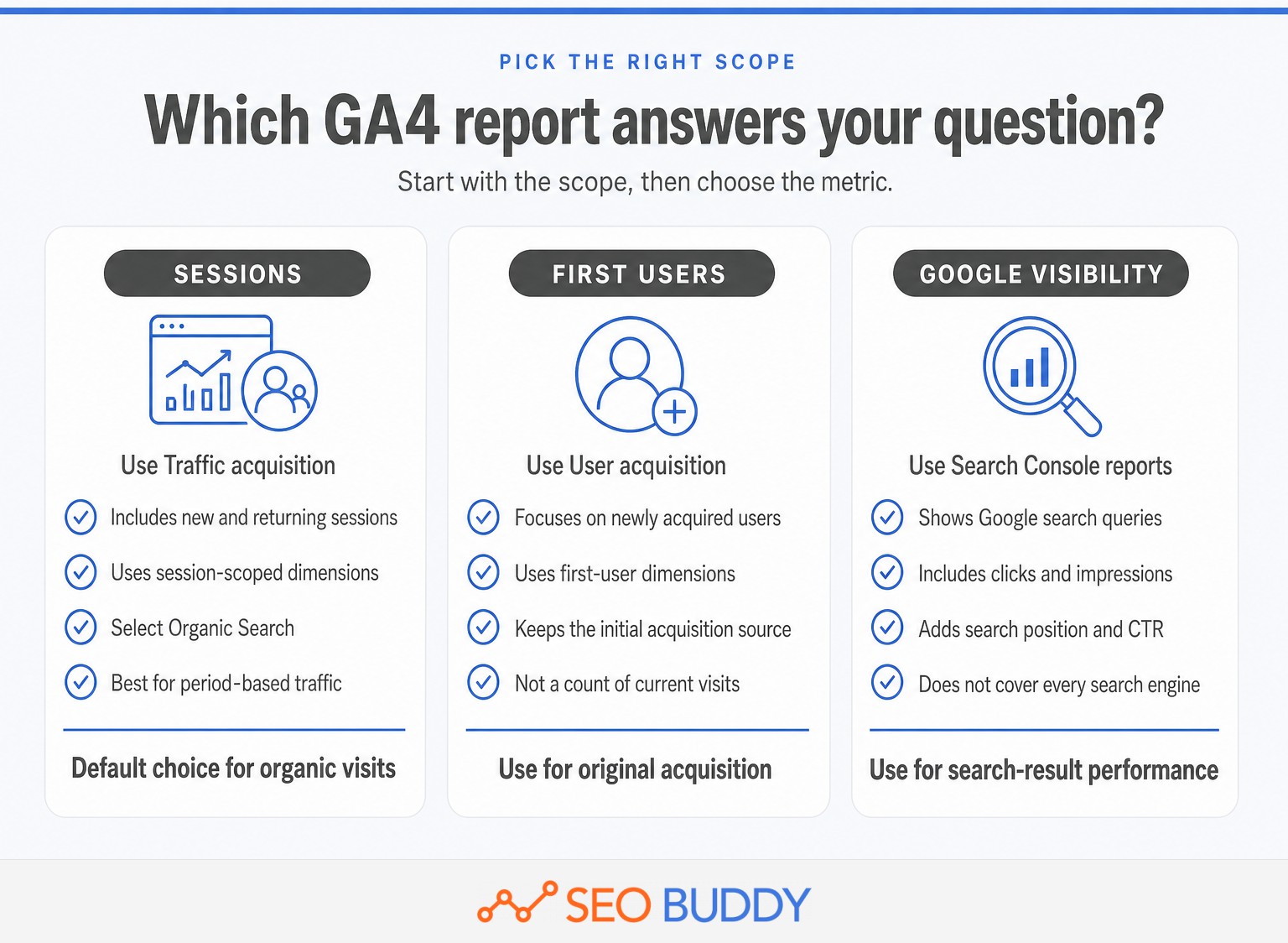
Choose the report according to the scope of the question, not according to whichever report is easiest to open. Traffic acquisition measures sessions, User acquisition describes how new users were first acquired, Landing page identifies entry pages, and Search Console reports show Google search visibility.
| Question | Use this report | Dimension or view |
|---|---|---|
| How many organic visits occurred? | Traffic acquisition | Session default channel group |
| How were new users first acquired? | User acquisition | First user default channel group |
| Which pages started organic sessions? | Landing page | Organic comparison or Session source / medium |
| Which search engine sent the visit? | Traffic acquisition | Session source / medium |
| Which Google queries earned visibility and clicks? | Search Console reports | Google Organic Search Queries |
Google’s comparison of User acquisition and Traffic acquisition explains why their numbers differ. Traffic acquisition is session-scoped, while User acquisition uses first-user dimensions that remain tied to how the person was initially acquired. (support.google.com)
For example, a person may first discover a site through organic search and return directly later. User acquisition can continue to associate that person with the original organic source, while Traffic acquisition evaluates the source of the later session according to session attribution rules.
Search Console answers another question. It reports Google queries, clicks, impressions, click-through rate, and position, while GA4 reports on-site behavior. The native linked reports do not provide a direct query-to-key-event join because Search Console metrics are compatible with a limited set of dimensions.
Choose the report by scope: sessions, first-time users, landing pages, or Google search visibility.
Which landing pages get organic search visits?
Open Reports > Engagement > Landing page and apply an organic comparison to identify the pages that began organic sessions. The Landing page report is session-scoped, so it shows entry pages rather than every page viewed during the visit. (support.google.com)
- Open Reports > Engagement > Landing page.
- Apply the saved Organic traffic comparison if it is available.
- If needed, create a comparison where Session default channel group exactly matches Organic Search.
- Review sessions, engagement, key events, and revenue by landing page.
- Add Session source / medium as a secondary dimension when the search engine matters.
Google’s report comparison documentation says GA4 includes prebuilt comparisons for common cases such as organic traffic. It also allows a new comparison to be created from a compatible dimension and an exact or partial match. (support.google.com)
A page with increasing organic sessions but no key events may be attracting the wrong intent or failing to move visitors forward. A page with modest traffic and strong key-event performance may deserve further optimization or internal promotion.
The Landing page report shows which entry pages earned organic sessions, not every page viewed during those sessions.
How do you compare organic traffic over time?
Use the report’s date picker to compare equal periods, then read traffic, engagement, and outcomes together. A traffic increase is not automatically an improvement if engagement and key events fall at the same time.
- Select a stable reporting period, such as a complete week or month.
- Choose Compare, then select the previous period, the previous year, or a custom range.
- Review changes in organic sessions, engaged sessions, key events, and landing pages.
Google’s date range documentation supports previous-period, previous-year, and custom comparisons. The match-day-of-week option is useful when weekday patterns would otherwise distort a short comparison. (support.google.com)
If a decline affects many landing pages at once, review technical changes, demand, seasonality, and why Google rankings fluctuate before rewriting individual pages. If only one page declined, inspect that page’s queries, search visibility, and recent edits first.
A useful trend compares equal periods and reads traffic, engagement, and key events together.
How do you connect Search Console to GA4?
Create a Search Console link in GA4 Admin, then publish the Search Console report collection from the report Library. The integration adds query and landing-page reports for the selected web data stream, but it does not replace the session-based acquisition reports. (support.google.com)
To create the link:
- Open Admin in GA4.
- Under Product links, select Search Console Links.
- Select Link and choose a verified Search Console property.
- Select the matching GA4 web data stream.
- Review and submit the configuration.
- Open Reports > Library and publish the Search Console collection.
The setup requires the Editor role in GA4 and verified ownership of the Search Console property. Google also advises confirming that the Analytics stream and Search Console property cover the same set of website pages. See the official Search Console integration instructions. (support.google.com)
The integration creates two reports:
- Google Organic Search Queries shows queries and Search Console metrics. It does not support Analytics dimensions.
- Google Organic Search Traffic shows landing pages with Search Console and Analytics metrics, with country and device available for further analysis.
The linked reports retain a maximum of 16 months of Search Console data, and new data is available in Analytics about 48 hours after Search Console collects it. The report collection is unpublished by default, which is a common reason people cannot find it.
Search Console adds Google query and search-performance data, but it does not create native query-to-conversion reporting in GA4.
Why do GA4 and Search Console organic numbers not match?
Search Console counts clicks from Google Search, while GA4 counts tracked sessions after a visitor reaches the site. GA4’s Organic Search channel can also include search engines other than Google, so exact equality is neither expected nor required.
Common causes of a difference include:
- Different metrics: One click is not always one session.
- Different coverage: Search Console covers Google Search, while GA4 Organic Search can include multiple search engines.
- Privacy and processing: Search Console omits some low-volume queries and processes data to protect users.
- Time zones: Search Console generally labels daily Performance data in Pacific Time, while GA4 uses the property’s configured time zone.
- Collection methods: GA4 requires the site’s measurement code to run, which can be affected by JavaScript, consent choices, redirects, and implementation problems.
- Reporting delay: The newest Search Console data may not yet be complete.
Google’s Search Console discrepancy guide lists privacy, processing, time lag, time zones, and JavaScript as reasons its data can differ from analytics tools. (support.google.com)
For a fairer comparison:
- Filter GA4 to
google / organic, not the full Organic Search channel. - Use the same complete dates in both products.
- Avoid judging the newest two or three days while Search Console data is still processing.
- Compare directional trends and landing-page patterns before investigating small total differences.
GA4 sessions and Search Console clicks measure different events, so trend alignment matters more than exact equality.
What should you check if organic traffic looks wrong?
Verify the report scope and measurement setup before concluding that SEO performance changed. A wrong property, custom channel definition, missing tag, or incomplete comparison can make a healthy site look as if organic traffic disappeared.
Check the following:
- The correct GA4 property and web data stream are selected.
- The report uses Session default channel group, not a first-user or custom primary dimension.
- The date range includes complete days and the comparison uses an equivalent period.
- Organic Search has not been confused with Organic Social, Organic Shopping, Organic Video, or AI Assistant.
- Important landing pages load the Google tag correctly.
- Redirects, cross-domain navigation, and consent settings are not interrupting attribution.
- Unexpected traffic has not moved into Direct, Unassigned, or
(not set). - A decline is sitewide rather than limited to one page, country, device, or search engine.
Google’s tagging troubleshooting guide says configuration problems can produce Unassigned values, (not set) dimensions, and unexpectedly high Direct traffic. (support.google.com)
When organic traffic looks wrong, verify the scope and tracking setup before diagnosing SEO.
How do you turn this into a repeatable SEO report?
Use the same reports, dimensions, date windows, and definitions on every reporting cycle. End each review with a decision and an owner rather than copying metrics into a spreadsheet without an action.
A practical monthly sequence is:
- Record Organic Search sessions and engaged sessions from Traffic acquisition.
- Compare the period with the previous period and the same period last year when seasonality matters.
- Identify landing pages with the largest meaningful gains or losses.
- Review Google clicks, impressions, queries, and position in Search Console.
- Assign an investigation, optimization, technical fix, or content action for each material change.
Use an SEO measurement checklist to record the report, dimension, date window, metric definition, owner, and next review date. This prevents one person from reporting sessions while another reports first-user acquisition and calling the results comparable.
For teams that need a documented handoff, SEO Buddy’s measurement SOPs provide an editable structure for turning the monthly sequence into an assigned procedure.
A repeatable report ends with assigned actions, not a spreadsheet that nobody uses.
What else do people ask about organic traffic in GA4?
The following questions cover the distinctions that cause most GA4 reporting errors. Each answer starts with the report or dimension that matches the question’s scope.
How to find organic traffic?
Open Reports > Acquisition > Traffic acquisition in GA4, keep Session default channel group as the primary dimension, and find Organic Search. That row shows sessions from unpaid search results across recognized search engines. Change the dimension to Session source / medium when you need to separate Google, Bing, or another search source. (support.google.com)
What is organic traffic in Google Analytics?
Organic traffic in Google Analytics is traffic that GA4 assigns to an unpaid channel. For search reporting, Organic Search covers visits from non-ad search results. It is separate from Organic Social, Organic Video, Organic Shopping, and AI Assistant, so “organic” should not be treated as one catch-all bucket. (support.google.com)
What is organic search traffic in Google Analytics 4 (GA4)?
Organic search traffic in GA4 consists of users or sessions attributed to non-ad links in search results, depending on the report’s scope. Traffic acquisition uses session-scoped dimensions, while User acquisition uses first-user dimensions. Choose the report before comparing numbers because the same visitor can appear differently across those scopes. (support.google.com)
How to find traffic source in Google Analytics?
Open Reports > Acquisition > Traffic acquisition, then change the primary dimension to Session source, Session medium, or Session source / medium. Use the last option when you need a combined value such as google / organic. Add Landing page + query string as a secondary dimension to connect sources with entry pages. (support.google.com)
The report path is simple, but the correct answer still depends on whether the question is about sessions, first users, landing pages, or Google queries.
What should you do next?
Open Traffic acquisition and save the exact dimension, date range, and metrics used for the first baseline. Repeat the same check on the next reporting date before changing the workflow or diagnosing a trend.
A useful organic report begins by choosing the right scope before reading the number.

CEO & Founder at SEO Buddy


 Guest Post Services Compared: How to Choose a Safe Provider
General SEO
 Why Google Rankings Fluctuate and When to Take Action
General SEO
 Is SEO an Ongoing Process? What to Repeat Monthly, Quarterly, and Annually
General SEO
 Link-Building Packages Explained: Deliverables, Pricing, and Red Flags
General SEO
Get the SEO work done, not just read about it
Create a free account and run your first content plan, keyword research and link-building campaign. No card, and setup is free until your first article.
Free to start. We never sell your address.