
Wix SEO Review: Is Wix Good Enough for SEO in 2026?

In short
Wix is good enough for SEO in 2026 for most small-business, portfolio, local-service, and content sites. It supports indexing controls, editable metadata, canonicals, structured data, sitemaps, redirects, and Search Console integration. Its main trade-offs are limited server-level control, platform lock-in, and more careful performance and migration management. (support.wix.com)
Key takeaways
- Wix provides the crawl, metadata, canonical, sitemap, and structured-data controls required for standard small-business SEO. (support.wix.com)
- Wix's current redirect documentation says a changed Wix Blog post slug needs a manually created 301 redirect. (support.wix.com)
- Google's good Core Web Vitals thresholds are an LCP within 2.5 seconds, an INP below 200 milliseconds, and a CLS below 0.1. (developers.google.com)
- A finished Wix site must remain hosted and operated on Wix's infrastructure, even though the site owner retains ownership of the content. (support.wix.com)
- Wix is a stronger fit for teams that value managed infrastructure than for teams that need complete control over hosting, routing, and deployment.
Table of contents
- Is Wix good enough for SEO in 2026?
- Can Wix handle the SEO jobs that matter?
- Can a Wix site be fast enough for Google?
- What is the downside of using Wix?
- Does Wix work for an SEO content team?
- How should you test Wix before committing?
- Who is Wix best for if organic search matters?
- What else do people ask about Wix SEO?
- What should you do next?
This SEO Wix review judges the platform by seven jobs: getting pages discovered, controlling search snippets, managing duplicate URLs, adding structured data, preserving changed URLs, maintaining performance, and publishing content without losing quality control. The review reflects Wix and Google documentation available in September 2026, but it does not substitute for testing the exact template and apps a site will use.
Is Wix good enough for SEO in 2026?
Yes, Wix is good enough for SEO when a site needs standard technical controls and a managed publishing system. Wix does not create rankings by itself, but the platform no longer lacks the basic controls that would automatically disqualify it from serious organic search work. (support.wix.com)
Google Search Central's crawling FAQ says Google has no preference among page technologies as long as the pages can be crawled. Wix also says it uses server-side rendering so search engines and external tools can read page content and metadata in the initial source. (developers.google.com)
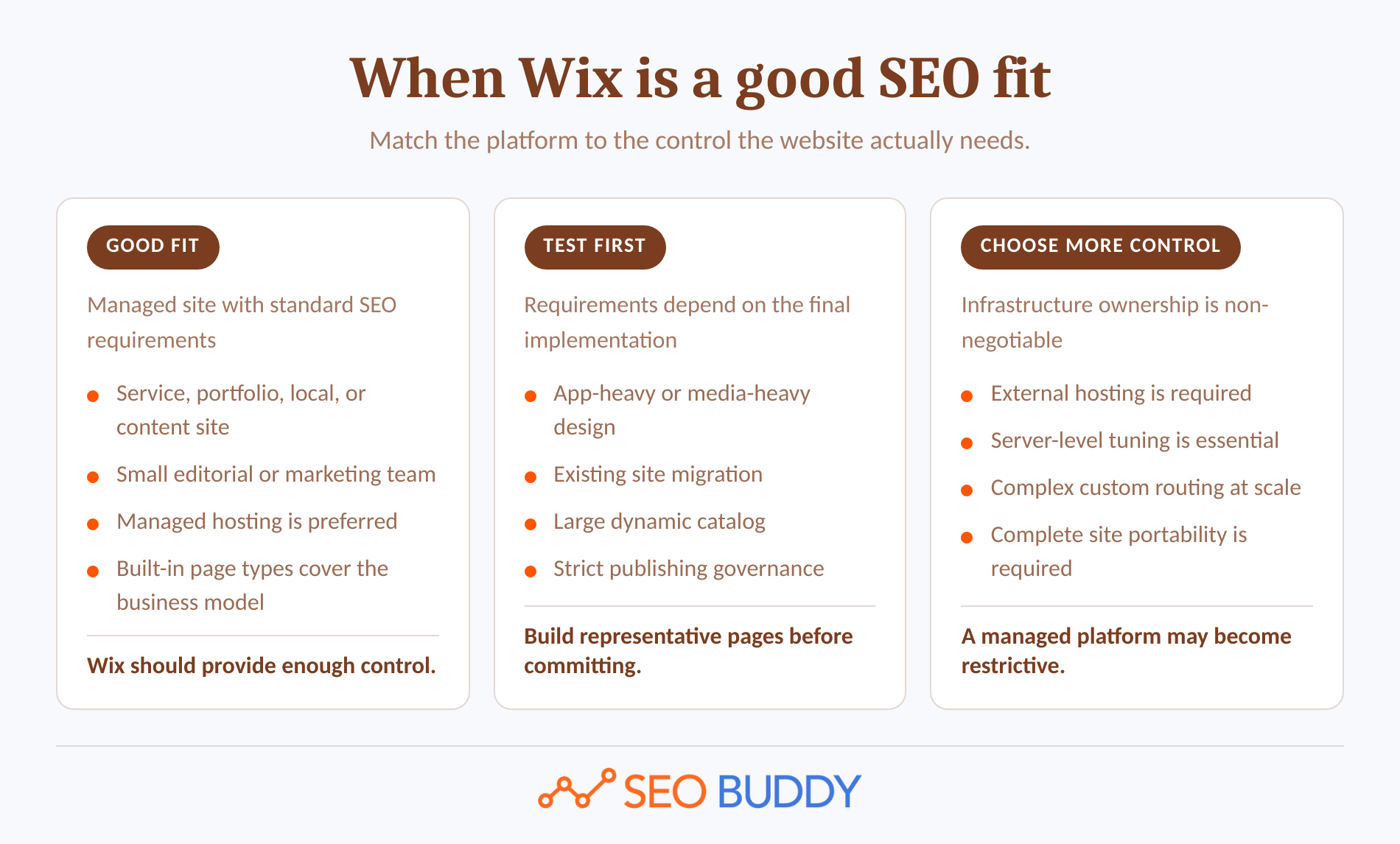
That moves the decision away from Wix's old reputation and toward the site's actual requirements:
- Wix is strong enough for editable titles and descriptions, index controls, canonical tags, automatic sitemaps, standard structured data, redirects, headings, alt text, and Search Console integration.
- Wix needs testing when pages use several third-party apps, large media, dynamic collections, custom code, or an existing URL structure that must be preserved.
- Wix is a weaker fit when the business requires external hosting, low-level infrastructure tuning, highly customized routing, or complete portability of the finished site.
If the question is simply 'is Wix good for SEO,' the honest answer is yes for many sites, provided the person running the site still does the SEO work.
Wix is not an SEO handicap by default; Wix becomes a constraint when a strategy needs control the platform does not expose.
Anybody can generate an article. Knowing which one is worth writing is the hard part.
The AI Content Engine reads your site and your competitors, then builds a ranked content plan and writes it. Setup is free, and you see your plan before you pay for anything.
See your content plan freeCan Wix handle the SEO jobs that matter?
Yes, Wix covers the essential jobs required to make pages crawlable, interpretable, and maintainable in search. The caveat is that controls differ across static pages, blog posts, products, apps, and dynamic pages, so every page type needs its own quality check. (support.wix.com)
| SEO job | Wix support in September 2026 | Operational caveat |
|---|---|---|
| Crawl and index control | Per-page index settings, editable robots.txt, and robots meta directives | An incorrect directive can remove pages from search. |
| Titles, descriptions, and URLs | Editable individually and through page-type rules | Default descriptions may remain blank until a rule or page value is added. |
| Canonical tags | Self-referencing defaults with page-level customization | A custom canonical can remove the page URL from the sitemap. |
| XML sitemaps | Automatically generated and updated, including multilingual files | The sitemap helps discovery but does not guarantee indexing. |
| Structured data | Preset, AI-generated blog markup, and manual JSON-LD | Manual markup is limited to five items per page and 7,000 characters per item. |
| Redirects | Single, group, automatic, and CSV-managed 301 redirects | Blog post slug changes are an exception that require a manual redirect. |
| Indexing diagnosis | Search Console integration and Wix Site Inspection | Site Inspection focuses on Google discoverability and indexability, not every possible technical issue. |
Can Wix control crawling and indexing?
Wix lets site owners allow or prevent indexing on individual pages. Its robots.txt editor can manage site-wide crawl instructions, while its robots meta tag controls include noindex, nofollow, nosnippet, noarchive, image-preview, and snippet-length directives. (support.wix.com)
Those controls are sufficient for common tasks such as excluding private utility pages, limiting search-result previews, or managing a page type in bulk. They are also capable of causing serious indexing mistakes, and Wix explicitly warns that its customer-care team does not support custom robots.txt or robots meta changes. (support.wix.com)
Can metadata be managed page by page and at scale?
The Wix page SEO settings guide documents editable URL slugs, title tags, meta descriptions, canonicals, structured data, social-sharing fields, and additional meta tags. Wix also supports SEO variables, allowing one rule to generate distinct values across products, blog posts, dynamic items, and other page groups. (support.wix.com)
That is enough for a site with dozens or hundreds of similarly structured pages, but templates still need review. A variable can produce duplicate, empty, or awkward metadata when the underlying collection fields are incomplete.
Wix automatically creates self-referencing canonical tags. The canonical documentation permits custom values, but it also warns that changing the default canonical can make the page disappear from the Wix sitemap. (support.wix.com)
Can Wix manage sitemaps, schema, and redirects?
Wix's sitemap documentation describes automatic sitemap indexes for static pages, blog posts, products, events, multilingual content, dynamic pages, and other supported page types. Wix updates the sitemap after site changes and can submit it when the site connects to Google through the setup checklist. (support.wix.com)
The structured data guide documents preset markup for several Wix apps, AI-generated markup for blog posts, and manual JSON-LD. Manual markup is limited to five items per page, with each item under 7,000 characters, so unusual schema graphs should be prototyped before the platform is selected. (support.wix.com)
Wix can create single and group redirects, and its CSV redirect import accepts up to 500 redirects per file. The important exception appears in Wix's redirect documentation: changing a Wix Blog post slug does not create the automatic redirect available for several other page types. (support.wix.com)
Can Wix diagnose indexing problems?
Wix Site Inspection can report discoverability and indexability information after the site is published, connected to a domain, and verified with Search Console. The Site Inspection documentation also notes Google's inspection limit of 2,000 pages per day. (support.wix.com)
That is useful for confirming what Google reports about a URL, but it should not be mistaken for a complete crawl of every internal-link, rendering, performance, and configuration issue. Teams unfamiliar with the terminology can use SEO Buddy's free SEO lessons on technical and on-page work before changing advanced directives. (seobuddy.com)
Wix covers the essential technical controls, but each page type still needs a documented QA check.
Can a Wix site be fast enough for Google?

Yes, a Wix site can meet Google's performance thresholds, but the domain name alone says nothing about the result. Page layout, above-the-fold media, fonts, animations, third-party apps, custom code, and visitor devices all affect the experience that must be measured. (support.wix.com)
Google's 2025 Core Web Vitals guidance defines a good experience as LCP within 2.5 seconds, INP below 200 milliseconds, and CLS below 0.1. Google recommends using Search Console field data rather than treating one laboratory score as the complete verdict. (developers.google.com)
The Wix Site Speed dashboard reports real visitor experience and a Google PageSpeed simulation. Wix says real site-speed data becomes available after at least 10 sessions within seven days, so a new test site may need lab diagnostics until it attracts enough visitors. (support.wix.com)
A sensible Wix performance test should use the final page template, responsive breakpoints, apps, analytics scripts, fonts, images, and consent tools. Testing an empty template proves very little.
Wix's performance best practices recommend reducing heavy above-the-fold media, unnecessary animation, and third-party code. The same documentation acknowledges that some suggestions from outside performance tools may require changes a Wix user cannot make directly. (support.wix.com)
A Wix site can meet Google's performance targets, but the design and app stack must be tested with real page content.
What is the downside of using Wix?
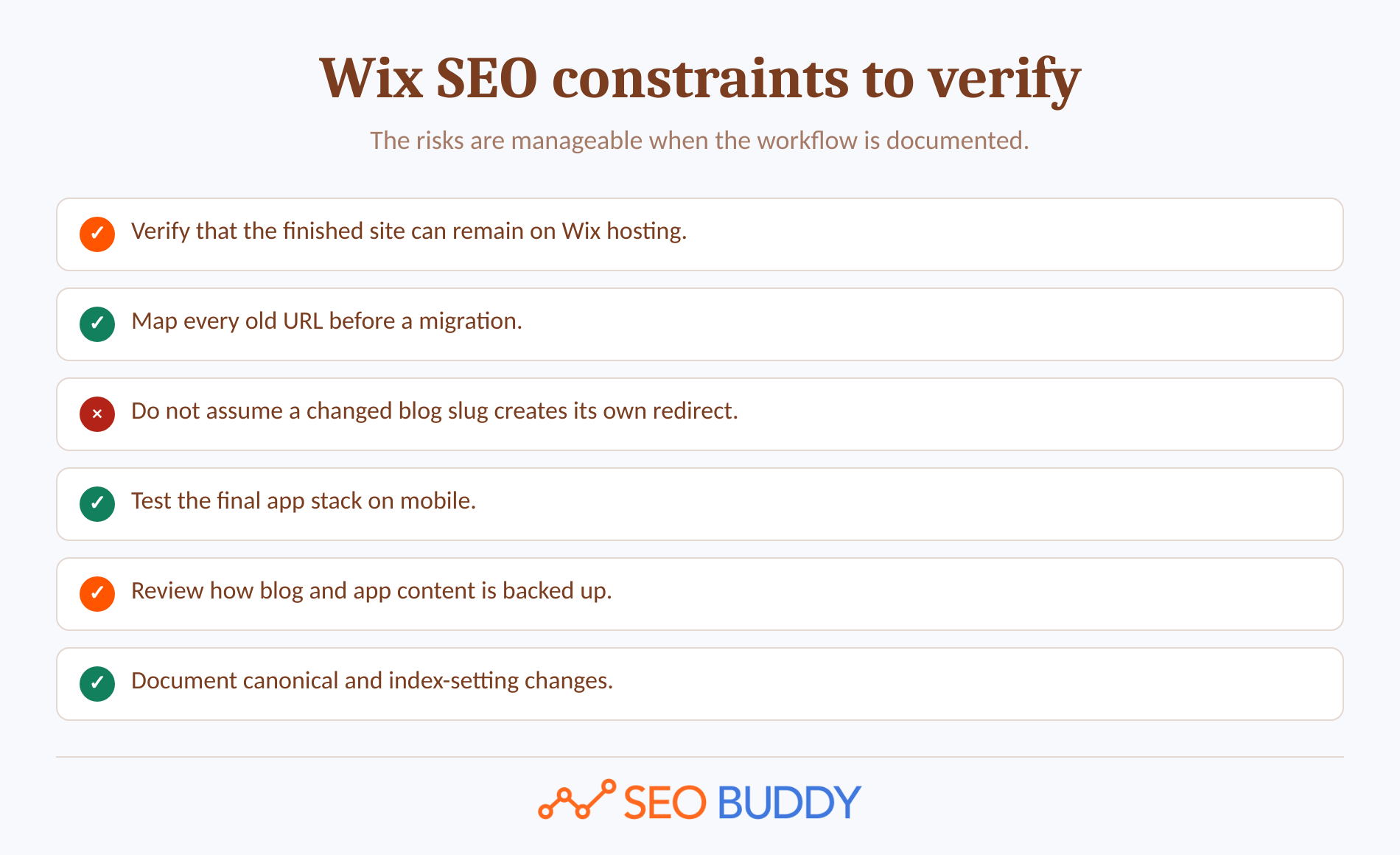
The main downside is reduced infrastructure and portability control, not an inability to edit a title tag. Wix manages the hosting and much of the technical stack, which removes maintenance work but also limits what a team can move, replace, or tune independently. (support.wix.com)
The recurring 'is Wix bad for SEO' complaint usually combines three separate issues.
First, the finished site is tied to Wix hosting. Wix's hosting and export documentation says the content belongs to the customer, but a Wix site depends on proprietary services and must run on Wix's servers. A future migration therefore means rebuilding the site rather than moving the complete installation to another host. (support.wix.com)
Second, migrations need page-type-specific procedures. Static page slug changes may receive automatic redirects, while Wix Blog post slug changes require manual redirects. A custom canonical can also remove a URL from the generated sitemap. Those are manageable rules, but only when the team knows they exist. (support.wix.com)
Third, rollback behavior has boundaries. Wix keeps editor history, but its site history limitations state that app content, including Wix Blog content, does not revert when an older site version is restored. SEO settings changed in the page panel may revert, while site-wide SEO Settings do not. (support.wix.com)
None of those limitations makes Wix universally bad. They make documentation, backups, URL mapping, and pre-launch testing more important for a site that expects organic search to become a major acquisition channel.
The biggest Wix SEO downside is not missing metadata; it is reduced infrastructure control and higher migration dependence on Wix-specific workflows.
Does Wix work for an SEO content team?
Yes, Wix supports the core workflow of a small editorial team through drafts, scheduled publication, contributor roles, and a submit-for-review process. Larger teams still need an external system for keyword ownership, briefs, approvals, change records, internal-link planning, and post-publication checks. (support.wix.com)
Wix's drafts and scheduling documentation supports unpublished drafts and timed publication. Its guest-writer review workflow lets writers submit posts to editors, who can approve, schedule, or reject them back to draft status. (support.wix.com)
The SEO workflow around the composer should still answer four questions:
- Which query and search intent does the page own?
- Which existing pages should link to it, and which pages should it link to?
- Who verifies the title, description, canonical, schema, headings, image text, and index setting?
- Who inspects the live URL and watches search performance after publication?
A publishing interface cannot answer those questions automatically. SEO Buddy's AI Content Engine addresses upstream topic selection, article production, illustration, and delivery to supported destinations or a signed webhook; the chosen Wix delivery route should be confirmed before it is treated as an integration. (seobuddy.com)
Teams managing the work manually can turn the checks into repeatable assignments with the 66-procedure SOP Collection. The important point is to keep the process outside any single editor so it survives staff changes and future platform decisions. (seobuddy.com)
Wix supports a small editorial team, but the SEO strategy and quality-control system must live outside the post composer.
How should you test Wix before committing?
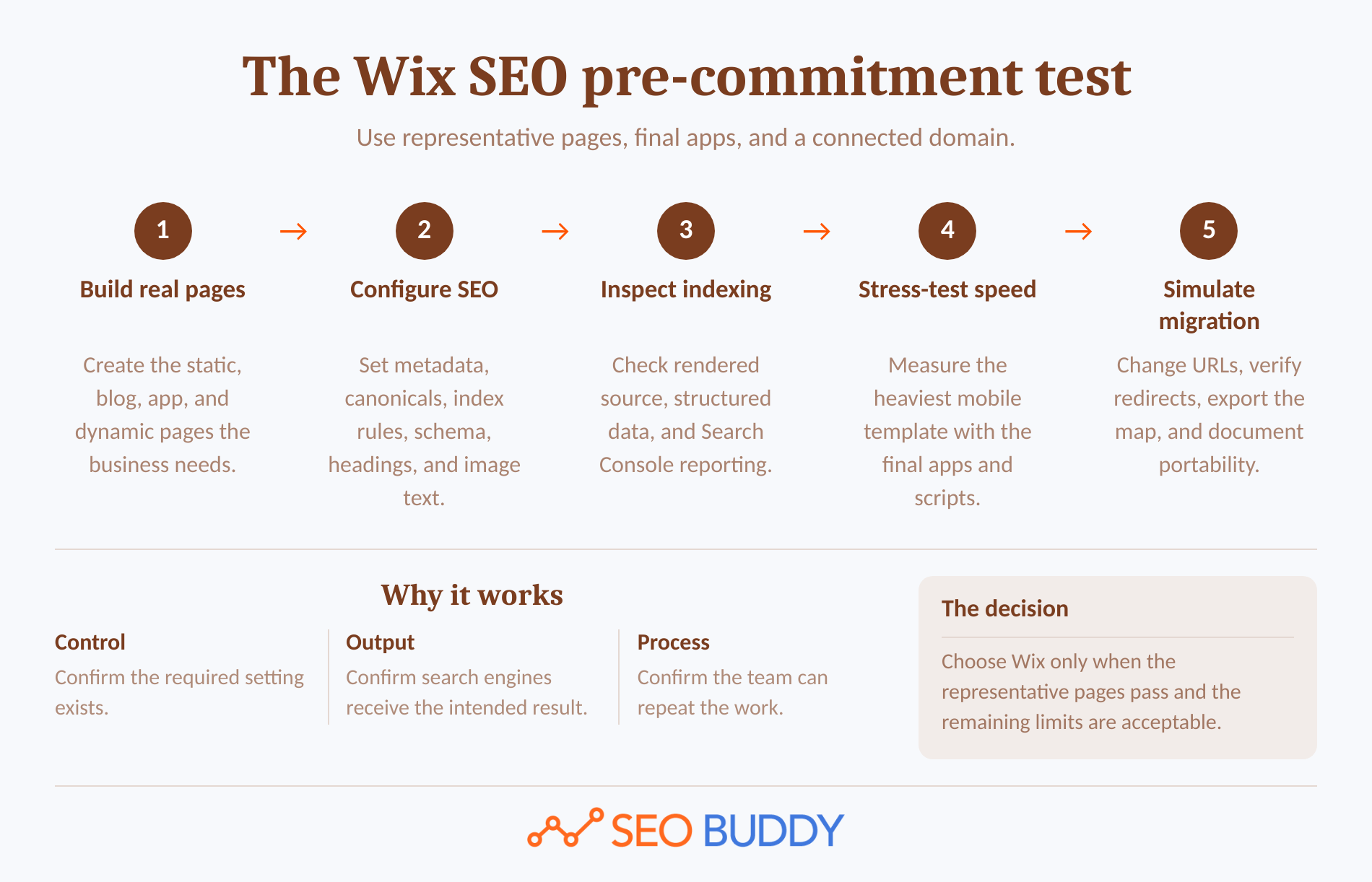
Build a representative prototype and make it pass the same checks the live site will face. A five-page test exposes more meaningful risks than browsing an SEO feature menu because it tests page types, apps, redirects, rendering, and performance together.
1. Build the pages the business will actually use
Create a static service or landing page, a blog post, an app-generated page, a dynamic or product page if relevant, and a changed URL that must redirect. Add realistic images, fonts, embeds, analytics, consent tools, and navigation.
2. Configure every SEO control
Set a unique title, description, URL, H1, canonical, index directive, image alt text, and structured-data markup. Add a page-type template rule, then check a page with missing source data to see how the rule fails.
3. Inspect the rendered result
View the source, run a structured-data test, and connect the domain to Search Console. Wix says its direct Search Console connection requires a Premium plan and a connected domain, even though basic Wix pages can be crawlable on a free site. (support.wix.com)
4. Stress-test mobile performance
Measure the heaviest important template, not just the homepage. Remove nonessential apps or media one at a time so the team can identify which design choice or script changes LCP, INP, or CLS.
5. Simulate a migration and update
Change a static-page slug and a blog-post slug, confirm both old URLs, inspect the resulting redirects, and export the redirect list. Document what would have to be rebuilt if the site later left Wix.
A passing prototype should show indexable HTML, valid metadata and schema, working redirects, acceptable mobile performance, and a workflow the team can repeat. A failed prototype is useful too: it identifies the exact requirement that needs a different implementation or more platform control.
A five-page prototype will reveal more about Wix's SEO fit than a long feature list.
Who is Wix best for if organic search matters?
Wix is best for businesses that want a managed site and can achieve their SEO plan through documented page-level and page-type controls. Wix is less suitable when infrastructure ownership, external hosting, complex routing, or unusually large-scale automation is a non-negotiable requirement.
For personal trainers, the website is only one part of a remote or hybrid coaching setup. If you also need to evaluate the platform used to deliver digital fitness services, this guide to choosing a digital fitness platform covers the main types and features to compare.
Wix is a sensible fit when:
- The site is for a local service, professional firm, portfolio, publication, event, booking operation, or moderately complex store.
- A small team needs to publish without maintaining a separate server and software stack.
- The SEO plan relies on useful pages, internal linking, standard schema, Search Console, and routine performance checks.
- The team is willing to test app-generated pages and maintain a migration record.
Test more carefully or choose more control when:
- The complete site must be portable to an external host.
- Developers need direct control over every infrastructure and deployment decision.
- A large existing site has a complicated URL history that cannot tolerate page-type exceptions.
- The SEO program depends on highly customized routing or programmatic publishing beyond the team's Wix development skills.
Wix only controls the site itself. It does not create external authority or persuade other sites to link, so outreach remains a separate workstream. SEO Buddy's link prospecting and three-email outreach workflow can support that work outside the CMS without changing the platform verdict. (seobuddy.com)
Wix is a sensible SEO choice when managed simplicity matters more than complete infrastructure control.
What else do people ask about Wix SEO?
The recurring questions focus on the same decision: whether Wix exposes enough control for ongoing work. The answers depend less on old platform reputation than on the site's page types, performance requirements, migration history, and operating process.
Is Wix SEO any good?
Yes. Wix SEO is good enough for many small businesses and content sites because the platform supports crawl controls, editable metadata, sitemaps, canonicals, structured data, redirects, Search Console integration, and performance reporting. The result still depends on content quality, internal linking, backlinks, page design, and consistent technical checks.
What is the downside of using Wix?
Wix is a managed platform, so site owners cannot move the finished site to another host or tune every server-level setting. Migration work also needs care: Wix's redirect documentation says blog post slug changes require manual 301 redirects, and some performance recommendations from outside tools may involve changes Wix does not expose.
Can I do SEO on Wix?
Yes. You can edit title tags, meta descriptions, URL slugs, headings, alt text, canonicals, robots directives, structured data, and redirects in Wix. Connect a custom domain and Search Console, inspect representative pages, monitor Core Web Vitals, and document a repeatable publishing checklist instead of assuming the setup wizard completes ongoing SEO.
Wix can support ongoing SEO, but the platform does not replace ongoing SEO work.
What should you do next?
Build the representative five-page test before moving a valuable domain or committing a large content library. Then use SEO Buddy's free 122-step SEO Checklist to assign and track the content, technical, on-page, and off-page work that the website platform will not complete for you. (seobuddy.com)

CEO & Founder at SEO Buddy






Get the SEO work done, not just read about it
Create a free account and run your first content plan, keyword research and link-building campaign. No card, and setup is free until your first article.
Free to start. We never sell your address.