
Subdomain SEO: When to Use a Subdomain vs. a Subdirectory

In short
Subdomain SEO is not automatically worse than subdirectory SEO. Google advises choosing the structure that makes sense for the business. Use a subdirectory for closely related content that the same team and platform can manage; use a subdomain when ownership, technology, purpose, or regional operations need a genuinely separate site section. (developers.google.com)
Key takeaways
- Google does not recommend a universal SEO winner between subdomains and subdirectories.
- A subdirectory is usually the safer default for core content managed by the same team and platform.
- A subdomain makes sense when a real operational boundary requires separate hosting, ownership, security, or regional management.
- Internal links, crawlability, canonicals, and ownership matter more than the label before or after the slash.
- Do not migrate a working section solely because someone promises an automatic authority boost.
Table of contents
- Should you use a subdomain or a subdirectory?
- How does Google treat subdomains for SEO?
- When does a subdomain make sense?
- When is a subdirectory the safer default?
- How should you set up a subdomain for SEO?
- What makes a subdomain migration risky?
- How can you make the decision without guessing?
- What else do people ask about subdomain SEO?
- What should you do next?
ICANN defines a subdomain as a domain within a higher-level domain. In practical terms, blog.example.com is a subdomain, while example.com/blog/ is a subdirectory or path beneath the same hostname. (icann.org)
The URLs can host identical-looking pages, but they create different operational choices. A subdomain can point to another server, platform, release process, or team. A subdirectory normally stays inside the root site's routing and management structure.
Should you use a subdomain or a subdirectory?
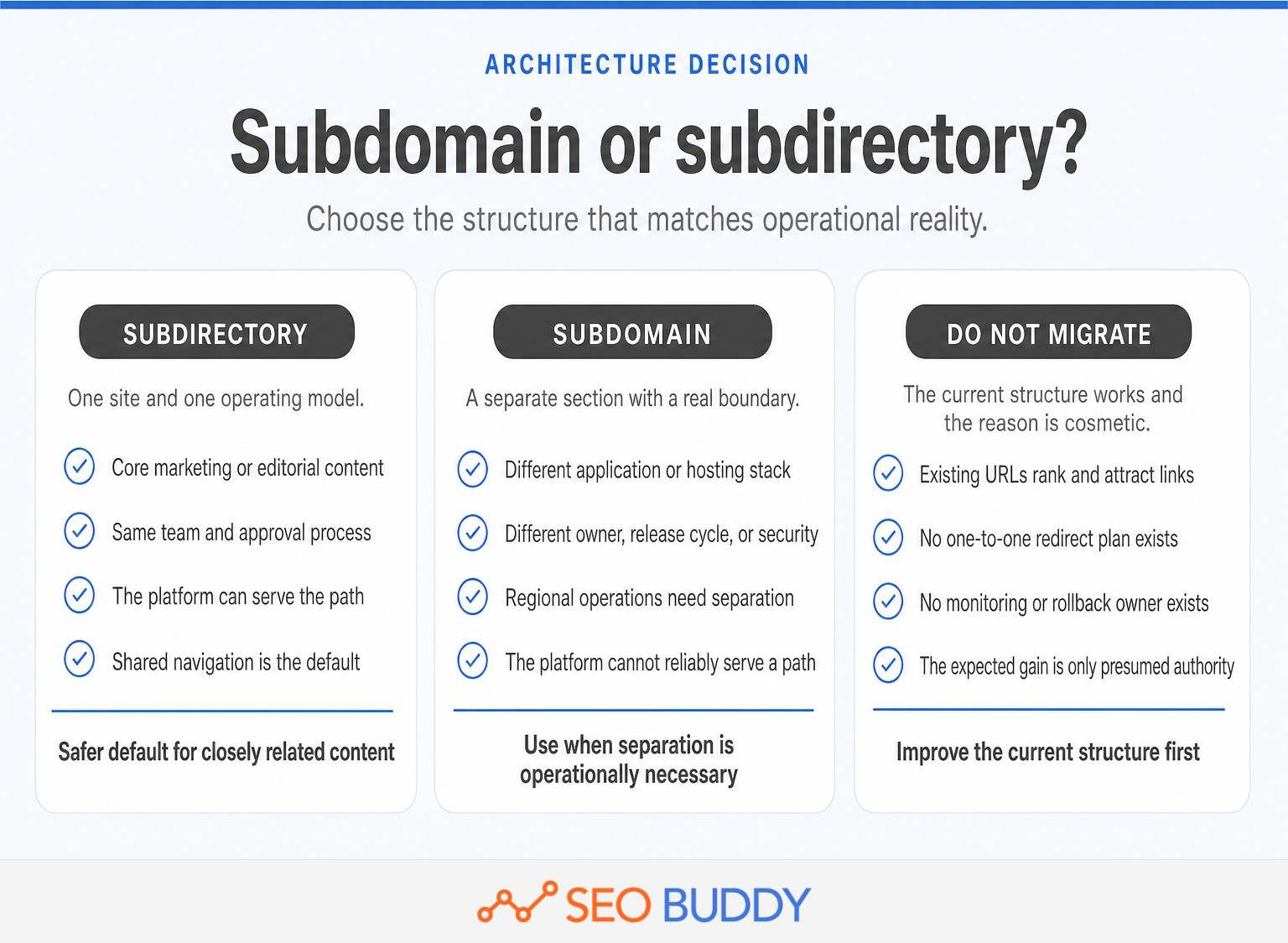
Use a subdirectory when the content is part of the same site experience and can be managed within the same technical stack. Use a subdomain when a hard operational requirement makes meaningful separation more useful than consolidation.
As of October 2026, Google's SEO Starter Guide says to use the option that makes sense for the business. Google notes that subdirectories may be easier to manage, while some topics or industries may reasonably be partitioned into subdomains. (developers.google.com)
That makes the architecture decision less about finding a secret ranking advantage and more about answering concrete questions:
| Decision question | Favor a subdirectory when | Favor a subdomain when |
|---|---|---|
| Content purpose | The content supports the same products, audience, and customer journey | The section performs a distinct function, such as an application or support portal |
| Ownership | The same team controls publishing, quality, and maintenance | A separate team needs independent access, releases, or governance |
| Platform | The existing CMS can serve the section reliably under a path | The required platform cannot be served safely or reliably under a path |
| Navigation | The pages belong in the main information architecture | The section needs its own navigation and site identity |
| International operations | Regions share infrastructure and management | Regions require separate hosting or operational ownership |
| Migration | The path can be launched without moving established URLs | The existing structure is already a subdomain and performs well |
A hard constraint is something that cannot be removed without harming security, reliability, ownership, or the user experience. A preference for a cleaner-looking URL is not a hard constraint.
Choose a subdomain only when the operational separation is real enough to justify the extra moving parts.
Anybody can generate an article. Knowing which one is worth writing is the hard part.
The AI Content Engine reads your site and your competitors, then builds a ranked content plan and writes it. Setup is free, and you see your plan before you pay for anything.
See your content plan freeHow does Google treat subdomains for SEO?
Google does not document an inherent ranking penalty for subdomains. The practical SEO difference comes from how the pages are discovered, linked, maintained, understood, and measured.
Google can treat a subdomain as a site-level entity for some search features. For example, Google's site-name guidance supports site names at the domain and subdomain level, but not at the subdirectory level. This does not prove that a subdomain loses or gains ranking authority; it shows that a subdomain can have a distinct site identity. (developers.google.com)
Search Console reporting is also more flexible than the common claim that every subdomain must be completely isolated. The Search Console property documentation says a Domain property includes all subdomains and protocols. A separate URL-prefix property can still be added when the team wants isolated reporting for blog.example.com or a particular path. (support.google.com)
Links remain central. Google's link best practices state that links help Google discover pages and understand their relevance. A subdomain hidden from the main navigation and contextual links can become operationally isolated, while a well-linked subdomain remains connected to the wider site. (developers.google.com)
Claims that a subdomain always starts from zero or that a subdirectory automatically inherits every ranking benefit are too absolute. Architecture creates opportunities and risks, but execution determines whether search engines and users can move through the site.
Teams that need a broader foundation before approving an architecture can use SEO architecture education to align marketers, developers, and content owners on the terminology and controls.
Google does not penalize the label before the domain; weak architecture and isolation cause the practical problems.
When does a subdomain make sense?

A subdomain makes sense when the section needs to operate as a distinct site while remaining under the parent domain. The separation should solve a technical, organizational, regional, security, or user-experience problem.
Common defensible cases include:
- A separate web application: The application has its own authentication, deployment cycle, infrastructure, or security controls.
- A support or documentation portal: Another team or platform owns the experience and cannot reliably serve it beneath the main site's path.
- A hosted commerce system: The commerce stack requires a separate hostname, and a reverse-proxy path would add unacceptable complexity or risk.
- Regional operations: Country or language teams need separate hosting, management, or release schedules.
- A distinct site identity: The section genuinely serves a different purpose and needs its own home page, navigation, and search appearance.
Internationalization needs more than a URL choice. Google's international site guidance lists both subdomains such as de.example.com and subdirectories such as example.com/de/ as valid options. It also recommends locale-specific URLs, explicit links, and hreflang annotations where appropriate. (developers.google.com)
Architecture often follows what the publishing or commerce platform can support reliably. Teams managing an online store can review these shopify seo tips alongside the architecture decision. Before separating a blog, also confirm whether the existing content publishing workflow can deliver content to a root-domain path.
Use a subdomain to reflect a boundary that already exists, not to manufacture an SEO advantage.
When is a subdirectory the safer default?
A subdirectory is the safer default when the pages support the same audience, brand, products, and conversion journey as the root site. It keeps closely related content inside one operational and navigational structure.
A subdirectory is usually the simpler choice for:
- A company blog supporting the main products or services
- A resource center, glossary, academy, or case-study library
- Product category and solution pages
- Core documentation maintained by the same team and platform
- Locale sections that share hosting and central management
The strongest reason is not a guaranteed ranking gain. It is reduced complexity. Teams can maintain one navigation system, one set of templates, one publishing process, and fewer boundaries where canonicals, analytics, internal links, consent settings, or design standards can drift.
Do not move an established subdomain merely to make the URL look tidier. If the section is indexed, linked, and performing, the expected benefit must be strong enough to justify changing every URL and monitoring the resulting migration.
Keep closely related, centrally managed content in a subdirectory unless a hard constraint prevents it.
How should you set up a subdomain for SEO?
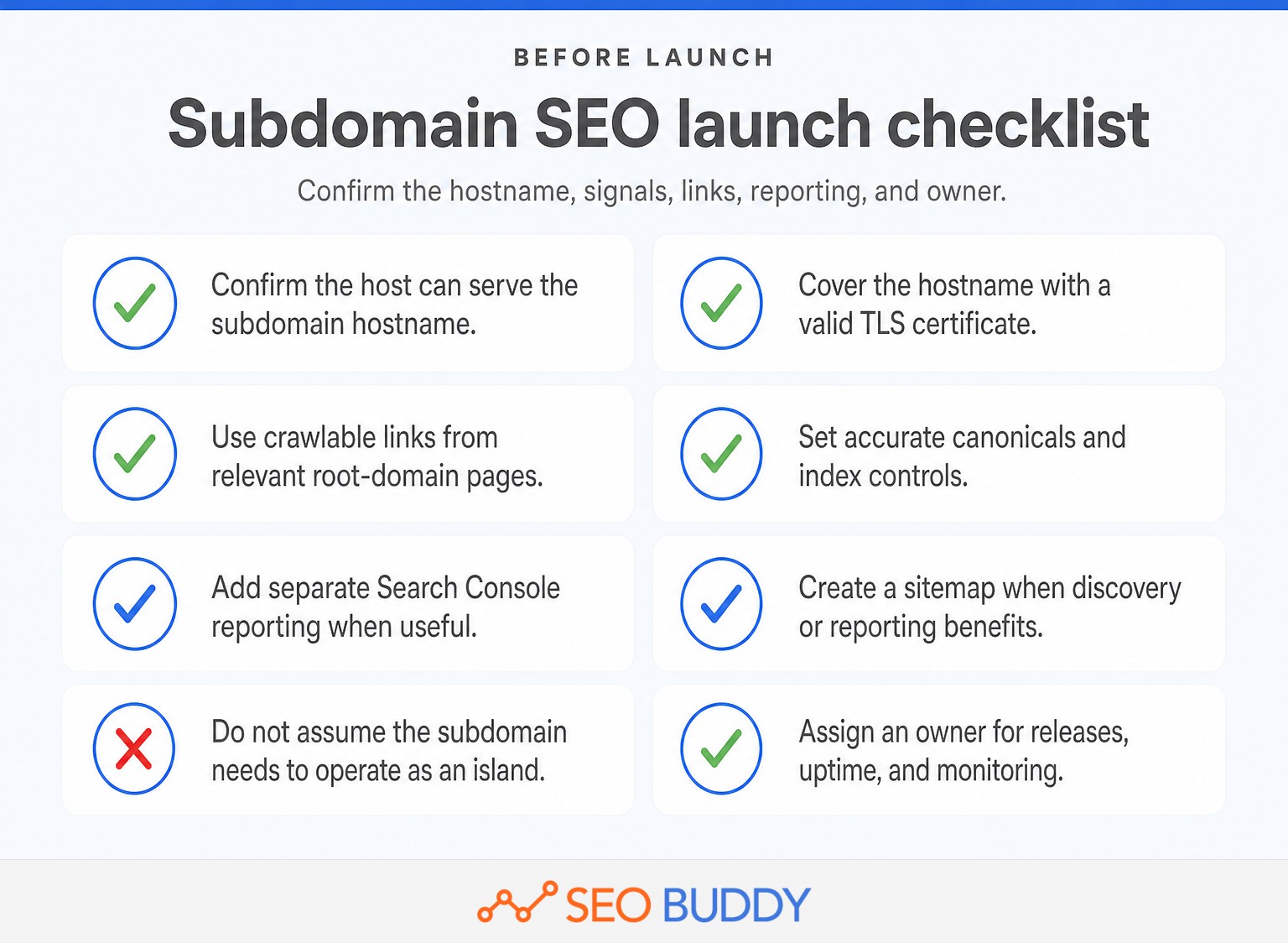
A subdomain needs the same SEO foundations as any other indexable site section. Confirm secure hosting, crawlability, canonical signals, internal links, ownership, and monitoring before publishing valuable content.
- Configure DNS and TLS. The hosting system must serve the intended hostname. Cloudflare's subdomain DNS documentation explains that a subdomain generally needs an appropriate
A,AAAA, orCNAMErecord and valid TLS coverage. (developers.cloudflare.com)
- Check index controls. Confirm that production pages do not retain development
noindexdirectives or accidental robots.txt blocks. Return proper status codes for missing pages.
- Use accurate canonical URLs. Unique pages should normally use self-referencing canonicals. If substantially duplicate pages exist elsewhere, decide which URL should be canonical instead of sending conflicting signals.
- Build crawlable internal links. Link the subdomain from relevant navigation and contextual pages on the root site. The subdomain should also link back where that helps users, rather than operating as an SEO island.
- Set up Search Console intentionally. A Domain property can provide domain-wide visibility across subdomains. Add a URL-prefix property for the subdomain if its owner needs separate reports, permissions, or troubleshooting views.
- Use sitemaps when useful. A separate XML sitemap is not automatically required merely because content is on a subdomain. Google's sitemap guidance says well-linked sites can often be discovered without one, although a sitemap can help larger, newer, or more complex sections. (developers.google.com)
- Assign operational ownership. Name the team responsible for uptime, releases, redirects, structured data, analytics, consent controls, and SEO monitoring. Documenting these tasks through implementation SOPs reduces the risk of a launch checklist becoming a one-time exercise.
A subdomain can rank well when it is crawlable, securely served, internally connected, and actively monitored.
What makes a subdomain migration risky?
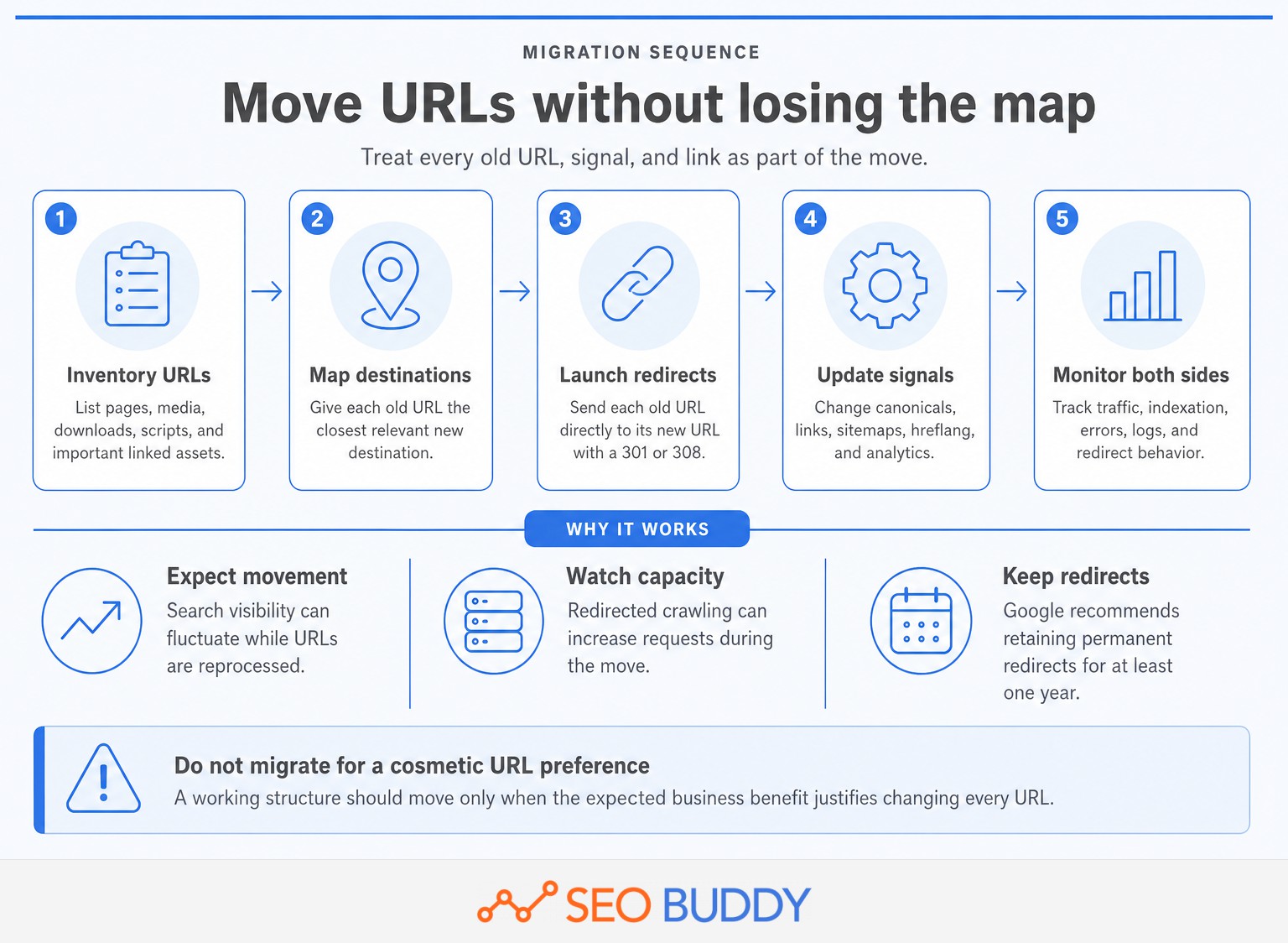
Moving between a subdomain and a subdirectory changes the URLs, even when every page keeps the same content and design. The main risks come from incomplete redirects, conflicting signals, broken links, blocked crawling, and weak monitoring.
Google's current site-move documentation recommends server-side permanent redirects such as 301 or 308, direct redirects to final destinations, updated internal links and canonicals, and a new sitemap. Google also recommends retaining redirects for at least one year and warns that search visibility may fluctuate temporarily while URLs are recrawled and reprocessed. (developers.google.com)
Use this migration sequence:
- Inventory every indexable page, image, download, script, and other URL that must move.
- Map each old URL to the closest relevant new URL, not to a generic home page.
- Test the new pages, canonicals, robots directives, structured data, analytics, and
hreflangbefore launch. - Activate direct permanent redirects and update navigation, contextual links, sitemaps, and important external links.
- Monitor old and new properties, server logs, indexation, traffic, errors, and redirect behavior.
Do not combine an avoidable architecture migration with a redesign, CMS replacement, content rewrite, and analytics change. Separating major changes makes failures easier to detect and diagnose.
Use Search Console's Change of Address tool only when the move meets its domain-level requirements. Google's Change of Address documentation excludes ordinary path-to-path moves and does not support path-level source properties. Permanent redirects and updated URL signals remain essential regardless of tool eligibility. (support.google.com)
Migration risk comes from changing URLs and signals, not from the word subdomain itself.
How can you make the decision without guessing?
Write a short architecture decision record before approving a new subdomain or migration. The record should identify the hard constraint, the owner, the SEO controls, and the cost of reversing the decision.
Document these points:
- Purpose: What user problem requires this section to exist?
- Constraint: Why can the content not be served reliably from a subdirectory?
- Ownership: Who controls content quality, releases, security, and uptime?
- Discovery: Where will crawlable internal links connect the section to the rest of the site?
- Measurement: Which Search Console and analytics views will the team monitor?
- Migration: Are existing URLs moving, and who owns redirects, testing, and rollback?
If the team cannot name a hard constraint, choose a subdirectory. If the hard constraint is genuine, keep the subdomain and make its links, monitoring, and ownership explicit.
This is not a point-scoring exercise. A single security or platform requirement can outweigh several softer preferences. The final decision should be signed off by the people responsible for engineering, content, analytics, and technical SEO.
Use documented implementation SOPs to turn the approved architecture into repeatable launch, quality-assurance, and monitoring tasks rather than relying on institutional memory.
Document the hard constraint, the SEO controls, and the owner before approving a subdomain.
What else do people ask about subdomain SEO?
These questions address the basic domain and cost concerns that often appear before the architecture discussion. Each answer applies generally, but hosting and platform requirements should still be checked before implementation.
What is an example of a subdomain?
An example of a subdomain is blog.example.com. The label blog sits before the registered domain example.com, while a subdirectory would look like example.com/blog/. A subdomain can point to different hosting or software, but it can also serve content from the same infrastructure.
Which domain is best for SEO?
There is no universally best domain structure for SEO. Google advises choosing subdomains or subdirectories according to business needs. A subdirectory is often the simpler default for closely related content, while a subdomain fits content that needs separate ownership, infrastructure, security, regional operations, or site identity. (developers.google.com)
Does a domain name affect SEO?
A domain name can affect recognition, trust, and geographic targeting, but keywords in a domain or URL path have little direct ranking effect by themselves, according to Google's SEO Starter Guide. Country-code domains can send a location signal. Content quality, links, crawlability, and user value matter far more. (developers.google.com)
Do subdomains cost money?
Subdomains do not normally require a separate domain registration because they exist within a domain the registrant controls. They can still create costs for hosting, platform plans, DNS services, TLS certificates, development, monitoring, and maintenance. Check the limits and pricing of the domain, hosting, and software providers involved. (icann.org)
Subdomains are ordinary parts of a domain hierarchy, but operating them can still add cost and complexity.
What should you do next?
Write the architecture decision before changing DNS or URLs, then ask a technical SEO specialist and the implementation owner to review it. Use the technical SEO checklist to assign the crawlability, canonical, internal-linking, redirect, and monitoring work before launch.
Before changing architecture, write the decision down and have the implementation reviewed.

CEO & Founder at SEO Buddy






Get the SEO work done, not just read about it
Create a free account and run your first content plan, keyword research and link-building campaign. No card, and setup is free until your first article.
Free to start. We never sell your address.