
Meta Tags for SEO: The Complete 2026 List, Examples, and Checklist

In short
Meta tags for SEO fall into three groups: configure on every page, add only when a specific need exists, and ignore because search engines no longer use them. Prioritize the title element, meta description, robots directives, charset, and viewport; use canonical and social tags when relevant; skip meta keywords and obsolete cache directives.
Key takeaways
- The title and canonical elements matter to SEO, but they are technically
<title>and<link>elements rather than meta tags. - Google publishes no fixed character limit for title elements or meta descriptions; both may be truncated to fit the searcher's device. (developers.google.com)
- The default robots behavior is
index, follow, so most indexable pages do not need an explicit robots tag. - Google states that the meta keywords tag has no effect on indexing or ranking. (developers.google.com)
- Google's March 24, 2026 robots documentation lists
noarchive,nocache, andnositelinkssearchboxas unused rules. (developers.google.com)
Table of contents
- Which meta tags actually matter for SEO?
- What should a clean HTML head contain?
- How should you write title tags and meta descriptions?
- How should you configure robots meta tags?
- Which meta tags are useful only in certain situations?
- Which meta tags should you remove or ignore?
- How do you review meta tags before publishing?
- What are the common questions about meta tags?
- What should you do next?
Most complete lists mix browser settings, search directives, social metadata, and obsolete tags without explaining which ones deserve attention. The useful question is not how many tags exist. It is what each tag controls, whether the page needs that control, and what can go wrong if the value is incorrect.
Which meta tags actually matter for SEO?
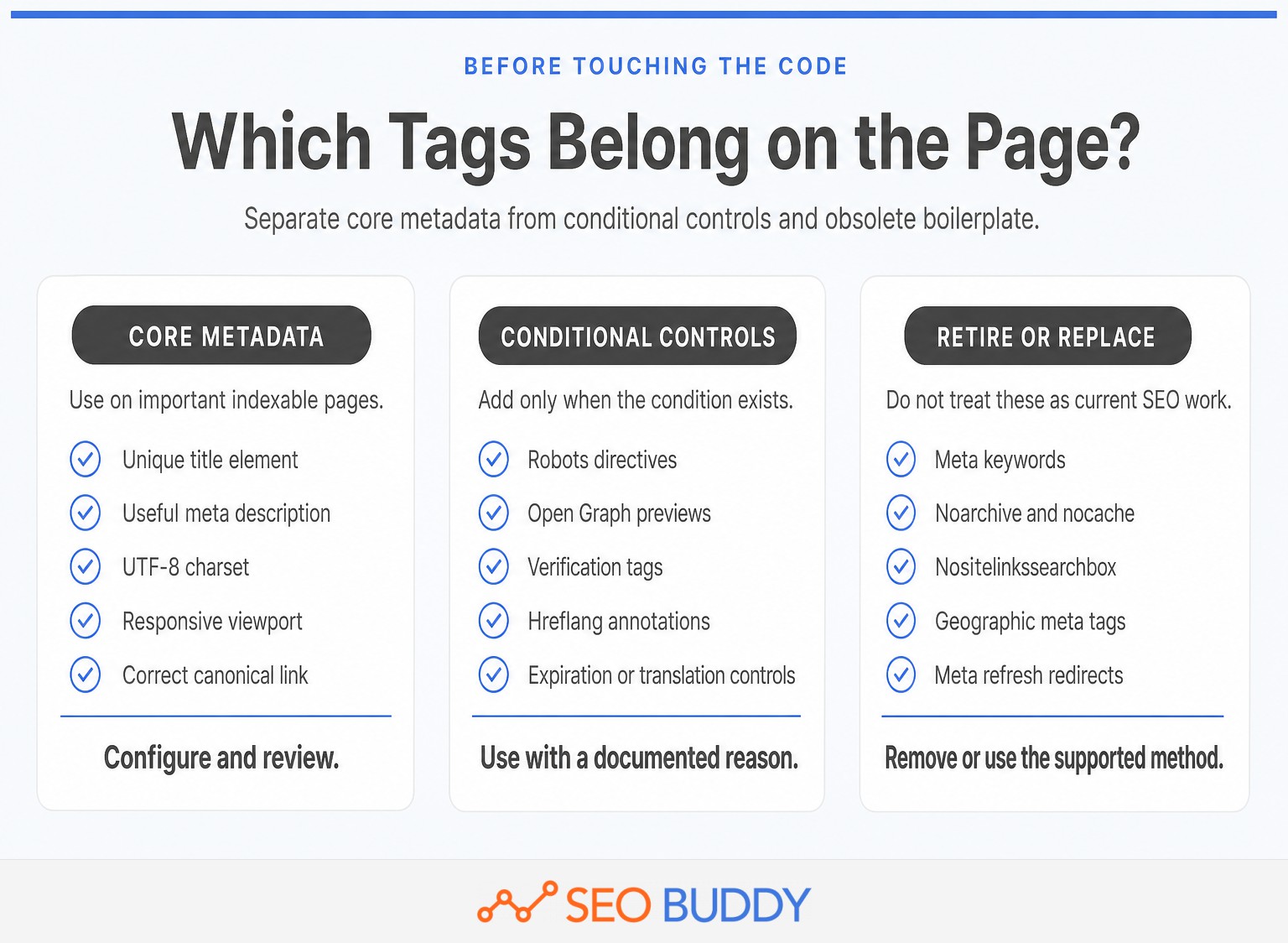
The meta tags that matter are the ones that influence search presentation, indexing instructions, or correct rendering. A practical setup uses a small core on important indexable pages, adds conditional controls only when needed, and removes obsolete boilerplate.
As of September 2026, the core list is shorter than many generators suggest:
Configure on important indexable pages:
- A unique
<title>element that accurately names the page. - A unique meta description that can serve as a search snippet.
- UTF-8 charset metadata.
- A responsive viewport tag.
- A correct canonical link, usually self-referential on the preferred URL.
Add when a specific condition exists:
- Robots directives such as
noindex,nosnippet, ormax-image-preview:large. - Search Console or other service-verification tags.
- Open Graph metadata for social previews.
hreflanglink elements for separate language or regional URLs.- Specialized controls such as
notranslate,rating, orunavailable_after.
Remove, replace, or ignore for Google SEO:
- Meta keywords.
noarchiveandnocache.nositelinkssearchbox.- Geographic tags such as
geo.positionanddistribution. - Meta refresh when a server-side redirect is available.
Google's supported-tags documentation, last updated December 10, 2025, says unsupported meta tags are ignored. It also says meta keywords have no indexing or ranking effect, while default robots values do not need to be declared. Google's supported meta tags and attributes remain the primary reference. (developers.google.com)
The useful list is short: configure core metadata, add conditional controls only when needed, and delete obsolete Google-only boilerplate.
Anybody can generate an article. Knowing which one is worth writing is the hard part.
The AI Content Engine reads your site and your competitors, then builds a ranked content plan and writes it. Setup is free, and you see your plan before you pay for anything.
See your content plan freeWhat should a clean HTML head contain?

A clean HTML head contains the metadata required to render, identify, summarize, and consolidate the page, followed by any conditional search or social controls. Keep it valid, avoid copied directives with no purpose, and inspect the final rendered output rather than trusting a CMS field.
Google's valid-metadata documentation warns that an invalid element such as an <img> or <iframe> inside the head can cause Google to stop reading later head elements. Valid head children include title, meta, link, script, style, base, noscript, and template. Review Google's valid head guidance. (developers.google.com)
A typical indexable article or landing page can start with this pattern:
“`html
“`
The social block is optional. A robots tag is also absent because index, follow is the default. Add a robots tag only when the page needs a non-default instruction or a deliberate preview setting.
Use an absolute canonical URL and ensure the canonical page points to itself. Google's canonical guidance, updated July 10, 2026, recommends self-referential canonicals and warns against conflicting HTML and HTTP canonical declarations. Read the canonical implementation guidance. (developers.google.com)
The viewport setting width=device-width, initial-scale=1 tells browsers to match the page to the device width. Google's web.dev guidance also cautions against settings that prevent users from zooming. See the responsive viewport guidance. (web.dev)
Teams that need broader on-page foundations can use the free SEO University lessons alongside this implementation template.
A clean, valid <head> is easier to audit than a long block of copied tags.
How should you write title tags and meta descriptions?
Write each title and description as an accurate promise about the page, not as a container for repeated keywords. Make the title distinct, keep the visible heading aligned with it, and use the description to state what the searcher will find or be able to do.
How do you write the title element?
Google recommends descriptive, concise, page-specific title text and warns against boilerplate and keyword stuffing. Google also states that a <title> element has no fixed length limit; the displayed title link is truncated as needed to fit the device. Google's title-link guidance was last updated December 10, 2025. (developers.google.com)
A useful pattern is:
“`html
“`
Weak:
“`html
“`
Better:
“`html
“`
Do not force every variation of a target phrase into the title. Include the language a searcher recognizes, then use the page copy to cover the subject naturally.
Google may generate a different title link from the visible page heading, prominent text, anchor text, or og:title. A rewritten title is therefore a reason to check consistency across the title, H1, page purpose, and internal links, not a reason to add more keywords.
How do you write the meta description?
A meta description should summarize the specific page and give the searcher a reason to choose it. Avoid using the same generic description across a section of the site.
Google's snippet documentation, updated April 20, 2026, says snippets are primarily generated from page content. Google may use the meta description when it describes the page more accurately, and it may show different snippets for different searches. Google publishes no fixed description length; snippets are truncated to fit the device. Read Google's meta-description guidance. (developers.google.com)
Weak:
“`html
“`
Better:
“`html
“`
A good description names the page's subject, the useful outcome, and a concrete differentiator. It does not need a string of synonyms, an unsupported superlative, or a call to action that the page cannot fulfill.
Search display rules change, so internal guidance should be reviewed against primary documentation and current SEO guides rather than an old character-count template.
Write titles and descriptions for accurate search presentation, not for a fixed character counter.
How should you configure robots meta tags?
Use robots directives to control indexing and previews, not as decoration on every page. The default is index, follow, while restrictive directives should be added only after confirming the exact outcome required.
Common examples include:
“`html
“`
A noindex rule can work only when the crawler can access and read it. If the same URL is disallowed in robots.txt, Google may not see the page-level instruction. Google's robots documentation also says the more restrictive rule wins when directives conflict. Review the robots meta specifications, updated March 24, 2026. (developers.google.com)
The 2026 documentation adds an important AI-search implication. Google's nosnippet rule prevents the page's content from being used as a direct input for AI Overviews and AI Mode, while max-snippet limits how much content may be used as a direct input, subject to Google's documented exceptions. (developers.google.com)
Other supported controls include:
nofollow, which tells the crawler not to follow links on the page.noimageindex, which prevents images on the page from being indexed.max-image-preview, which acceptsnone,standard, orlarge.max-video-preview, which sets a maximum video-preview duration.unavailable_after, which removes the result after a specified date and time.notranslate, which asks Google not to offer a translated title link and snippet.
Use the X-Robots-Tag HTTP response header when the resource is not an HTML page, such as a PDF or image file. The HTTP header can carry the same supported rules as the HTML robots tag.
Robots directives are access and preview controls, so one accidental value can outweigh every other optimization on the page.
Which meta tags are useful only in certain situations?
Situational metadata belongs on a page only when the corresponding condition exists, such as duplicate URLs, social sharing, multilingual versions, verification, adult content, or a scheduled expiration. Adding every possible tag does not strengthen SEO and makes errors harder to spot.
| Element or directive | Use it when | Do not use it as |
|---|---|---|
rel="canonical" |
Duplicate or variant URLs need a preferred representative, or a preferred page needs a self-reference | A substitute for redirecting a retired URL |
hreflang |
Separate URLs serve equivalent content in different languages or regions | A generic language meta tag |
| Open Graph | Shared links need controlled titles, images, URLs, and descriptions | A direct Google ranking tactic |
| Verification meta tag | A platform requires proof of site ownership | Permanent metadata on every page |
notranslate |
Translated search results are undesirable for the page | A default multilingual setting |
rating |
Sexually explicit content needs SafeSearch labeling | A general content rating system |
unavailable_after |
A result must disappear after a known date and time | A replacement for removing or redirecting a URL |
A canonical is a <link> element, not a meta tag. Use an absolute URL, point duplicate variants at the preferred page, and avoid mixing canonicalization with noindex when the goal is consolidation rather than removal.
hreflang is also a link annotation. Google's international-site guidance recommends separate URLs for language versions and hreflang annotations to connect them. The same guidance says Google ignores locational meta tags such as geo.position and distribution. See Google's multilingual and multiregional guidance. (developers.google.com)
Open Graph tags control how supported clients represent a shared page. The protocol defines og:title, og:type, og:image, and og:url as its four basic properties, with og:description and og:image:alt among the useful additions. Review the Open Graph protocol. (ogp.me)
Situational tags are valuable only when the page has the situation they were designed to describe.
Which meta tags should you remove or ignore?
Remove tags that have no search function, and replace outdated mechanisms with the supported method for the job. Before deleting sitewide metadata, confirm that an internal application or non-search client does not depend on it for another purpose.
- Meta keywords: Google says
<meta name="keywords">has no effect on indexing or ranking. noarchiveandnocache: Google's March 2026 robots documentation says these rules are unused. The cached-link feature thatnoarchiveonce controlled no longer exists.nositelinkssearchbox: Google no longer uses this directive because the sitelinks search box feature no longer exists.rel="next"andrel="prev": These are link attributes rather than meta tags, but Google says they no longer affect indexing.- Geographic meta tags: Google ignores tags such as
geo.positionanddistributionfor location targeting. - Meta refresh redirects: Google supports meta refresh but recommends a server-side 301 redirect because refresh behavior can confuse users and is not supported consistently by all browsers.
A generator may still output these tags because its template was written years ago. Their presence is not evidence that they are helping.
Schedule a periodic review rather than treating the head as permanent configuration. Primary documentation changes when search features are introduced or retired, as the 2026 robots update demonstrates.
Remove obsolete tags from the SEO checklist, but confirm that no non-search system still depends on them.
How do you review meta tags before publishing?
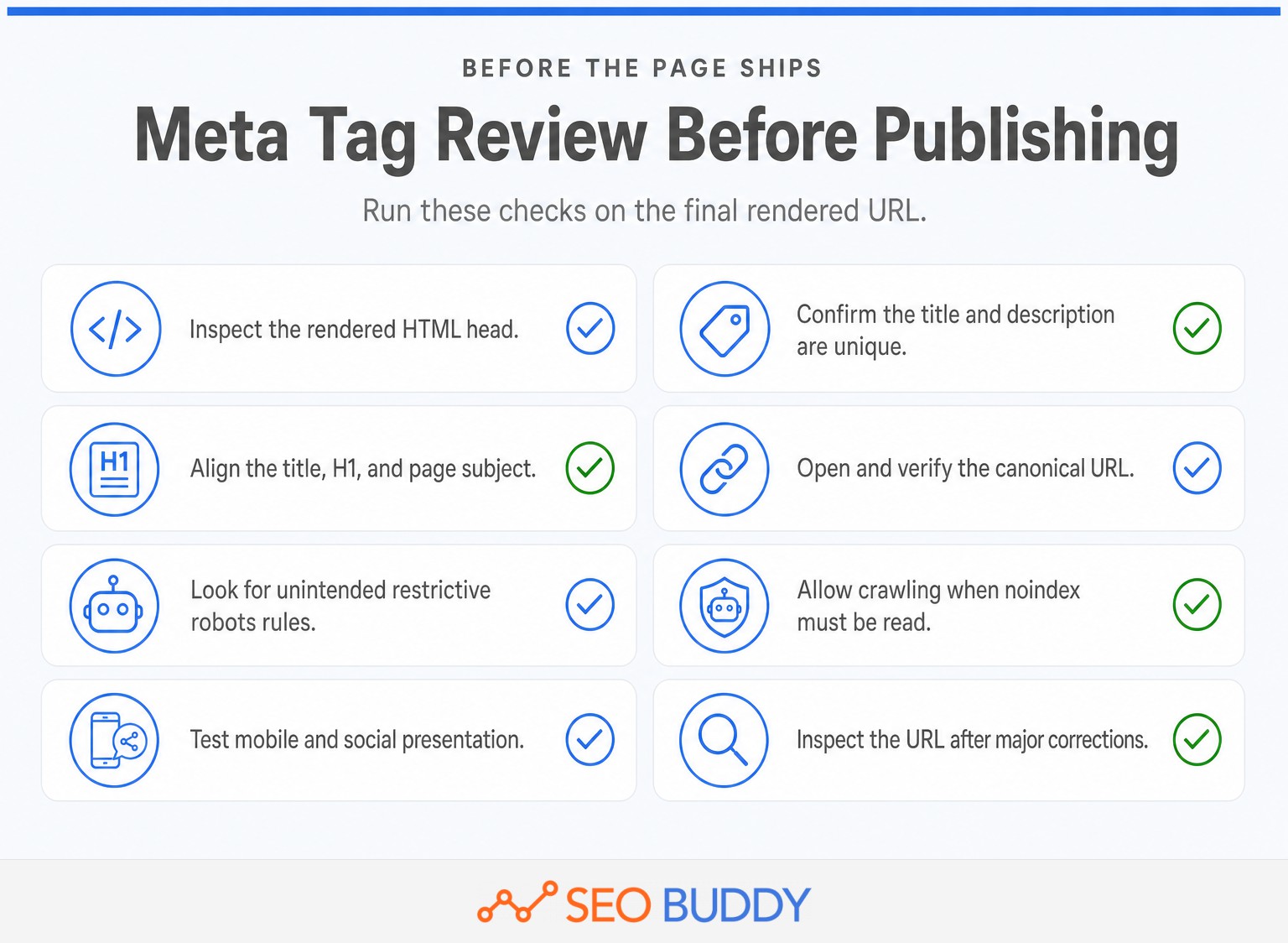
Review the rendered HTML for the exact URL that will be published, then trace every directive to an intentional decision. A field that looks correct inside a CMS can still be duplicated, overwritten, omitted, or changed by a template or JavaScript.
- Inspect the final head. Confirm that the title, description, canonical, robots directives, charset, viewport, and social tags appear in the rendered page.
- Check uniqueness. Make sure the title and description describe this page rather than a category-wide template.
- Compare the visible page. Align the title, H1, primary subject, and opening content so they do not send conflicting signals.
- Follow the canonical. Verify that it is absolute, resolves successfully, uses the preferred protocol and hostname, and identifies the correct representative URL.
- Read every robots value. Look for accidental
noindex,nofollow,nosnippet, or restrictive preview settings. Remember that the more restrictive conflicting rule wins. - Check crawler access. Do not block a URL in robots.txt when a crawler must read its
noindexor preview directives. - Test the presentation layer. Confirm responsive rendering and inspect the social preview image, title, URL, and description.
- Use URL Inspection. Check how Google sees the URL and request another crawl after correcting a significant metadata error.
A team can turn this sequence into one of its editable SEO procedures, with ownership and pass or fail criteria defined for every release.
For teams publishing at higher volume, the AI Content Engine can plan, write, illustrate, and publish articles to connected destinations. Automated publication still benefits from a rendered page check because themes, plugins, and templates control the final head. (seobuddy.com)
Review the rendered page, not the CMS form, because search engines process the output.
What are the common questions about meta tags?
The same four questions recur because the term meta tags is often used for several different head elements. The answers below separate actual <meta> elements from related title and link elements.
What are meta tags for SEO?
Meta tags for SEO are HTML elements in a page's <head> that provide information or instructions to search engines and browsers. Important examples include the meta description and robots tag. The title and canonical elements are often grouped with meta tags, although they are technically <title> and <link> elements.
What are examples of meta tags?
Examples of meta tags include <meta name="description">, <meta name="robots">, <meta name="viewport">, <meta charset="utf-8">, and site-verification tags. Open Graph properties are also meta tags used for social previews. A complete SEO setup may include a <title> element and canonical <link>, which are not meta tags.
Is meta keywords tag important for SEO?
The meta keywords tag is not important for Google SEO. Google's supported-tags documentation states that <meta name="keywords"> has no effect on indexing or ranking. Remove it unless another documented system, such as an internal site search or legacy publishing tool, still depends on the field. (developers.google.com)
Are meta keywords outdated for SEO?
Meta keywords are outdated for Google SEO, and keeping the tag does not improve visibility. The tag is usually harmless, but it adds clutter and may expose the keyword list a publisher targeted. Before deleting it across a site, confirm that no internal application uses the field outside public search.
What should you do next?
Audit one important page in its final rendered form, then fix robots and canonical errors before rewriting descriptive metadata. Once the process works, add it to SEO Buddy's SEO Checklist + SOP Collection so the same checks happen on every release.
The current collection includes 122 ordered SEO steps and 66 SOPs, free with an account as of September 2026. Start with the page most likely to lose qualified traffic if a metadata mistake reaches production. (seobuddy.com)

CEO & Founder at SEO Buddy


 11 SEO Link-Building Tools for Prospecting, Outreach, and Tracking
General SEO
11 SEO Link-Building Tools for Prospecting, Outreach, and Tracking
General SEO
 SEO Content: How to Research, Write, and Publish Articles That Rank
General SEO
SEO Content: How to Research, Write, and Publish Articles That Rank
General SEO
 SEO Competitor Analysis: How to Find and Prioritize Content Gaps
General SEO
SEO Competitor Analysis: How to Find and Prioritize Content Gaps
General SEO
 How to Buy Backlinks Safely: Costs, Risks, and Provider Red Flags
General SEO
How to Buy Backlinks Safely: Costs, Risks, and Provider Red Flags
General SEO
Get the SEO work done, not just read about it
Create a free account and run your first content plan, keyword research and link-building campaign. No card, and setup is free until your first article.
Free to start. We never sell your address.