
Daily SEO Tasks: A Practical Routine Without Busywork

In short
Daily SEO tasks should focus on detecting urgent problems and moving one useful action forward, not rerunning full audits. Check alerts, major traffic or conversion anomalies, recent deployments, and priority work. Schedule performance analysis, content updates, technical audits, keyword research, and backlink reviews weekly or monthly unless a launch, migration, outage, or sudden drop triggers them.
Key takeaways
- As of November 2026, Google says many site owners need only a monthly Search Console check unless an alert arrives or the site changes. Search Console guidance explains the recommended cadence. (developers.google.com)
- A useful daily SEO tasks list is a triage routine, not a condensed version of the entire SEO strategy.
- Search Console's newest performance data can be preliminary, so one recent data point should not trigger an immediate rewrite or technical project. Performance report documentation explains when recent values may change. (support.google.com)
- Weekly blocks are better for production work, while monthly reviews provide enough context for prioritization and strategy changes.
- Event-triggered checks override the calendar when a launch, migration, outage, security warning, indexing mistake, or persistent performance drop creates immediate risk.
Table of contents
- What are SEO tasks, and which ones are truly daily?
- What should you check every day?
- Which SEO work belongs on a weekly schedule?
- Which tasks should you do monthly?
- When should SEO tasks run immediately instead of waiting?
- How do you build a routine that does not turn into busywork?
- What else do people ask about daily SEO tasks?
- What should you do next?
What are SEO tasks, and which ones are truly daily?
SEO tasks are the actions used to help search engines discover, understand, trust, and measure a website. Only tasks that detect time-sensitive damage or advance active work need daily attention; most analysis and maintenance becomes more useful when grouped into longer intervals.
SEO tasks generally fall into five workstreams:
- Monitoring: Detect alerts, outages, indexing mistakes, and unusual performance changes.
- Production: Create or improve pages, briefs, internal links, and search-oriented assets.
- Maintenance: Correct technical problems, outdated information, broken journeys, and weak templates.
- Authority: Earn relevant links, mentions, reviews, and community visibility.
- Measurement: Connect search visibility with qualified visits, leads, sales, or another business outcome.
For a beginner, the SEO Starter Guide provides a simpler way to organize the work around on-page optimization, content, and authority. (seobuddy.com)
As of November 2026, Google Search Central explicitly says there is no need to sign in to Search Console every day. Google suggests checking around once a month or after site changes because Search Console sends email alerts when it discovers new issues. (developers.google.com)
That guidance does not mean SEO should be ignored between monthly reports. It means the daily routine should be selective: receive alerts, confirm that recent changes worked, identify serious anomalies, and keep planned work moving.
Daily SEO should catch urgent damage and keep work moving, not repeat the entire SEO program every morning.
Anybody can generate an article. Knowing which one is worth writing is the hard part.
The AI Content Engine reads your site and your competitors, then builds a ranked content plan and writes it. Setup is free, and you see your plan before you pay for anything.
See your content plan freeWhat should you check every day?
Use the daily pass to catch urgent problems and choose one action that matters. For most small sites, a short, fixed timebox is more useful than leaving analytics, rankings, and crawlers open throughout the day.
What is the daily triage loop?
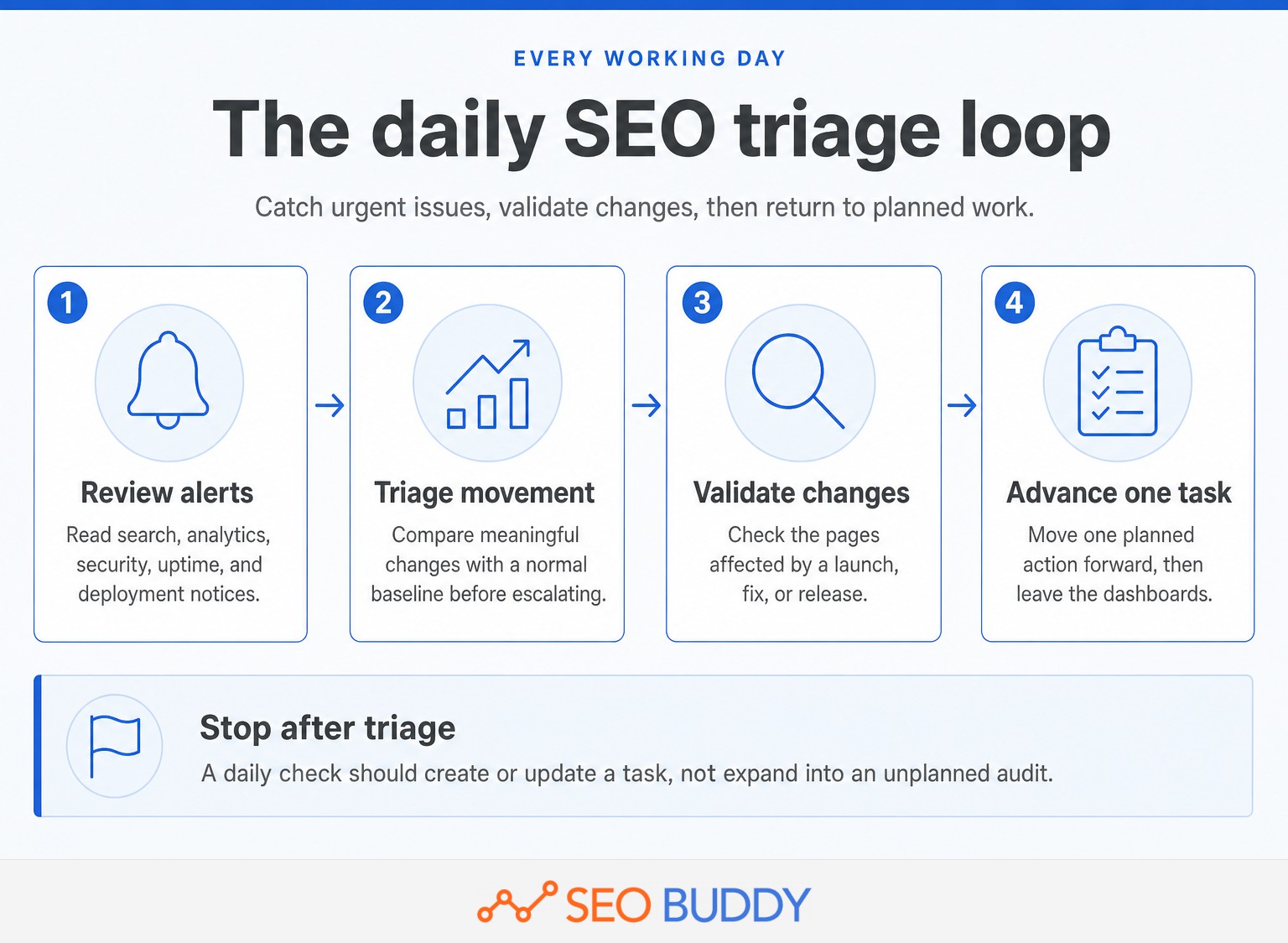
A useful daily SEO tasks list has four moves:
- Review alerts. Check search, analytics, security, uptime, content management, and deployment notifications.
- Triage anomalies. Compare meaningful changes with a normal baseline before deciding that there is a problem.
- Validate recent changes. Check important pages affected by yesterday's launch, fix, redirect, or template release.
- Advance one priority. Complete or assign one planned action, then leave the dashboards and return to focused work.
Start with alerts rather than opening every report. If many pages or sites appear to be moving unexpectedly, the Google Search Status Dashboard can show whether Google has confirmed a crawling, indexing, ranking, or serving incident. (status.search.google.com)
For performance anomalies, compare the movement with the same weekday, a rolling range, recent campaigns, seasonality, and known site changes. Search Console warns that its newest data may still be preliminary and can change during the next few hours. (support.google.com)
For recent launches and fixes, test only the affected journey. Confirm the response, redirect destination, canonical, indexability, primary content, analytics events, and internal links. When one important page needs a precise indexing check, use google search console url inspection rather than turning the check into an unplanned site-wide audit. Google's documentation describes URL Inspection as a page-level diagnostic for index status, live testing, and recrawl requests. (developers.google.com)
The final step is productive work. A daily routine that only observes metrics creates anxiety without improving the site, so move one approved content, technical, internal-linking, or authority task forward.
What can wait?
These tasks usually do not need to be repeated every day:
- Running a complete technical crawl
- Performing fresh keyword research
- Auditing the full backlink profile
- Rewriting pages after small ranking movements
- Refreshing the content inventory
- Reviewing every Core Web Vitals group
- Rebuilding the content calendar
- Producing a full stakeholder report
Google's traffic-drop debugging guide says small position fluctuations can happen without requiring action and advises against radical changes when a page is already performing well. Investigate sharp, persistent, or widespread changes instead of reacting to normal movement. (developers.google.com)
A useful daily routine detects urgent change, validates recent work, and advances one priority task.
Which SEO work belongs on a weekly schedule?
Weekly SEO should convert patterns into completed work. The interval is long enough to reduce daily noise but short enough to prevent content, technical, and authority backlogs from stalling.
What belongs in the weekly queue?
| Workstream | Weekly action | Useful output | Why it is not daily |
|---|---|---|---|
| Performance | Compare stable periods and isolate affected pages, queries, and conversions | A short investigation list | One-day movement rarely provides enough context |
| Content | Publish, improve, consolidate, or brief priority pages | A live page or approved brief | Meaningful content work needs uninterrupted time |
| Technical SEO | Work through the prioritized issue queue and test representative URLs | Fixed issues with validation evidence | Repeated full-site checks create duplicate findings |
| Internal links | Add useful contextual links from new or authoritative pages | Better discovery and clearer topic relationships | Internal linking is efficient when batched around publishing |
| Authority | Research prospects, send outreach, follow up, and record outcomes | A controlled campaign queue | Outreach requires consistent follow-up rather than constant checking |
A weekly review should end with outputs, owners, and due dates. A report that identifies ten opportunities but assigns none of them is an observation, not an operating process.
Founders and junior specialists who encounter an unfamiliar task can use SEO University to find focused lessons by topic instead of interrupting the schedule for broad, unfocused research. (seobuddy.com)
Weekly SEO turns patterns into production work without letting one-day noise rewrite the plan.
Which tasks should you do monthly?
Monthly SEO is for context, prioritization, and resource decisions. It should explain what changed, identify the likely reason, and select the work that deserves attention during the next cycle.
A practical monthly review includes:
- Compare business outcomes. Review organic leads, sales, sign-ups, qualified visits, or another meaningful conversion alongside clicks and impressions.
- Identify page and query patterns. Separate site-wide changes from one template, directory, country, device, search appearance, or page group.
- Review technical trends. Look for growing indexing exclusions, crawl failures, performance groups, redirect problems, and recurring template defects.
- Assess the content inventory. Find pages that need a refresh, consolidation, stronger internal links, clearer intent alignment, or no action at all.
- Reprioritize the backlog. Rank proposed work by expected impact, effort, confidence, risk, owner, and dependency.
Google recommends using up to 16 months of Search Console data when investigating traffic changes so seasonal patterns are visible. Its guidance also recommends comparing equivalent periods and examining pages, queries, countries, devices, and search appearances before selecting a cause. (developers.google.com)
When a confirmed ranking update is rolling out, avoid using an unfinished update as the basis for a monthly strategy change. Google's ranking update guidance recommends waiting until the update is complete and then allowing at least one additional week of data before evaluating the effect. (developers.google.com)
End the monthly review with a short action register: the finding, the evidence, the next action, the owner, and the review date. Remove metrics that never change a decision.
Monthly SEO should explain what changed, choose the next priorities, and assign owners and dates.
When should SEO tasks run immediately instead of waiting?
Event-triggered SEO begins when waiting for the next scheduled review could increase damage or lose useful diagnostic evidence. The trigger should create a focused response with a defined scope, not a permanent state of emergency.
Which events should override the calendar?
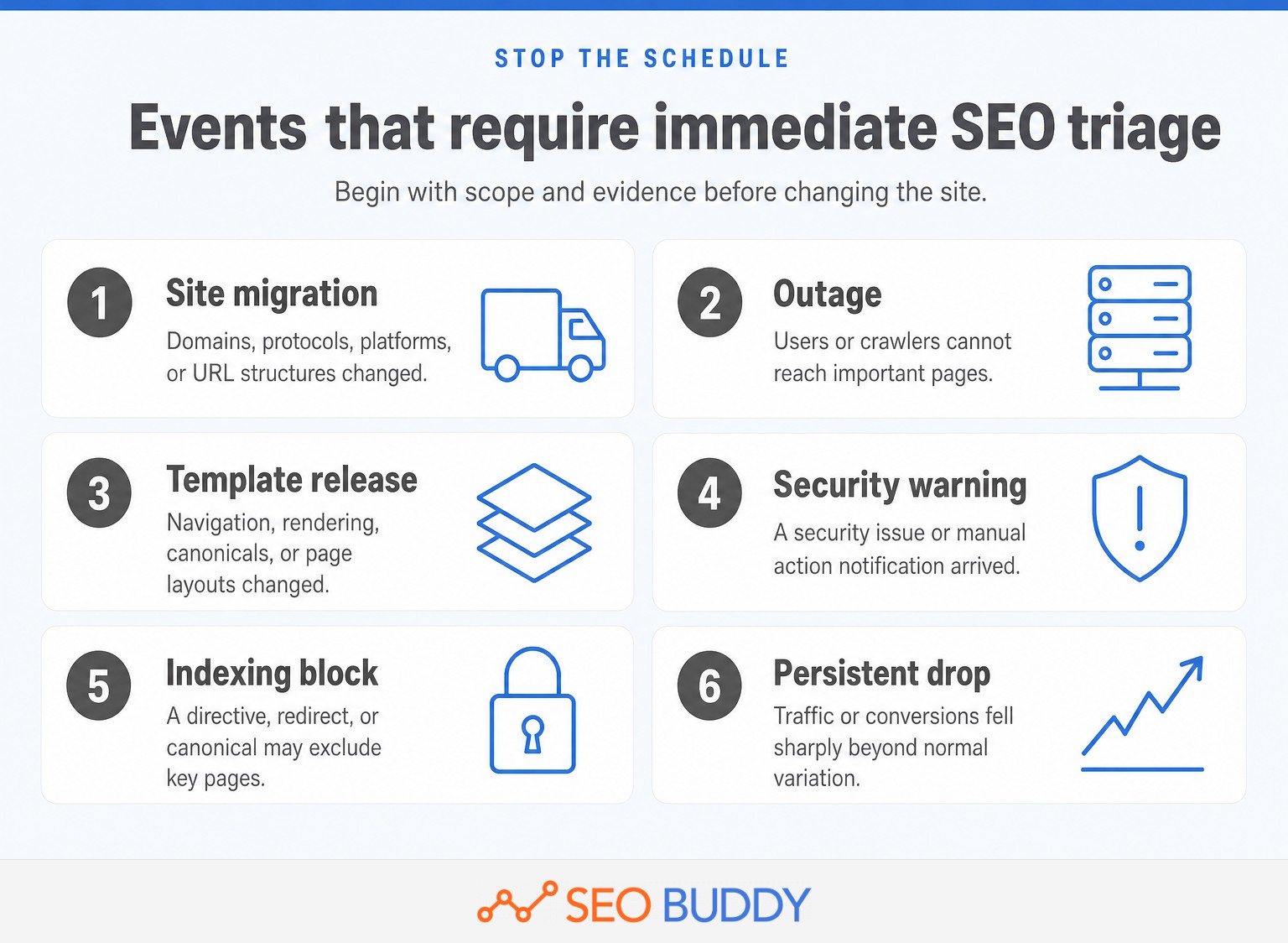
Run an immediate check after:
- A domain, platform, protocol, or URL migration
- A site outage, server failure, or major performance incident
- A template, navigation, rendering, or content management system release
- A security warning or manual action notification
- An accidental indexing block, canonical change, or redirect problem
- A major page launch or substantial update
- A sharp, persistent drop in search traffic, conversions, or indexed pages
Google lists technical failures, security issues, manual actions, ranking changes, seasonality, and site moves among the main causes to investigate when search traffic drops. The right first step is to establish which pages, queries, devices, countries, and dates are affected before changing the site. (developers.google.com)
Use this response order:
- Record the event. Note deployment time, affected systems, URLs, owners, and expected behavior.
- Establish scope. Determine whether the problem affects one URL, a template, a directory, or the whole site.
- Reproduce the failure. Confirm the actual response, rendered page, redirect path, indexing directive, or tracking problem.
- Fix or roll back. Choose the smallest safe change that removes the cause.
- Validate and monitor. Retest representative pages and watch the relevant metrics until they stabilize.
Google's recrawl guidance says recrawling can take from a few days to a few weeks, does not guarantee indexing, and is not accelerated by repeatedly submitting the same URL. Request indexing after fixing and validating an important URL, not as a substitute for diagnosis. (developers.google.com)
The calendar stops when a change can damage crawling, indexing, traffic, security, or revenue.
How do you build a routine that does not turn into busywork?
A low-noise SEO routine gives every signal one destination, every recurring task a frequency, and every project a definition of done. The routine should protect production time rather than reward the person who opens the most dashboards.
Apply five rules:
- Use one intake queue. Send alerts, ideas, audit findings, and stakeholder requests into the same backlog before prioritizing them.
- Define thresholds. Decide what size, duration, and scope of change creates an investigation instead of relying on surprise or anxiety.
- Separate monitoring from production. A check identifies work; it should not silently consume the time reserved for completing work.
- Give every task an owner and outcome. Replace vague items such as check rankings with specific actions such as compare lost-click pages and assign the top three investigations.
- Document repeated processes. If a task has been completed twice, consider turning it into a checklist or procedure that another person can follow.
What does a low-noise workflow look like?

For a small site, try this starting cadence:
- Daily: A 15-minute alert, anomaly, and recent-change review, followed by one priority action.
- Weekly: A 60-to-90-minute review that creates and completes content, technical, internal-linking, or authority work.
- Monthly: A two-hour performance and prioritization session that resets the backlog.
- Event-triggered: Immediate triage with a narrow incident scope and a named owner.
These timeboxes are starting constraints, not industry benchmarks. Increase them for large publishing operations, international sites, migrations, active development, or businesses where organic search directly affects high-value transactions.
Teams can turn repeatable jobs into editable SEO operating procedures, including the evidence to collect, the steps to follow, and the condition that marks the task complete.
A low-noise SEO routine has one queue, clear thresholds, fixed review windows, and documented procedures.
What else do people ask about daily SEO tasks?
The right frequency depends on the risk and decision attached to each task. These answers distinguish ongoing SEO work from unnecessary daily repetition.
How often should SEO be done?
SEO should be worked on continuously, but not every task belongs on a daily schedule. Use daily monitoring for alerts, launches, and major anomalies; batch production and analysis weekly; review strategy and broader trends monthly; and respond immediately to migrations, outages, security warnings, or sudden persistent traffic drops.
What SEO tasks should be done every day?
Daily SEO tasks should be limited to urgent monitoring and forward motion. Review search, analytics, security, uptime, and deployment alerts; check meaningful anomalies against a normal baseline; validate recent high-risk changes; then advance one priority task. Full crawls, content audits, keyword research, and backlink reviews usually produce better decisions when batched.
Should you check keyword rankings every day?
Most small teams should not change strategy because of one day of ranking movement. Daily data can be useful for detecting a major incident, but decisions should rely on persistent patterns across pages, queries, conversions, and known site changes. Investigate sharp or lasting drops; record minor fluctuations and wait for more evidence.
Is SEO a stressful job?
SEO can become stressful when every metric is treated as an emergency and the work has no queue, owner, or decision threshold. A cadence reduces that pressure: alerts trigger immediate triage, planned work stays in weekly or monthly blocks, and small ranking fluctuations do not automatically create a new project.
Good SEO frequency answers depend on risk, change rate, and evidence, not a universal daily checklist.
What should you do next?
Choose one daily monitoring window and move every non-urgent task into a weekly or monthly queue. Then use SEO Buddy's 122-step SEO Checklist to prioritize the first high-impact actions, assign owners, and track completion instead of adding every possible check to tomorrow's list. As of November 2026, the checklist contains 122 steps organized across nine SEO areas. (seobuddy.com)
The best daily SEO routine is short enough to repeat and selective enough to protect focused work.

CEO & Founder at SEO Buddy


 Blog Posting Ideas: 80 Formats Plus a System for Better Topics
General SEO
 SEO Content Brief Template: Free Framework, Example, and Instructions
General SEO
 Best Link Building Companies in 2026: How to Compare Quality, Pricing, and Risk
General SEO
 Google Search Console URL Inspection: A Step-by-Step Diagnostic Guide
General SEO
Get the SEO work done, not just read about it
Create a free account and run your first content plan, keyword research and link-building campaign. No card, and setup is free until your first article.
Free to start. We never sell your address.